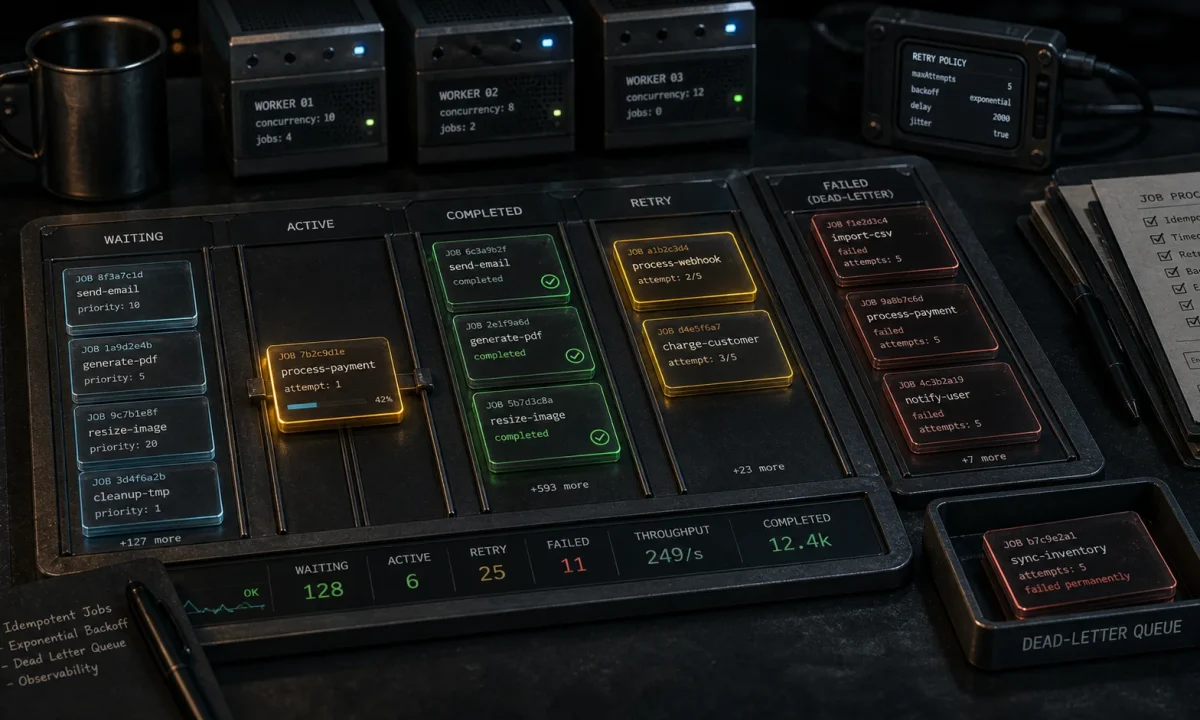
I had a Node.js logistics API that emitted shipment-tracking emails inline with the customer request. Single SMTP slowdown and the entire HTTP path went to 4-second p99 latencies. I moved the emails to a queue, customers stopped seeing the latency, and within a week we caught a separate problem: the original Bull library was throwing deprecation warnings on every job. Migrated to BullMQ in an afternoon and the queue’s been quiet since. BullMQ background jobs in Node.js are the closest thing to a no-regret decision in backend work — once you wire them up properly. This is the BullMQ 5.x setup I run on every Node 24 LTS project that has any work that doesn’t need to happen inline, against Redis 8.x.
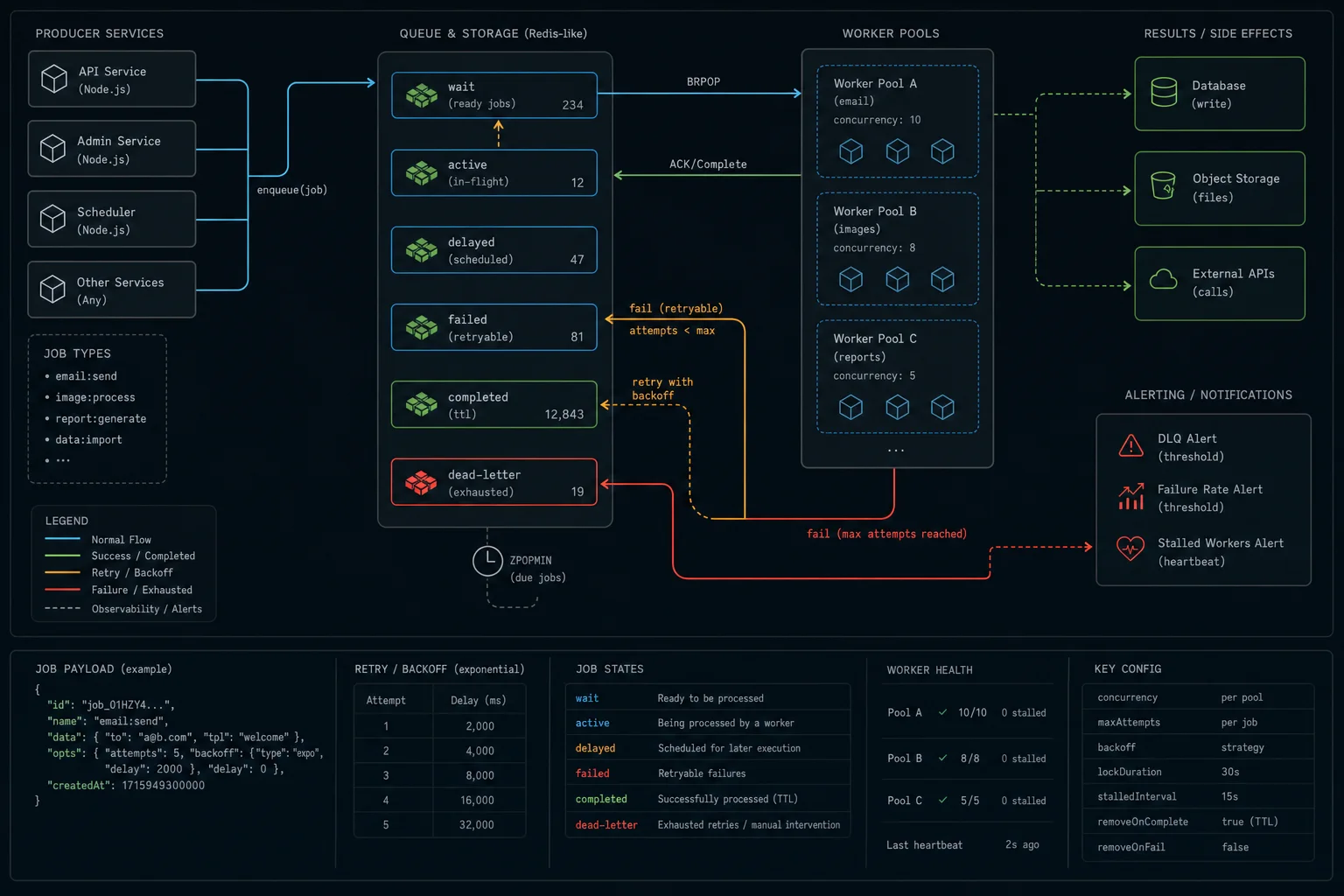
bullmq@^5.71 with ioredis against Redis 8. Required: maxRetriesPerRequest: null on the BullMQ Redis connection. Set attempts: 5, exponential backoff, removeOnComplete: { age: 3600, count: 1000 }. Run workers as separate processes (separate Docker containers in prod). Add a dead-letter queue for jobs that exhaust retries. Use jobId as your idempotency key. Wire up bull-board behind auth and Sentry on every failed event. Don’t queue work that runs in <50ms — the queue overhead beats the win.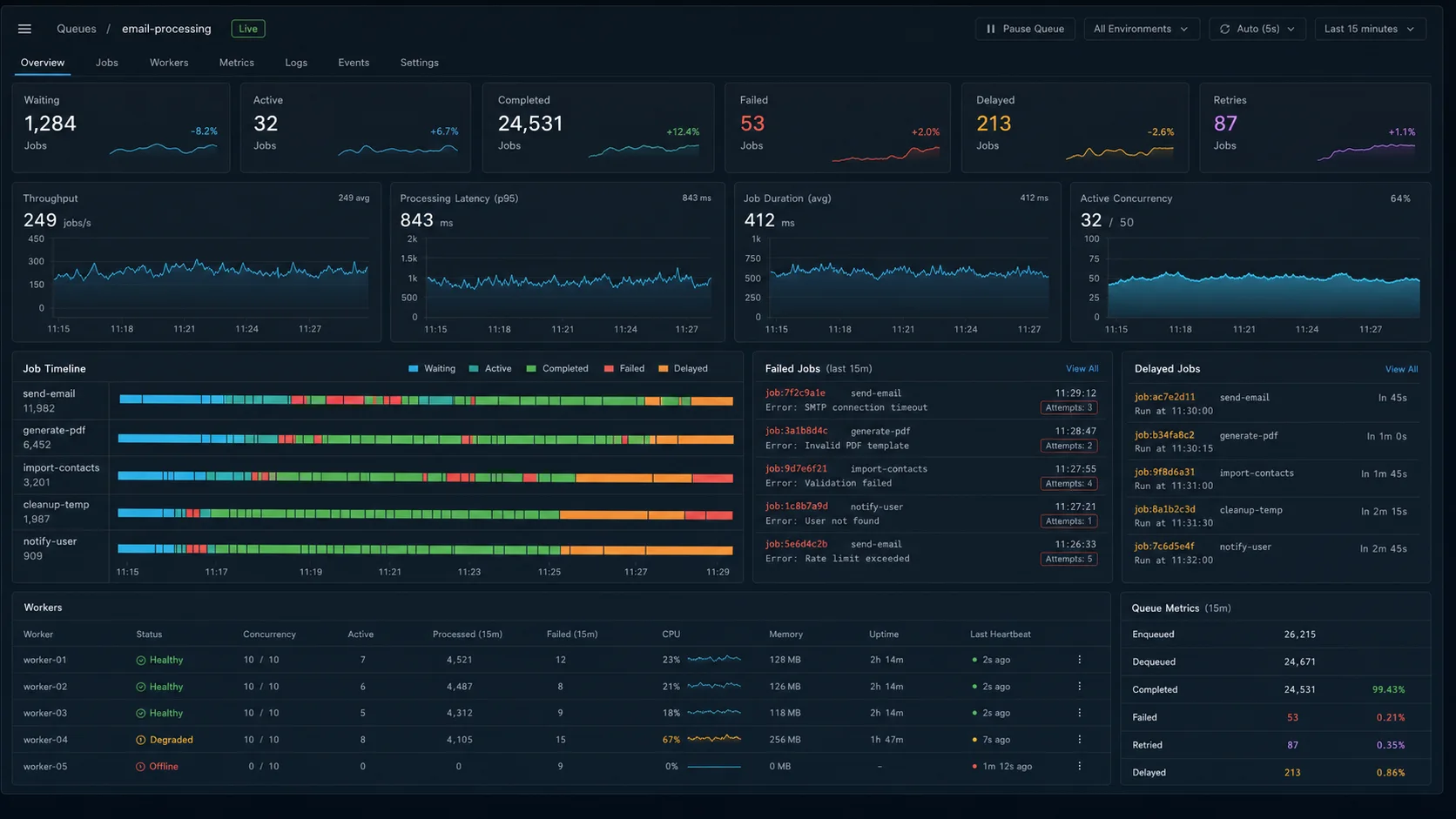
Bull vs BullMQ in 2026
The original Bull library was great for years. It’s now in maintenance mode — the author rebuilt it from scratch as BullMQ in 2020 with a TypeScript-first API, separate Queue / Worker / QueueEvents design, native streams support, and a proper FlowProducer for job dependencies.
| Feature | Bull (legacy) | BullMQ 5.x (2026) |
|---|---|---|
| Status | Maintenance only — bug fixes | Actively developed (5.71 shipped Mar 2026) |
| TypeScript support | Add-on types | Built-in, strict |
| Worker model | queue.process() (callback) |
Separate Worker class |
| Job dependencies | Not supported | FlowProducer with parent/child trees |
| OpenTelemetry tracing | — | bullmq-otel package, one-line enable |
| Repeatable jobs API | repeat: { cron } |
upsertJobScheduler() (5.x) — idempotent by name |
| Rate limiter | Per worker | Per queue, shared across workers |
For new projects: BullMQ. For a Bull codebase you don’t want to migrate: stay on Bull, it still works. The migration guide covers the renames if you want to switch. The migration cost is roughly half a day for a typical 10–15 queue project.
Step 1: install and the minimal setup
npm i bullmq ioredis
npm i -D @types/node// src/redis.ts — connection used by Queue, Worker, QueueEvents
import Redis from "ioredis";
import { env } from "./env.js";
// IMPORTANT: BullMQ uses BLPOP internally — maxRetriesPerRequest must be null.
export const queueConnection = new Redis(env.REDIS_URL, {
maxRetriesPerRequest: null,
enableReadyCheck: true,
});
queueConnection.on("error", (err) => console.error("queue redis error", err.message));That maxRetriesPerRequest: null setting is the single most common BullMQ footgun. The default in ioredis is 20 — once you have an active worker (which holds a blocking BRPOPLPUSH open) and it hits the cap, the connection throws and the worker stalls. If you also use Redis for caching, run a separate ioredis instance against the same Redis with the cache-side retry settings. The full Redis client setup is in the Node.js Redis caching guide.
// src/queues/email-queue.ts
import { Queue } from "bullmq";
import { queueConnection } from "../redis.js";

export const emailQueue = new Queue("email", {
  connection: queueConnection,
  defaultJobOptions: {
    attempts: 5,
    backoff: { type: "exponential", delay: 1000 },
    removeOnComplete: { age: 3600, count: 1000 },
    removeOnFail: { age: 86400 },
  },
});
The defaultJobOptions are the defaults I’ve landed on after enough production incidents:
- 5 attempts with exponential backoff. Most transient failures (DNS hiccups, SMTP throttling, third-party 5xx) resolve within five retries spread over ~1.5 minutes. Fewer attempts and you lose jobs to flaky upstreams; more and you DDoS yourself recovering.
removeOnCompletewith age + count caps. Without it, completed jobs accumulate in Redis forever. With it, you keep enough recent history for debugging without your Redis memory bill spiralling.removeOnFailwith a 24-hour age. Failed jobs stick around long enough to investigate, then get garbage-collected. Jobs that go to a DLQ (below) are kept indefinitely there.
Step 2: produce jobs from your API
// auth/register.ts
import { emailQueue } from "../queues/email-queue.js";

export async function registerUser(input: { email: string; password: string }) {
  const user = await db.user.create({
    data: { email: input.email, passwordHash: await hash(input.password) },
  });

  await emailQueue.add(
    "welcome",
    { userId: user.id, email: user.email },
    { jobId: `welcome:${user.id}` },
  );

  return user;
}
Two things about the add call worth naming:
- The job name (
"welcome") is not the queue name. One queue can hold many job types. The worker switches on name to know what to run. jobIdis your idempotency key. IfregisterUseris called twice for the same user (network retry, double-click), only one job gets enqueued. Without an explicitjobId, you’d send two welcome emails.
Job options you’ll actually use
// Delay — run in 10 minutes
await emailQueue.add("nudge", { userId }, { delay: 10 * 60 * 1000 });

// Priority — lower number = higher priority (1 wins over 5)
await emailQueue.add("password-reset", { userId }, { priority: 1 });

// Idempotency by composite key
await emailQueue.add("daily-digest", { userId }, {
  jobId: `digest:${userId}:${new Date().toISOString().slice(0, 10)}`,
});

// Removing a delayed job before it runs
const job = await emailQueue.add("nudge", { userId }, { delay: 60_000, jobId: `nudge:${userId}` });
await job.remove();
Don’t store large payloads in data — store IDs. A job carrying a 50 KB user object is 50 KB extra per enqueue, per attempt, per retry. Pass the ID, fetch fresh in the worker. Stale-payload bugs vanish in the same change.
Step 3: the worker process
// src/workers/email-worker.ts
import { Worker, Job } from "bullmq";
import { queueConnection } from "../redis.js";
import { sendWelcomeEmail, sendPasswordResetEmail } from "../email/templates.js";

const worker = new Worker(
  "email",
  async (job: Job) => {
    switch (job.name) {
      case "welcome":
        return sendWelcomeEmail(job.data);
      case "password-reset":
        return sendPasswordResetEmail(job.data);
      default:
        throw new Error(`unknown job name: ${job.name}`);
    }
  },
  {
    connection: queueConnection,
    concurrency: 10,
    limiter: { max: 100, duration: 60_000 },
  },
);

worker.on("failed", (job, err) => {
  console.error({ jobId: job?.id, name: job?.name, err: err.message }, "job failed");
});

worker.on("error", (err) => {
  // Worker-level errors (Redis disconnects, etc.) — not job failures
  console.error("worker error", err.message);
});
concurrency: 10 means this worker processes 10 jobs at once. limiter caps the rate at 100 jobs per 60 seconds — important when the downstream service has its own rate limit (SMTP providers, payment APIs, OpenAI). The limiter is shared across worker instances on the same queue.
Concurrency strategy: pick by workload
| Workload type | Concurrency | Why |
|---|---|---|
| I/O-bound (HTTP, SMTP, S3 uploads) | 20–50 | Most time waiting on the network — high concurrency, low CPU |
| CPU-bound (image resize, PDF render) | 1–2 × vCPU count | One job pegs a core; concurrency above the core count thrashes |
| Rate-limited APIs (Twilio, Stripe, OpenAI) | concurrency: 1, limiter at queue level | The rate limit is the bottleneck, not the worker |
| Mixed (some heavy, some light) | Split into separate queues per workload type | Don’t let a slow image job block 50 emails |
Step 4: dead-letter queue for the jobs that won’t recover
BullMQ doesn’t ship a built-in DLQ — it ships the events to build one. After a job exhausts its attempts, push it to a separate “dlq” queue with the failure context. Inspect, replay, or escalate from there.
// src/workers/email-worker.ts
import { Queue, Worker } from "bullmq";
import { queueConnection } from "../redis.js";

const emailDeadLetter = new Queue("email:dlq", { connection: queueConnection });

worker.on("failed", async (job, err) => {
  if (!job) return;
  const exhausted = job.attemptsMade >= (job.opts.attempts ?? 1);
  if (!exhausted) return;

  await emailDeadLetter.add(
    job.name,
    {
      ...job.data,
      _failedReason: err.message,
      _failedAt: new Date().toISOString(),
      _originalJobId: job.id,
      _attempts: job.attemptsMade,
    },
    { removeOnComplete: false },
  );
});
Pair the DLQ with an alert. A job in the DLQ is a job a human needs to look at — Sentry, PagerDuty, Slack, your call.
Step 5: scheduled / repeatable jobs (the cron replacement)
BullMQ 5.x prefers upsertJobScheduler over the older repeat API. The new API is idempotent by scheduler name — re-running it on every deploy doesn’t pile up duplicate schedules, which was the legacy repeat pain point.
// schedule at boot — idempotent
import { Queue } from "bullmq";
import { queueConnection } from "../redis.js";

const reportQueue = new Queue("reports", { connection: queueConnection });

await reportQueue.upsertJobScheduler(
  "daily-summary",
  { pattern: "0 8 * * *", tz: "America/Chicago" },
  { name: "daily-summary", data: { reportType: "daily-summary" } },
);

// Every-N-seconds variant
await reportQueue.upsertJobScheduler(
  "queue-depth-check",
  { every: 30_000 },
  { name: "queue-depth-check", data: {} },
);
Don’t reach for node-cron in a multi-instance deployment — covered in the Node.js cron jobs guide. BullMQ’s scheduler uses Redis for coordination, so the job fires exactly once across the cluster regardless of how many worker replicas you run.
Step 6: FlowProducer for multi-step jobs
When a single “background task” is actually three steps (resize image → upload to S3 → notify user), modelling it as a flow gives you parallelism on the children and a single result on the parent. Replaces a fragile chain of “job-completes-then-enqueues-the-next-job” callbacks.
import { FlowProducer } from "bullmq";
import { queueConnection } from "../redis.js";

const flow = new FlowProducer({ connection: queueConnection });

await flow.add({
  name: "publish-video",
  queueName: "video",
  data: { videoId, userId },
  children: [
    { name: "extract-audio", queueName: "video", data: { videoId } },
    { name: "generate-thumbnails", queueName: "video", data: { videoId, count: 5 } },
  ],
});
The parent job runs only after both children complete successfully. If either child exhausts its retries, the parent is marked failed too — no orphaned half-finished work.
Step 7: monitor what’s failing
The single biggest mistake teams make with queues: they don’t watch them. Failed jobs sit silently in Redis. Your health checks show green. Customers don’t get their emails. At minimum, log every failure with structured Pino — the Fastify vs Express comparison covers the logging setup that pairs with this.
Three things to wire up day one:
- Sentry on every job failure. Catch in the worker, send to Sentry with job context (name, attempts, payload-without-PII).
- A dashboard. Self-hosted: bull-board is the standard. Behind auth — never expose it publicly.
- Queue-depth health endpoint. Expose waiting/active/failed counts as a Prometheus metric or a JSON health route. Alert on waiting > 10,000 or failed > 100.
import * as Sentry from "@sentry/node";

worker.on("failed", (job, err) => {
  if (!job) return;
  Sentry.captureException(err, {
    tags: { queue: job.queueName, jobName: job.name },
    extra: { jobId: job.id, attempts: job.attemptsMade, data: redact(job.data) },
  });
});

function redact(data: unknown) {
  if (typeof data !== "object" || data === null) return data;
  const clone: Record<string, unknown> = { ...(data as Record<string, unknown>) };
  for (const k of ["email", "password", "token", "phone", "name"]) delete clone[k];
  return clone;
}// src/health/queues.ts — wire into your /health/queues route
export async function getQueueHealth(queue: Queue) {
const [waiting, active, completed, failed, delayed] = await Promise.all([
queue.getWaitingCount(),
queue.getActiveCount(),
queue.getCompletedCount(),
queue.getFailedCount(),
queue.getDelayedCount(),
]);
const healthy = failed < 100 && waiting < 10_000;
return { healthy, waiting, active, completed, failed, delayed };
}OpenTelemetry tracing (BullMQ 5.x)
If you already run distributed tracing, BullMQ 5 ships bullmq-otel. One-line enable.
npm i bullmq-otel @opentelemetry/sdk-node @opentelemetry/exporter-trace-otlp-httpimport { Worker } from "bullmq";
import { BullMQOtel } from "bullmq-otel";
const worker = new Worker("email", processor, {
connection: queueConnection,
concurrency: 10,
telemetry: new BullMQOtel("email-worker"),
});You get end-to-end traces showing time-in-queue, processing duration, retry attempts, and which worker instance handled the job. Connects to Jaeger, Grafana Tempo, Datadog — anything that speaks OpenTelemetry.
Step 8: graceful shutdown
If your worker process gets SIGTERM mid-job, the job either retries somewhere or vanishes. BullMQ handles both correctly if you let it close cleanly.
async function shutdown() {
  console.log("worker shutting down");
  await worker.close();
  await queueConnection.quit();
  process.exit(0);
}

process.on("SIGTERM", shutdown);
process.on("SIGINT", shutdown);
On worker.close(), BullMQ stops picking up new jobs, finishes the in-flight ones, and releases the Redis lock. Your container orchestrator (Docker, Kubernetes) needs to send SIGTERM with a generous grace period — 60 seconds for jobs that can run that long, less if your jobs are short. Container-side details are in the Postgres + Prisma setup guide for graceful DB disconnect, and the same SIGTERM handling extends across the worker.
Step 9: separate the worker process from your API
Don’t run the worker inside your HTTP server process. Two reasons:
- Resource contention. A burst of jobs steals CPU from request handlers, your p99 latency spikes, your alerts go off.
- Independent scaling. Workers and APIs scale on different signals. APIs scale on req/s. Workers scale on queue depth. Coupling them in one binary means you over-provision both.
I run them as separate Node processes, separate containers in production:
{
  "scripts": {
    "start:api":    "node dist/api/server.js",
    "start:worker": "node dist/workers/email-worker.js"
  }
}# Scale workers independently of the API
docker compose up --scale worker=10 apiSame codebase, same Docker image, different entry point. The Compose file or Kubernetes deployment runs each in its own container. The Docker setup that pairs with this — multi-stage Node.js Dockerfile — covers the image build that backs both processes.
Decision matrix: when to use which BullMQ pattern
| Use case | Pattern | Notes |
|---|---|---|
| Welcome email after signup | Standard queue.add with jobId |
Idempotent on user ID, 5 attempts |
| “Send reminder in 7 days” | add with delay |
Use a deterministic jobId so duplicate signups don’t double-schedule |
| Daily report at 8am | upsertJobScheduler with cron pattern |
Idempotent across deploys |
| Image processing pipeline | FlowProducer with parent + children |
Children run in parallel, parent waits |
| Stripe webhook → email + audit log | Two job types in one queue | Worker switches on job.name |
| Twilio SMS (rate-limited) | Queue-level limiter + concurrency 1 |
Limiter is shared across worker replicas |
| Mission-critical billing job | Standard queue + DLQ + Sentry alert | Idempotency key matches Stripe key |
| “Retry forever” worker | BullMQ is wrong here | Use a workflow engine (Temporal) for human-step retries |
When NOT to use BullMQ
- You don’t have Redis. Adding Redis just for a queue is overkill if you have no other use for it. pg-boss on Postgres is a serious option, especially if you already run Postgres. better-queue with a SQLite backend works for low-volume in-process work.
- You need cross-language workers. BullMQ is Node-only. For producers in Node and consumers in Python, use a real message broker — RabbitMQ, NATS, or Kafka. The serialization format is shared; the queue isn’t.
- Your “background work” runs in < 50ms. The queue overhead (serialize → Redis → deserialize → run → ack) is real — adds 8–15ms per job at low concurrency, more under load. For genuinely fast work, run it inline.
- You need workflow orchestration with human steps. “Wait for manager approval, then resume.” That’s Temporal, not BullMQ. BullMQ retries failed jobs; Temporal pauses workflows for hours/days/weeks waiting on external signals.
Common pitfalls
- Forgetting
maxRetriesPerRequest: null. Worker stalls silently after the first burst of activity. Set it on everyioredisconnection BullMQ touches. - Storing payloads, not IDs. Job size grows, Redis memory bills climb, retried jobs run on stale data. Store the ID, fetch fresh in the worker.
- No
errorhandler on the worker. Different fromfailed—errorfires for worker-level issues (Redis disconnects, permission errors). Without it, unhandled errors crash the process. - Blocking the event loop in a worker. Synchronous CPU work (
crypto.pbkdf2Sync,bcrypt.hashSync) inside a worker blocks the event loop and stalls every concurrent job. Use the async variants or push to a worker thread — patterns are in the Node.js memory leak fix guide. - Sharing the cache Redis connection with BullMQ. Different retry settings clash. Two
ioredisinstances against the same Redis is fine and recommended. - No graceful shutdown. A SIGTERM during a job either retries the job (good) or crashes mid-write (bad). Always
await worker.close()before exit.
Production checklist
- [ ] BullMQ 5.71+ with
maxRetriesPerRequest: nullon Redis connection - [ ] Redis 7.x or 8.x with persistence enabled (
appendonly yes) - [ ] Workers run as separate processes / containers from API
- [ ]
defaultJobOptionswith attempts, exponential backoff, removeOnComplete, removeOnFail - [ ] DLQ for jobs that exhaust retries, with Sentry/Slack alerting
- [ ]
jobIdset on every dedupable job - [ ] Rate limiters configured for external APIs
- [ ]
bull-boardbehind auth in production - [ ] Queue-depth metrics exported to monitoring
- [ ] OpenTelemetry tracing enabled (
bullmq-otel) - [ ] Graceful shutdown handler on
SIGTERMandSIGINT - [ ] Worker has both
failedanderrorevent handlers
FAQ
What is BullMQ?
A Redis-backed job queue for Node.js, written in TypeScript. It’s the modern successor to the original Bull library, with separate Queue / Worker / QueueEvents objects, native streams support, FlowProducer for parent/child job dependencies, and OpenTelemetry tracing in the 5.x line. Used in production by thousands of companies processing billions of jobs daily.
Should I use Bull or BullMQ in 2026?
BullMQ for new projects. The original Bull is in maintenance mode — bug fixes only, no new features. The migration is straightforward if you’re already on Bull and want to upgrade — half a day for a typical project, mostly renames (queue.process() → new Worker()) and the new upsertJobScheduler API for repeats.
How do I make a BullMQ job idempotent?
Pass an explicit jobId when adding the job. BullMQ deduplicates: if a job with the same ID is already in the queue or recently completed, the duplicate is rejected. For workloads where the worker writes externally (Stripe, Twilio), reuse the same jobId as the upstream idempotency key — that way a retried job hits the upstream’s own idempotency check too.
How do I schedule recurring jobs in BullMQ?
Use upsertJobScheduler in BullMQ 5.x with a cron pattern: queue.upsertJobScheduler("daily-summary", { pattern: "0 8 * * *", tz: "America/Chicago" }, { name: "daily-summary", data }). The first argument is the scheduler name; re-running this on every deploy is safe — BullMQ updates the existing schedule rather than creating duplicates. The legacy repeat option still works in 5.x but is being phased out.
Can BullMQ handle high throughput?
Yes. A single Redis instance can comfortably handle 10,000+ jobs per second. Workers scale horizontally — add more processes and BullMQ distributes work across them. The bottleneck is almost always the work the worker does, not the queue itself. If individual jobs are CPU-heavy, push the work onto worker threads inside the worker process.
How do I monitor BullMQ in production?
Self-hosted: bull-board for a UI behind auth, plus your own metrics on queue depth and failure rate. Hook job failures into Sentry. For Datadog or similar, BullMQ exposes events you can adapt into custom metrics, or use bullmq-otel for native OpenTelemetry tracing.
How do I implement a dead-letter queue in BullMQ?
BullMQ doesn’t ship a built-in DLQ but exposes the events to build one. In the worker.on("failed") handler, check job.attemptsMade >= job.opts.attempts — if true, the job has exhausted retries. Push it to a separate “queue-name:dlq” queue with the failure context (error message, original job ID, timestamp). Alert on the DLQ depth.