Last month a client wanted a small Fastify API off Heroku before the renewal hit. “Just pick something cheap and fast.” So I took the actual app — Fastify on Node 22, Prisma against Postgres, a Redis cache, one background worker — and deployed it to Railway, Render, and Fly.io in one afternoon. Same repo, same Dockerfile, three dashboards open.
The hosting choice
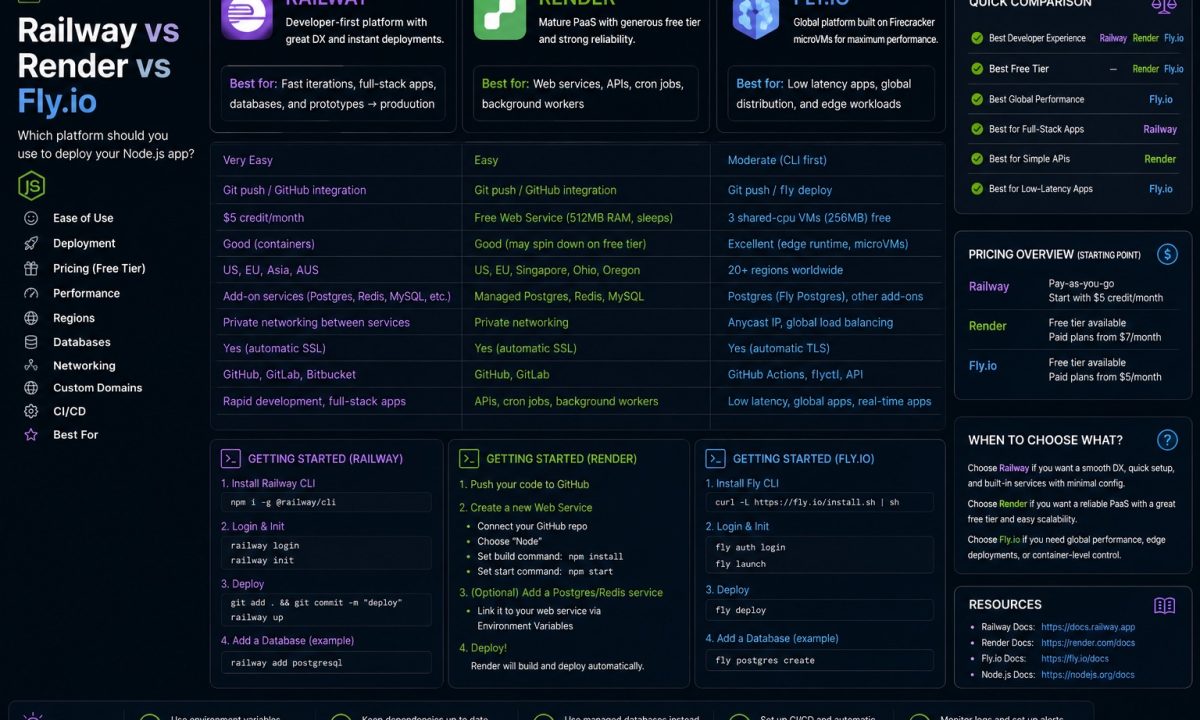
Railway is usually the fastest path for a small Node.js app plus Postgres, Render is the cleanest conventional PaaS choice for predictable web services, and Fly.io makes the most sense when Docker, regions, and low-latency global placement matter. The wrong choice is rarely about the deploy button; it is usually cold starts, database distance, background workers, and surprise usage costs.
If you want to deploy Node.js on Railway, Render, or Fly.io in 2026, the differences that matter aren’t on the marketing pages. They’re in the billing model, the cold-start behavior, and how the database is wired. I’ll show the config for each, what it cost me, and the one thing that broke in staging that would’ve been a 2 a.m. page in prod.
The 30-second comparison
| Railway | Render | Fly.io | |
|---|---|---|---|
| Pricing model | Usage-based, $5/mo Hobby minimum | Per-instance tiers, free tier + $7/mo Starter | Pay-as-you-go, billed per second |
| Deploy method | Railpack (auto) or Dockerfile + railway.json |
render.yaml Blueprint or dashboard |
fly.toml + fly deploy, runs Machines |
| Cold starts | None on paid; service stays up | Free tier spins down after 15 min (~1 min wake) | Optional: auto_stop_machines scales to zero |
| Databases | One-click Postgres, MySQL, Redis, Mongo | Managed Postgres + Key Value (Redis-compatible) | Managed Postgres (MPG) or run your own |
| Regions | Multi-region (US, EU, Asia metros) | 5 regions (OR, OH, VA, Frankfurt, Singapore) | ~35 regions worldwide |
| Best for | Fastest “git push and it’s live” | Predictable flat bills, generous free tier | Latency-sensitive, multi-region, scale-to-zero |
Now the parts that don’t fit in a table.
Deploying the same Node app on Railway
The problem Railway solves: you don’t want to think about build config at all. You connect a repo and it figures out it’s Node, installs deps, runs your build, and starts the process.
It does this with Railpack (the successor to Nixpacks). For most Node apps you write zero config. But the moment you have a monorepo or a non-standard start command, you want a railway.json in the repo root so the build is reproducible instead of inferred:
# Railway picks up package.json automatically.
# Make the contract explicit so CI and prod agree.
npm run build   # tsc -> dist/
npm start        # node dist/server.js
{
  "$schema": "https://railway.com/railway.schema.json",
  "build": { "builder": "DOCKERFILE", "dockerfilePath": "Dockerfile" },
  "deploy": {
    "startCommand": "node dist/server.js",
    "healthcheckPath": "/healthz",
    "restartPolicyType": "ON_FAILURE"
  }
}
I switched the builder to DOCKERFILE on purpose: the image I run locally is the one Railway runs, so I’m not debugging a Railpack-specific build that only fails in the cloud. If you’ve already containerized — and you should, see my Node Docker containerization guide — this is the path of least surprise.
Postgres is genuinely a few clicks: + New → Database → PostgreSQL, and Railway injects DATABASE_URL plus the PG* vars into your service. No copy-pasting connection strings between dashboards. That’s why I reach for Railway first on a prototype.
The catch is the bill. Railway is usage-based: CPU, memory, volumes, and egress are metered per second, and the Hobby plan’s $5/month is a minimum, not a cap. A sleepy API costs a couple of dollars; a busy one, or one you forgot to scale down, climbs faster than a flat tier would. Read the model on the Railway pricing page before you trust a back-of-napkin estimate — and know the old free tier is gone. New accounts get a one-time $5 trial credit, then it’s Hobby.
Deploying on Render
The problem Render solves: you want a flat, boring bill and a config you can review in a pull request.
That config is render.yaml, a Blueprint describing every service and database in one file. Commit it, point Render at the repo, and the whole stack comes up:
services:
  - type: web
    name: fastify-api
    runtime: node
    region: oregon
    plan: starter
    buildCommand: npm ci && npm run build
    startCommand: node dist/server.js
    healthCheckPath: /healthz
    envVars:
      - key: DATABASE_URL
        fromDatabase:
          name: app-db
          property: connectionString

databases:
  - name: app-db
    postgresMajorVersion: "16"
    region: oregon
That fromDatabase wiring is the part I like. The connection string flows in automatically, so there’s no secret to leak in a .env you forgot to gitignore.
Here’s the free-tier gotcha, and it’s a real one. Free web services spin down after 15 minutes of inactivity, and the first request after that takes about a minute to wake. Your health check, your demo link, your “click here” in Slack — all eat a 60-second cold start. Free Postgres is worse for staging: it expires 30 days after creation. You’ll come back to a month-old environment, find the database gone, and waste an hour before you remember why.
For anything a human will hit, the Starter instance (around $7/month) keeps the service always-on and kills the spin-down. Confirm current numbers on the Render pricing docs — bandwidth overages and disk are billed separately, so the “flat” bill grows line items.
Deploying on Fly.io
The problem Fly.io solves: you want your Node process running close to your users, in as many cities as you like, and you’re fine that it runs as Machines (Firecracker microVMs) rather than a generic “web service.”
fly launch scans the repo, writes a fly.toml, and deploys. The file is where Fly earns its keep:
app = "fastify-api"
primary_region = "iad"  # Ashburn, VA

[build]
  dockerfile = "Dockerfile"

[http_service]
  internal_port = 8080
  force_https = true
  auto_stop_machines = "stop"
  auto_start_machines = true
  min_machines_running = 0
fly launch --no-deploy   # generate fly.toml, review it
fly deploy               # build + boot Machines
fly scale count 2 --region fra  # add Frankfurt
Two things to call out. auto_stop_machines takes off, stop, or suspend — suspend resumes faster than a cold stop because it freezes memory instead of killing the VM. With min_machines_running = 0 you get scale-to-zero, which means cold starts when traffic is sparse; set it to 1 if you can’t tolerate them. And Fly runs in roughly 35 regions, so fly scale count 2 --region fra literally puts a copy of your app in Frankfurt — the trick none of the others do as cleanly.
Databases: Fly has Managed Postgres (MPG), or you run an unmanaged Postgres yourself. MPG isn’t in every region yet, so check coverage against where your Machines live. Pricing is pure pay-as-you-go billed per second — a minimal always-on Machine is a couple of dollars a month, egress metered. The Fly.io pricing page has the per-resource rates; like Railway, there’s no free tier, just a small trial credit.
The pricing reality
Three different bets on how you should pay:
- Render is the only one with a usable free tier in 2026 (750 instance hours, free Postgres for 30 days), plus a flat $7-ish Starter when you outgrow it. You can hand the bill to a finance person without a footnote.
- Railway and Fly.io both killed their free tiers for usage-based, per-second billing. Cheaper for genuinely idle apps, pricier for busy ones, and easy to underestimate without a budget alert.
Usage-based is great until a runaway loop or a traffic spike does the metering for you. Flat tiers are “wasteful” on an idle app and a relief on a busy one. Pick the failure mode you’d rather explain.
Cold starts and scaling
This is where staging lies to you.
On Render free, the 15-minute spin-down means staging is asleep most of the time, so every manual test pays the wake cost and you start “optimizing” a latency problem that doesn’t exist in prod (Starter, always-on). On Fly.io with min_machines_running = 0, same trap in reverse — snappy in prod under steady traffic, then a 3 a.m. cron with no warm Machine eats a cold boot.
Scaling up is straightforward on all three. The difference is direction: Railway and Render scale up well; Fly scales out across regions well. If your problem is “users in Singapore wait 300ms,” Fly is the answer. If it’s “this one endpoint is slow,” none of them fixes your code for you.
Whatever you pick, your process has to die cleanly when the platform reschedules it — drain connections, finish in-flight requests, close the pool. That’s not optional on any of these. The shutdown pattern is covered in graceful shutdown for Node.
Databases and the latency you forget to measure
All three give you managed Postgres. The thing that bites isn’t provisioning — it’s distance.
Put your app in Frankfurt and your database in Oregon and every query crosses the Atlantic. On Render, services in different regions can’t even reach each other on the private network; you’d be forced onto public URLs — slower, and a security smell. On Fly, your Machines might be multi-region while MPG sits in one, so reads from the far Machines are slow even though everything is “on Fly.” Keep app and database in the same region unless you’ve designed for read replicas.
And pool your connections. Elastic scaling plus a fixed Postgres connection limit is a classic way to exhaust the database under load — I cover the fix in Postgres connection pooling for Node. It matters more here than on a single VPS, because these platforms will happily spin up more instances than your max_connections can handle.
What breaks in staging that won’t in prod
- Render free spin-down. Staging sleeps after 15 minutes; the first hit takes ~60s. Prod on Starter never does this — don’t chase a ghost.
- Render free Postgres expiry. It vanishes 30 days after creation. Use a paid DB for anything you want to persist.
- Fly scale-to-zero.
min_machines_running = 0in staging means cold boots your warm prod fleet never shows. Set it to1to mirror prod. - Cross-region DB latency. Invisible in staging where data is tiny. Under prod load, it’s your whole tail latency.
My recommendation, by use case
Prototype you want live in five minutes: Railway. The auto-detection and one-click Postgres are the smoothest on-ramp. Where Render wins instead: if you can’t pay anything yet, Render’s free tier (spin-down and all) is the only real free option here.
Small production app, fixed budget, a boring bill: Render Starter. Flat pricing, render.yaml in code review, no metering anxiety. Where Railway wins: if your app is genuinely idle most of the day, per-second billing can undercut a flat tier.
Latency-sensitive, multi-region, or you want true scale-to-zero: Fly.io. Nothing else puts your Node process in 35 cities with one CLI flag, and auto_stop_machines gives you real cost control. Where Fly loses: for one boring region, the fly.toml and microVM model is more rope than you need.
Pick the constraint that actually hurts — surprise bills, cold starts, or distance to your users — and let that choose for you. The deploy commands are the easy part.
FAQ
Which is cheapest to deploy a Node.js app on in 2026?
It depends on traffic, not the sticker price. For an idle app, Railway and Fly.io (both per-second usage-based) usually cost less than a flat tier. For a steadily-used app, Render’s ~$7 Starter is predictable and often cheaper than the metered equivalent. Render is the only one with a usable free tier, but its free web services spin down after 15 minutes.
Does Railway still have a free tier?
No. Railway ended its ongoing free tier; new accounts get a one-time $5 trial credit, then move to the Hobby plan, which has a $5/month minimum with usage billed on top. Check the Railway pricing page for the current model before estimating.
How do I avoid cold starts on Render and Fly.io?
On Render, upgrade the web service from Free to Starter — paid instances are always-on and never spin down. On Fly.io, set min_machines_running = 1 in fly.toml so at least one Machine stays warm, or use auto_stop_machines = "suspend" instead of "stop" for a faster resume. Railway paid services don’t spin down at all.
render.yaml vs fly.toml vs railway.json — what’s the difference?
render.yaml is a Blueprint describing your whole stack (services plus databases) in one file. fly.toml configures a single Fly app, including regions and Machine auto-start/stop. railway.json overrides build and deploy settings for a Railway service, though Railway can deploy many Node apps with no config file at all.
Can I deploy a Dockerfile instead of using auto-detection?
Yes, on all three. Railway uses your Dockerfile when you set the builder to DOCKERFILE in railway.json. Render supports a Docker runtime in render.yaml. Fly.io builds from your Dockerfile via the [build] section. Shipping the same image you run locally is the most reliable way to avoid cloud-only build failures.
Where should I put my Postgres database?
In the same region as your app. Cross-region queries cross the network on every call, and on Render, services in different regions can’t use the private network at all. On Fly.io, confirm Managed Postgres (MPG) is available in your app’s region, since it doesn’t yet cover all ~35 regions. Pool your connections regardless so you don’t exhaust the database’s connection limit when the platform scales out.
Is Fly.io overkill for a single-region app?
Often, yes. Fly’s strength is multi-region deployment and scale-to-zero via Machines. If you only need one region and don’t want to manage fly.toml and microVM behavior, Railway or Render give you a simpler mental model for the same result. Reach for Fly when distance to your users, or true scale-to-zero, is the actual problem.