
I added Redis caching to a Node.js dashboard API at the wrong layer once and made it slower. Cache hit ratio was 92%, latency on cache hits was 4ms. Latency on cache misses went from 180ms to 340ms because the cache lookup was now blocking the database call instead of running in parallel with a circuit breaker. Three days of staring at clinic.js output to figure out why caching had backfired. The answer was the cache pattern, not Redis. This is the version that actually works — the patterns I drop into every Node.js + Redis project on Node 24 LTS with ioredis 5.x against Redis 8.x, with the bugs they prevent.
ioredis against Redis 8 with retryStrategy capped at 2s, default to cache-aside for reads, version your cache keys instead of bulk-deleting, lock the rebuild on hot keys with SET NX EX (single-flight) so you do not stampede the database, set maxmemory-policy allkeys-lru, and wrap every Redis call in a 50ms circuit breaker so a Redis hiccup degrades to origin reads instead of crashing the API. Skip caching when the source is already <5ms or the data changes faster than the TTL.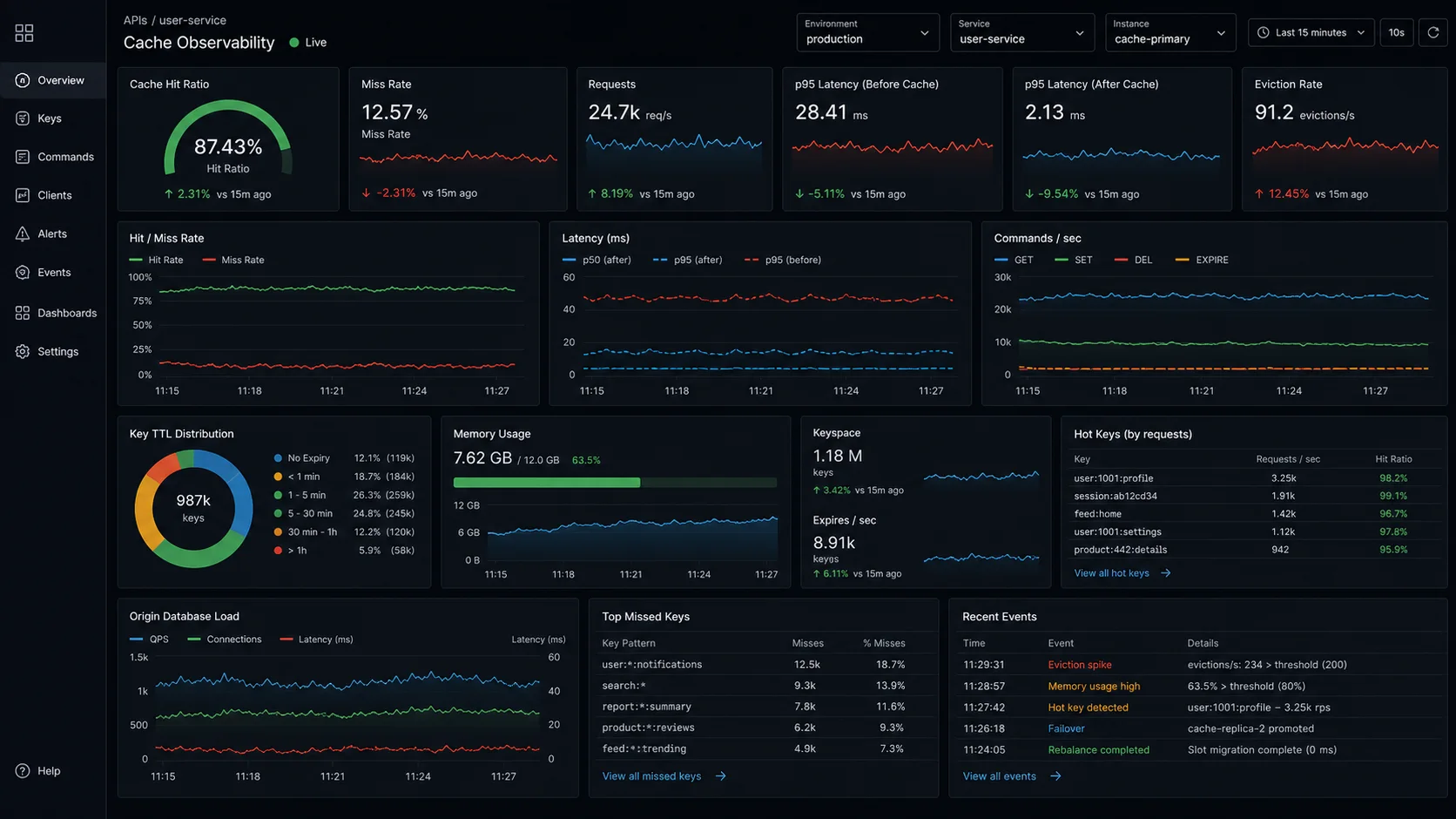
Step 0: when caching is actually the answer
Before installing anything, name the bottleneck. Caching helps when:
- The same data is requested by many clients within a short window (read amplification).
- The cost of recomputing or refetching is high relative to a Redis round-trip (~1ms on the same network, ~3ms across an Availability Zone).
- The data is allowed to be slightly stale.
If the data changes faster than your TTL, or every request is unique, caching adds overhead and complexity for nothing. Don’t cache user-specific data with a 1-second TTL — you’re paying for the round-trip and getting almost no hits. If the bottleneck is the database itself, fix the schema and indexes first — the Postgres + Prisma setup guide covers the patterns. The break-even calculus is in the Node.js performance optimization guide: a Redis hit at ~1ms only beats a Postgres query if the query is >3ms and your hit ratio clears 80%.
ioredis vs node-redis: the actual call
Two serious clients in 2026: redis (the official client, v5) and ioredis (v5.6.x). They are functionally close. The differences that matter at production scale:
| Feature | ioredis 5.x | node-redis 5.x |
|---|---|---|
| Cluster support | new Redis.Cluster([...]) baked in |
createCluster() — works, slightly later to ship features |
| Sentinel / HA failover | First-class, well documented | Available in v5 |
| Auto-reconnect with backoff | Default retryStrategy, customisable |
socket.reconnectStrategy |
| BullMQ compatibility | Native — same client doubles as the queue backend | Not supported by BullMQ |
| RESP3 / client-side caching | Supported (v5.4+) | Supported (v5) |
| TypeScript types | Bundled, strict | Bundled, strict |
I run ioredis on every project. The deciding factor is BullMQ — same connection pool for cache + queues — see the BullMQ background jobs guide. If you do not run BullMQ and you want the official client, node-redis is fine.
npm i ioredis// src/redis.ts
import Redis from "ioredis";
import { env } from "./env.js";
export const redis = new Redis(env.REDIS_URL, {
maxRetriesPerRequest: 3,
enableReadyCheck: true,
lazyConnect: false,
retryStrategy: (times) => Math.min(times * 200, 2000),
reconnectOnError: (err) => {
// Reconnect on READONLY errors (failover from primary to replica)
return err.message.includes("READONLY");
},
});
redis.on("error", (err) => {
// Don't crash the process on Redis hiccups — degrade gracefully.
console.error("redis error", err.message);
});
redis.on("ready", () => console.log("redis ready"));The retryStrategy is the part most teams skip. The default in ioredis is reasonable, but I tighten the cap to 2 seconds — past that, you should be serving from origin, not waiting on Redis to come back. reconnectOnError handles the moment a managed Redis fails over: replicas reject writes with READONLY, the client reconnects, the new primary accepts the next write.
Cache patterns: the table that decides which one
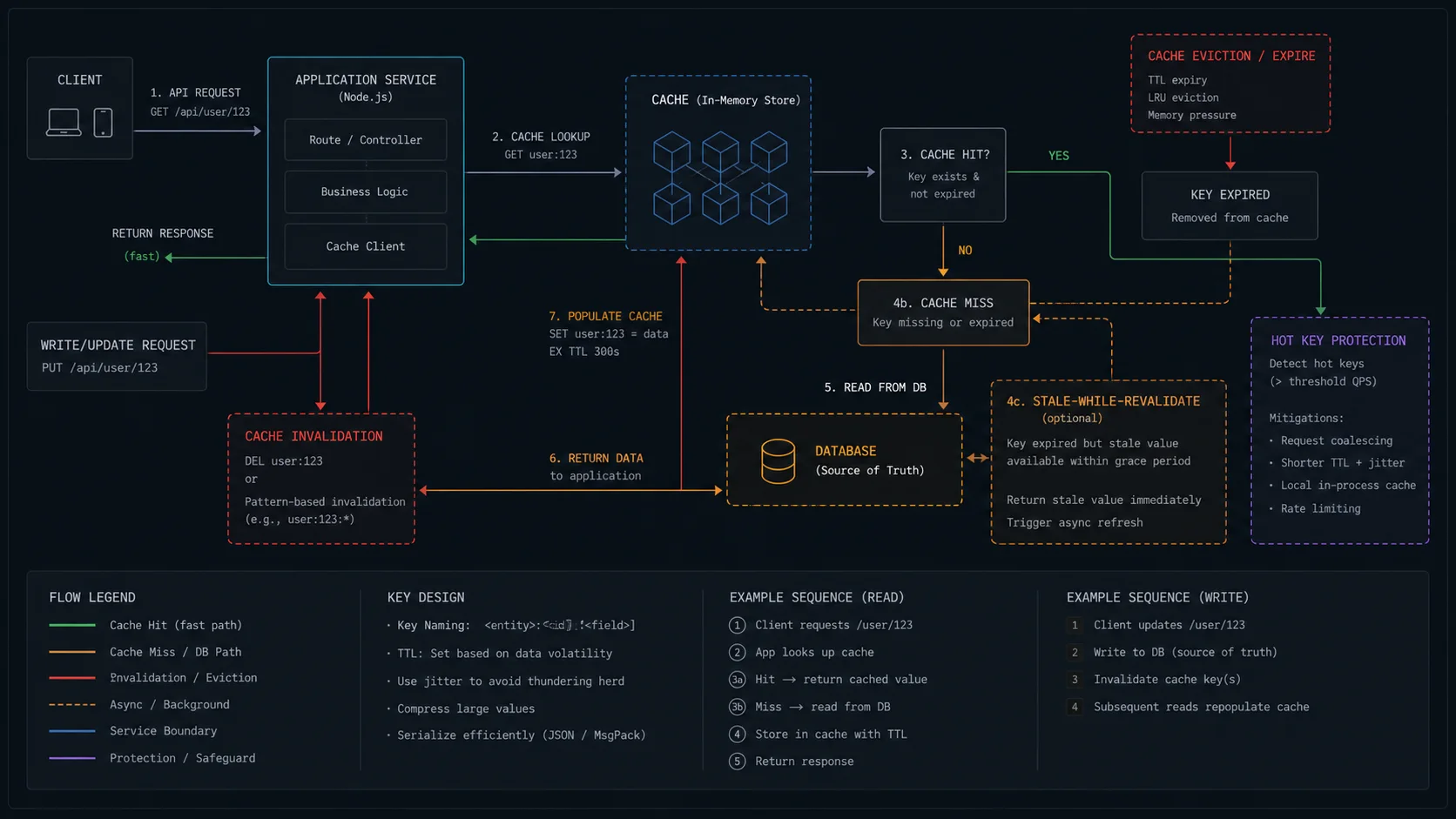
“Use Redis” is not a strategy. The pattern decides whether caching helps or hurts.
| Pattern | How it works | Best for | Drawback |
|---|---|---|---|
| Cache-aside (lazy loading) | App reads cache; on miss, reads source and populates cache | Read-heavy endpoints, default choice | First request after expiry pays full latency |
| Read-through | Cache itself fetches from source on miss (Redis on Flash, RedisGears) | Hidden caching layer — rare in raw ioredis | Tighter coupling to source |
| Write-through | Writes go to cache and source synchronously | Read-after-write consistency, hot reads of just-written data | Doubles write latency |
| Write-behind | Writes hit cache; flushed to source asynchronously by a worker | Burst writes, leaderboards, analytics counters | Crash window can lose writes |
| Write-around | Writes skip cache, go straight to source; cache fills lazily | Write-heavy data rarely re-read | Reads after writes always miss |
| Refresh-ahead | Background job refreshes hot keys before TTL expiry | Hot reports, dashboards with predictable hit ratio | Wastes work on keys that are not read |
For 90% of Node.js APIs you want cache-aside with single-flight on hot keys. Write-through earns its keep when you have a small set of records that are written and immediately re-read — payment receipts after a successful charge, for example.
Cache-aside with a reusable helper
The shape every cache-aside call collapses to is the same: key, TTL, fallback function. Wrap it once.
// src/cache.ts
import { redis } from "./redis.js";

export async function withCache<T>(
  key: string,
  ttlSeconds: number,
  fetchFn: () => Promise<T>,
): Promise<T> {
  try {
    const cached = await redis.get(key);
    if (cached) return JSON.parse(cached) as T;
  } catch (err) {
    // Redis down? Skip cache, hit origin. Don't fail the request.
    console.error("cache read failed", { key, err: (err as Error).message });
  }

  const data = await fetchFn();
  if (data !== null && data !== undefined) {
    redis
      .set(key, JSON.stringify(data), "EX", ttlSeconds)
      .catch((err) => console.error("cache write failed", { key, err: err.message }));
  }
  return data;
}
Usage in a route handler stays one line:
import { withCache } from "../cache.js";
import { db } from "../db.js";

export async function getUserById(userId: string) {
  return withCache(`user:${userId}:v3`, 300, () =>
    db.user.findUnique({ where: { id: userId } }),
  );
}
Three things worth naming:
- The key is namespaced and versioned.
user:abc:v3, notabc. Without namespacing, your cache becomes a minefield of key collisions the first time you cache a second resource type. The version suffix is your invalidation lever — bumpv3tov4on a schema change and old keys age out via TTL. - Cache writes are fire-and-forget. The
.catchonredis.setmeans a slow Redis write doesn’t block the response. - Read failures degrade to origin. A try/catch around
redis.getis the difference between “Redis is down for 30 seconds, latency goes up” and “Redis is down for 30 seconds, the API is down.” Always degrade.
Express middleware for whole-response caching
For HTTP endpoints where the response body is identical for every caller (public product pages, sitemap data), cache the full response upstream of the route handler. X-Cache: HIT headers help debugging.
// src/cache-middleware.ts
import type { Request, Response, NextFunction } from "express";
import { redis } from "./redis.js";

export function cacheResponse(ttlSeconds: number) {
  return async (req: Request, res: Response, next: NextFunction) => {
    if (req.method !== "GET") return next();
    const key = `http:${req.originalUrl}`;

    try {
      const cached = await redis.get(key);
      if (cached) {
        res.setHeader("X-Cache", "HIT");
        res.setHeader("Content-Type", "application/json");
        return res.send(cached);
      }
    } catch {
      /* degrade silently */
    }

    res.setHeader("X-Cache", "MISS");
    const originalJson = res.json.bind(res);
    res.json = (body: unknown) => {
      const payload = JSON.stringify(body);
      if (res.statusCode >= 200 && res.statusCode < 300) {
        redis.set(key, payload, "EX", ttlSeconds).catch(() => {});
      }
      res.setHeader("Content-Type", "application/json");
      return res.send(payload);
    };
    next();
  };
}app.get("/api/products/:id", cacheResponse(600), async (req, res) => {
const product = await db.product.findUnique({ where: { id: req.params.id } });
if (!product) return res.status(404).json({ error: "not found" });
res.json(product);
});Two notes: the middleware ships the cached JSON as a string straight to res.send, skipping a round-trip through JSON.parse+JSON.stringify. And it only caches 2xx responses — caching a 500 with a 5-minute TTL is a way to extend an outage.
Cache key naming for paginated lists
Paginated endpoints look stateless but turn into a key-explosion problem the first time you cache them. The key has to include every parameter that affects the response.
function listKey(opts: { page: number; limit: number; category?: string; sort?: string }) {
  return [
    "products",
    `p${opts.page}`,
    `l${opts.limit}`,
    `c${opts.category ?? "all"}`,
    `s${opts.sort ?? "default"}`,
  ].join(":");
}
// products:p1:l20:cbooks:sprice
Skip JSON.stringify(opts) as the key. Object key ordering is not stable across all V8 versions for non-string keys, and the resulting key is much larger than it needs to be. Build the key from primitives in a fixed order.
Invalidation: the part nobody wants to think about
The cache is a lie if you don’t invalidate it on writes. Three patterns I lean on, ranked by how often I reach for them:
- Versioned keys. Cache key includes a version suffix (
user:abc:v3). On a global schema change, bump the version. Old keys age out via TTL. No bulk delete. This is what I default to. - Direct delete on write. For known-affected keys, delete them after the source write succeeds.
- Tag-based invalidation. Store a Redis Set
tags:user:abccontaining every cache key that includes data for userabc. On update, delete every key in the set, then delete the set itself. Heavier but more flexible.
export async function updateUserEmail(userId: string, email: string) {
  await db.user.update({ where: { id: userId }, data: { email } });
  await redis.del(`user:${userId}:v3`);
  await redis.del(`user:${userId}:profile:v3`, `dashboard:user:${userId}:v3`);
}
One trap: do not use KEYS pattern for bulk delete on a busy Redis. KEYS is O(n) over the entire keyspace and blocks the server. Use SCAN + UNLINK instead:
export async function deleteByPattern(pattern: string) {
  const stream = redis.scanStream({ match: pattern, count: 100 });
  for await (const keys of stream) {
    if (keys.length) await redis.unlink(...keys); // UNLINK is non-blocking DEL
  }
}
Thundering herd: the bug that took me three days
The dashboard API was rebuilding a per-customer report on every cache miss. Cache TTL was 60 seconds. When the cache expired, every concurrent request hit the database simultaneously and rebuilt the same report 47 times in parallel. Database fell over.
Fix: lock the rebuild. The first miss takes the lock and rebuilds; everyone else waits.
// src/single-flight.ts
import { redis } from "./redis.js";

const inFlight = new Map<string, Promise<unknown>>();

export async function singleFlight<T>(
  key: string,
  ttlSeconds: number,
  build: () => Promise<T>,
): Promise<T> {
  const cached = await redis.get(key);
  if (cached) return JSON.parse(cached) as T;

  // Process-local dedupe — same Node process, same key, one rebuild
  const local = inFlight.get(key);
  if (local) return local as Promise<T>;

  const lockKey = `lock:${key}`;
  const acquired = await redis.set(lockKey, process.pid.toString(), "EX", 10, "NX");

  if (!acquired) {
    // Another process is rebuilding. Brief wait, then re-read.
    await new Promise((r) => setTimeout(r, 75 + Math.random() * 75));
    return singleFlight(key, ttlSeconds, build);
  }

  const work = (async () => {
    try {
      const data = await build();
      await redis.set(key, JSON.stringify(data), "EX", ttlSeconds);
      return data;
    } finally {
      await redis.del(lockKey);
      inFlight.delete(key);
    }
  })();

  inFlight.set(key, work);
  return work;
}
Two layers of dedupe. The inFlight Map kills duplicate rebuilds inside the same Node process. The Redis SET NX EX kills duplicate rebuilds across processes. The 75ms+jitter wait stops every retrier waking up at exactly the same moment and stampeding the lock check.
This is a single-Redis lock. For real distributed locking across many Redis nodes, use node-redlock. For most caching scenarios, SET NX EX plus the in-process Map is enough.
Negative caching: handle “not found” too
If your endpoint takes random IDs from URLs, attackers (or legitimate broken links) can hammer “not found” paths and bypass your cache entirely — every request hits the database to confirm the user does not exist. Cache the absence with a short TTL.
const NOT_FOUND_TTL = 30; // seconds — short on purpose
const NOT_FOUND_SENTINEL = "__nf__";

export async function getUserCached(userId: string) {
  const key = `user:${userId}:v3`;
  const cached = await redis.get(key);
  if (cached === NOT_FOUND_SENTINEL) return null;
  if (cached) return JSON.parse(cached);

  const user = await db.user.findUnique({ where: { id: userId } });
  if (user) {
    await redis.set(key, JSON.stringify(user), "EX", 300);
  } else {
    await redis.set(key, NOT_FOUND_SENTINEL, "EX", NOT_FOUND_TTL);
  }
  return user;
}
Keep the negative TTL much shorter than the positive TTL — you don’t want a user who just signed up to look not-found for 5 minutes. 30 seconds is usually fine; tune it down to 5 for high-write systems.
Batch reads: pipelines and MGET
One GET takes ~1ms. Ten sequential GETs take ~10ms. Ten GETs in one round-trip take ~1.2ms. If you are hydrating a list of 50 items, this is the difference between a 60ms route and a 5ms route.
export async function getUsersByIds(ids: string[]) {
  const keys = ids.map((id) => `user:${id}:v3`);
  const cached = await redis.mget(...keys); // single round-trip
  const result: Record<string, unknown> = {};
  const misses: string[] = [];

  ids.forEach((id, i) => {
    const value = cached[i];
    if (value) result[id] = JSON.parse(value);
    else misses.push(id);
  });

  if (misses.length) {
    const fresh = await db.user.findMany({ where: { id: { in: misses } } });
    const pipeline = redis.pipeline();
    for (const u of fresh) {
      result[u.id] = u;
      pipeline.set(`user:${u.id}:v3`, JSON.stringify(u), "EX", 300);
    }
    await pipeline.exec();
  }
  return ids.map((id) => result[id]);
}
One round-trip for the read, one round-trip for the writes. Fifty users hydrated in roughly the latency of one cache lookup.
Don’t serialize JSON for hot reads
Once you’re past 5,000 cache reads per second, JSON.parse on a 4 KB blob becomes the bottleneck. Three options:
- Cache the already-formatted response body, not the parsed object. If the consumer is HTTP, ship the JSON string straight to the wire. The Express middleware above already does this.
- Use Redis Hashes for fielded data. If you’re only reading two fields out of a 12-field user object,
HGET user:abc emailavoids fetching and parsing the rest. - Switch to a binary format like MessagePack. Faster to parse and smaller on the wire — Redis stores fewer bytes per key.
For a dashboard endpoint serving 12,000 req/s, switching to “cache the response string” dropped the API’s CPU usage from 71% to 38%. Same throughput, half the work.
Eviction policy and memory sizing
Redis without an eviction policy is a disk space tank that explodes. The default noeviction rejects writes once maxmemory is hit. For a cache, that’s the wrong default.
| Policy | Behaviour | Pick when |
|---|---|---|
allkeys-lru |
Evict least-recently-used across all keys | Generic cache, default for most APIs |
allkeys-lfu |
Evict least-frequently-used | Workload with a stable hot set, occasional one-off requests |
volatile-lru |
LRU among keys with TTL only | Mixed cache + persistent state in same Redis |
volatile-ttl |
Evict the key with the shortest remaining TTL | Sessions where short-TTL keys are disposable |
noeviction |
Reject writes once full | Redis used as a database, not a cache |
Set it in redis.conf or via CONFIG SET maxmemory-policy allkeys-lru. On managed Redis (DigitalOcean, AWS ElastiCache, Upstash), the dashboard exposes the policy as a setting. Confirm it before you ship.
Sizing: a rough rule for an API cache is (avg payload bytes × distinct hot keys × 1.4). The 1.4 multiplier covers Redis’s per-key overhead and string headers. 50,000 hot keys × 4 KB × 1.4 ≈ 280 MB. The smallest managed Redis tier (1 GB) is plenty for most APIs until you cross 200,000 hot keys.
Circuit breaker around Redis
“Cache failure should not cause request failure.” Sounds obvious; the failure mode I see most often is the opposite. Long Redis timeouts under load make Redis the bottleneck instead of helping.
// src/cache-breaker.ts
let failures = 0;
let openUntil = 0;

const FAIL_THRESHOLD = 5;
const OPEN_FOR_MS = 5_000;
const CALL_TIMEOUT_MS = 50;

export async function safeRedis<T>(op: () => Promise<T>): Promise<T | null> {
  if (Date.now() < openUntil) return null; // circuit open: skip cache

  try {
    const result = await Promise.race([
      op(),
      new Promise<never>((_, rej) =>
        setTimeout(() => rej(new Error("redis timeout")), CALL_TIMEOUT_MS),
      ),
    ]);
    failures = 0;
    return result;
  } catch (err) {
    failures++;
    if (failures >= FAIL_THRESHOLD) openUntil = Date.now() + OPEN_FOR_MS;
    return null;
  }
}
Wrap your redis.get and redis.set calls in safeRedis. If Redis stops responding within 50ms, the breaker trips for 5 seconds and the API serves directly from origin. Recovery is automatic. The numbers tune to your tolerances — for a checkout API I’d cap timeouts even tighter, at 25ms.
Sentinel, Cluster, TLS — short version
Single-node Redis is fine up to ~100K ops/s on modern hardware. Past that, or for actual high availability, you have two options:
- Sentinel. One primary, multiple replicas, a Sentinel quorum that promotes a replica on primary failure. Same data on every node — no sharding.
ioredishas first-class Sentinel support:new Redis({ sentinels: [...], name: "mymaster" }). - Cluster. Sharded across multiple primaries, each with its own replica set. Picks up at the point Sentinel can’t keep up.
new Redis.Cluster([{ host, port }]).
For TLS to managed Redis (most cloud providers default to TLS now), pass tls: {} to the connection options. The empty object enables TLS with default certificate validation; for self-signed certs in dev, set tls: { rejectUnauthorized: false } — never in production.
Client-side caching with Redis 8 RESP3
RESP3 and the tracking protocol were introduced in Redis 6 and stabilised through 7. Redis 8 dropped the per-connection tracking buffer overhead further. The client subscribes to invalidation messages from the server and keeps a local LRU; the server tells the client when a key changed and the local entry is dropped. Lookup latency for hot keys drops to memory-access speed instead of a Redis round-trip.
// ioredis 5.4+ supports RESP3 client tracking
import Redis from "ioredis";

export const redis = new Redis(env.REDIS_URL, {
  enableAutoPipelining: true,
  // RESP3 needs to be explicitly opted into for tracking
  // Use the "redis" official client for the cleanest tracking API today
});
For now, node-redis v5 has the more polished tracking API. If you want client-side caching in 2026, this is the case where I’d run node-redis alongside ioredis. Most teams don’t need this — the round-trip to Redis is already fast enough — but for the top 1% of read paths it matters.
Decision matrix: pick the pattern by use case
| Use case | Pattern | TTL | Notes |
|---|---|---|---|
| Read-heavy public API (product detail) | Cache-aside + response middleware | 5–10 min | Cache the JSON string, not the object |
| Per-user dashboard | Cache-aside + single-flight | 30–60 s | Lock the rebuild, jitter the wait |
| Hot list with frequent writes | Versioned keys + invalidate-on-write | 5 min | Bump version on schema change |
| Counters / leaderboards | Write-behind to Postgres | n/a (persistent in Redis) | Use INCR, flush periodically |
| Session store | Direct Redis (no backing source) | Sliding TTL on activity | Set volatile-ttl eviction |
| Rate-limit counters | Direct Redis with INCR + EXPIRE |
Equal to the window | Pipeline the two commands |
| “Not found” responses | Negative caching | 30 s | Sentinel value, short TTL |
| Top 1% hot keys, >50K req/s | Client-side caching (RESP3) | n/a (server-invalidated) | Use node-redis v5 for tracking |
When NOT to cache
- Strongly-consistent reads. Banking balances, current inventory in checkout flows. Stale-by-1-second is wrong here.
- Per-request unique data. Search queries with rare filters, user-specific feeds with frequent updates. Hit rate will be near zero — you’re adding latency for no win.
- Workloads where the source is already fast. If the database query is 3ms, adding Redis adds 1ms on hit and 4ms on miss. Net loss unless your hit rate is > 85%.
- Data that’s already in HTTP cache. If your CDN fronts the API and caches at the edge for 60 seconds, adding a Redis cache layer for the same response saves nothing.
Operational notes from production
- Set
maxmemory-policy allkeys-lru. Otherwise Redis fills up and starts rejecting writes.allkeys-lruevicts the least-recently-used key when memory hits the cap. - Monitor hit ratio. Redis
INFO statsexposeskeyspace_hitsandkeyspace_misses. Below 80%, your TTL is too short or your access pattern doesn’t match what you’re caching. Below 30%, you should not be caching this data. - Don’t store large blobs. Redis is fast on small values (< 10 KB). Past 100 KB per value, you’re using Redis as a slow-but-networked memory store. Move large data to S3 or similar and cache the metadata. The break-even math is in the Node.js performance optimization guide.
- Avoid
FLUSHALLon a shared Redis. If your cache and your BullMQ queue share a Redis (which they should),FLUSHALLdeletes every queue, every job, every scheduled cron. UseUNLINKwith a pattern instead. - Run Redis in a separate AZ from app. Cross-AZ latency is 2–4ms. If your cache hit is 1ms, suddenly a hit is 5ms and the win shrinks. Co-locate. Cloud-specific deploys are covered in the DigitalOcean Node.js deployment guide.
- Pin the Redis client version.
ioredis@^5.6.0is the current line in 2026; minor versions land monthly and occasionally tighten retry behaviour. Pin the lockfile, watch the changelog.
Production checklist
- [ ]
retryStrategycapped at 2s - [ ]
reconnectOnErrorhandles READONLY for managed-Redis failover - [ ] All cache reads wrapped in try/catch — degrade to origin on failure
- [ ] Cache writes are fire-and-forget (no
awaiton the response path) - [ ] Hot rebuilds protected by single-flight (in-process Map + Redis lock)
- [ ] Cache keys are namespaced and versioned (
resource:id:vN) - [ ]
SCAN+UNLINKfor bulk invalidation, neverKEYS+DEL - [ ] Negative caching for “not found” with a short TTL
- [ ]
maxmemory-policyset toallkeys-lru(orallkeys-lfufor stable hot sets) - [ ] Hit ratio dashboard from
INFO stats - [ ] Circuit breaker with 50ms timeout in front of Redis calls
- [ ] TLS enabled to managed Redis (
tls: {}in client options)
FAQ
How do I implement Redis caching in Node.js?
Use the cache-aside pattern with ioredis: check Redis first, fall back to your data source on miss, populate Redis with the result and a TTL set atomically (SET ... EX). Wrap it in a withCache(key, ttl, fn) helper so every route uses the same shape. Invalidate on writes with versioned keys, lock the rebuild for hot keys, and put a 50ms circuit breaker in front of every Redis call.
Should I use ioredis or node-redis in 2026?
ioredis for projects that already run BullMQ — same client backs the queue, one connection pool. node-redis v5 if you want the official client and the cleanest RESP3 client-side tracking API. Both are fine; the migration cost is the deciding factor if you already chose one.
What is cache-aside vs write-through?
Cache-aside reads from cache, falls back to source on miss, and populates the cache from the result. Write-through writes to both cache and source on every write. Cache-aside is simpler and the right default for read-heavy workloads. Write-through helps when reads happen immediately after writes and you want the cache always populated.
How do I avoid stale cache data?
Invalidate on writes (delete the key after updating the source) and use TTLs as a safety net. For read-after-write consistency on the same client, write-through is cleaner. For systems where invalidation is hard, versioned cache keys let you skip the bulk delete entirely — bump v3 to v4 and old keys age out via TTL.
What is a thundering herd in caching?
When a hot cache key expires and many concurrent requests hit the source simultaneously to rebuild it. Fix it with a Redis lock (SET NX EX) plus an in-process Map: the first request rebuilds; others wait briefly with jitter and re-read. Layer both — same-process dedupe is faster, cross-process dedupe needs Redis.
How do I handle Redis going down without crashing the API?
Wrap every Redis call in a 50ms circuit breaker. After 5 timeouts in a row, open the breaker for 5 seconds and serve directly from origin. The cache becomes a performance optimisation, not a dependency. Pair it with a graceful error handler on the client so a TCP hiccup doesn’t crash the process — a related anti-pattern is covered in the Node.js memory leak fix guide where unhandled error events accumulate listeners.
Can I use the same Redis for caching and BullMQ?
Yes — and you usually should. Same client instance backs both. Watch out for two things: BullMQ requires maxRetriesPerRequest: null on its connection (the cache-side connection can keep its retry cap), so use two ioredis instances against the same Redis. And don’t FLUSHALL — it nukes both your cache and your queue. Patterns in the BullMQ background jobs guide.
Is Upstash Redis a good fit for Node.js?
Yes for serverless workloads — REST API access works from edge functions where TCP isn’t available. For a long-running Node.js process on a VPS, plain ioredis against managed Redis (DigitalOcean, AWS ElastiCache) is faster because the TCP connection persists.