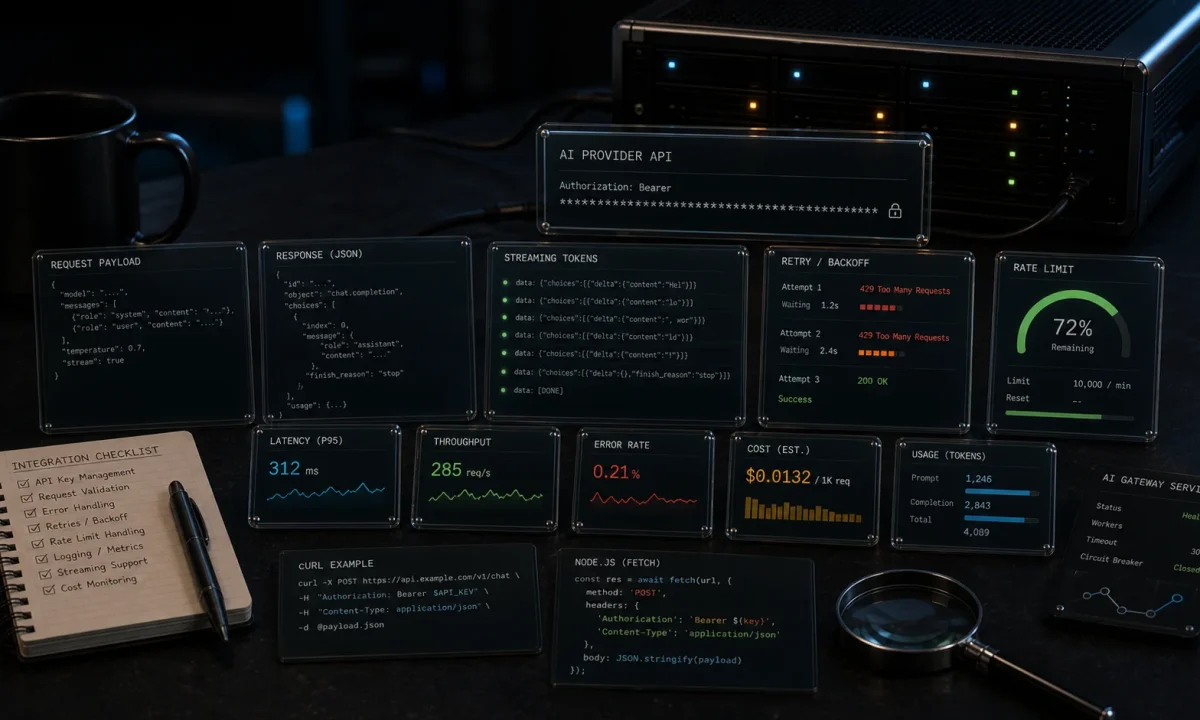
The first time I shipped an integration around the OpenAI API in Node.js for a paying client, the bill landed at $4,200 for the first month. The app was a customer-facing chatbot doing maybe 800 conversations a day. Without streaming, without retries, and with the entire chat history sent on every turn, the cost was a runaway. After two weeks of work — streaming responses, prompt caching, a hard token ceiling per conversation, and a tier-based model fallback — the same traffic cost $640 the next month. Same UX, 85% lower bill.
That gap is what most OpenAI tutorials skip. They show you openai.chat.completions.create() and stop. The setup below is what I now ship for production: streaming via Server-Sent Events, exponential backoff, function calling for external data, structured JSON output with Zod, embeddings for semantic search, a per-request cost ceiling, and the failure modes you only hit at 3 a.m. on a Friday. Node 24 LTS, TypeScript, OpenAI SDK 6.x.
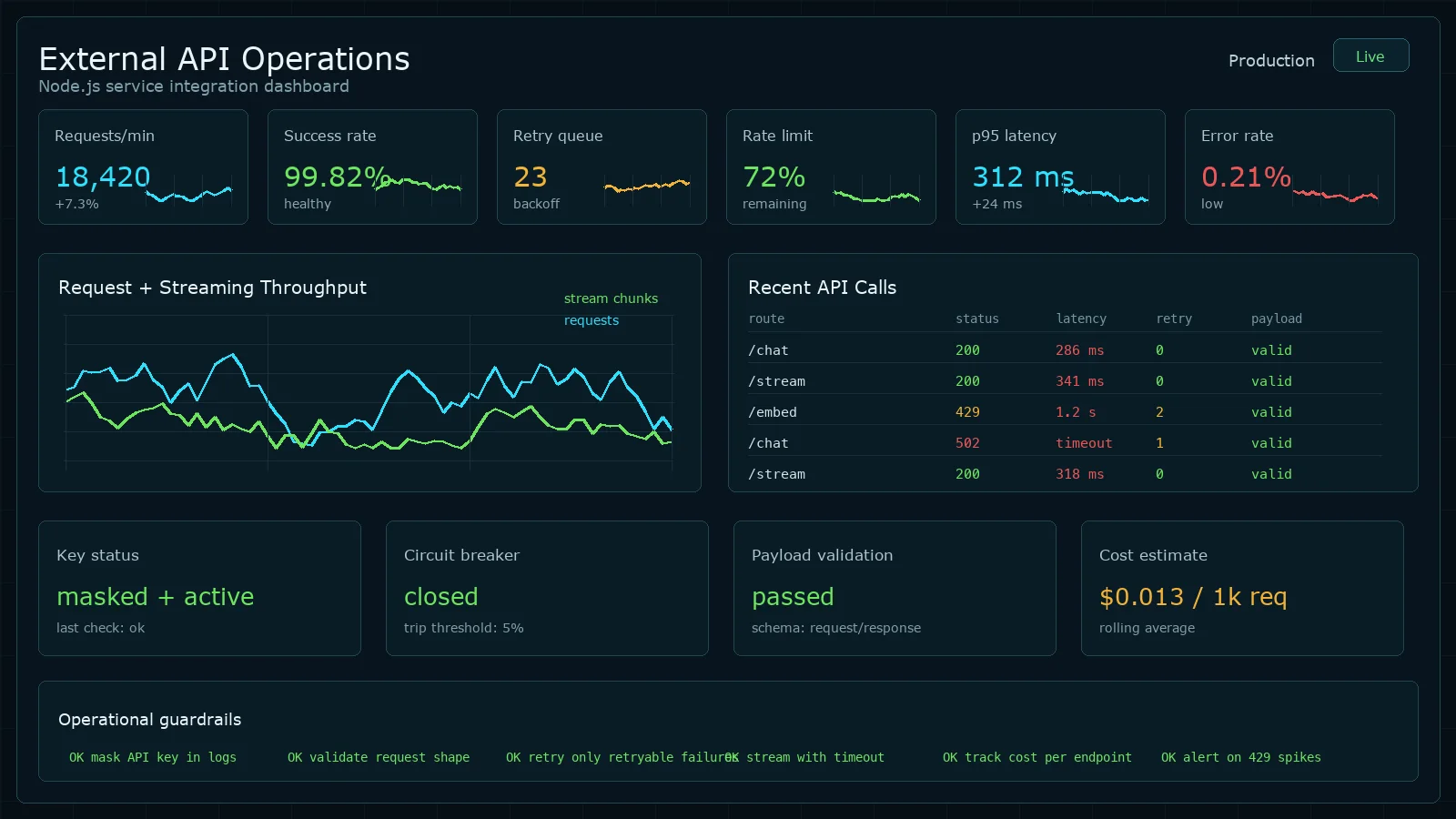
Quick start: streaming a response in 30 lines
Working baseline. Read the production sections after.
npm i openai
npm i -D typescript @types/node tsx// quickstart.ts
import OpenAI from 'openai';
const client = new OpenAI({ apiKey: process.env.OPENAI_API_KEY });
const stream = await client.chat.completions.create({
model: 'gpt-4o-mini',
stream: true,
messages: [
{ role: 'system', content: 'You are a terse Node.js engineer.' },
{ role: 'user', content: 'Why does Express return text/html by default?' },
],
});
for await (const chunk of stream) {
process.stdout.write(chunk.choices[0]?.delta?.content ?? '');
}OPENAI_API_KEY=sk-... npx tsx quickstart.tsWorks. Also wrong for production: no retries on transient 429s, no cost cap, no graceful degradation when the model is slow, no abort signal when the user closes the tab.
What is wrong with the typical OpenAI tutorial
Four production failures I have personally been paged for:
- No retry logic on 429 / 500. OpenAI returns rate-limit errors during traffic spikes and 500s during their own incidents. Default behaviour is to crash the request — your user sees an error toast.
- No cost ceiling. One prompt-injection that asks the model to “repeat the previous text 100 times” can cost $50 per request on GPT-4o. OpenAI’s own safety docs recommend per-request limits and you should listen.
- Sending the full chat history every turn. A 20-turn conversation with no summarisation hits the context window in dollars before it hits it in tokens.
- No abort handling. When the user closes the browser tab mid-stream, your server keeps generating tokens and pays for the full response. At scale this is real money.
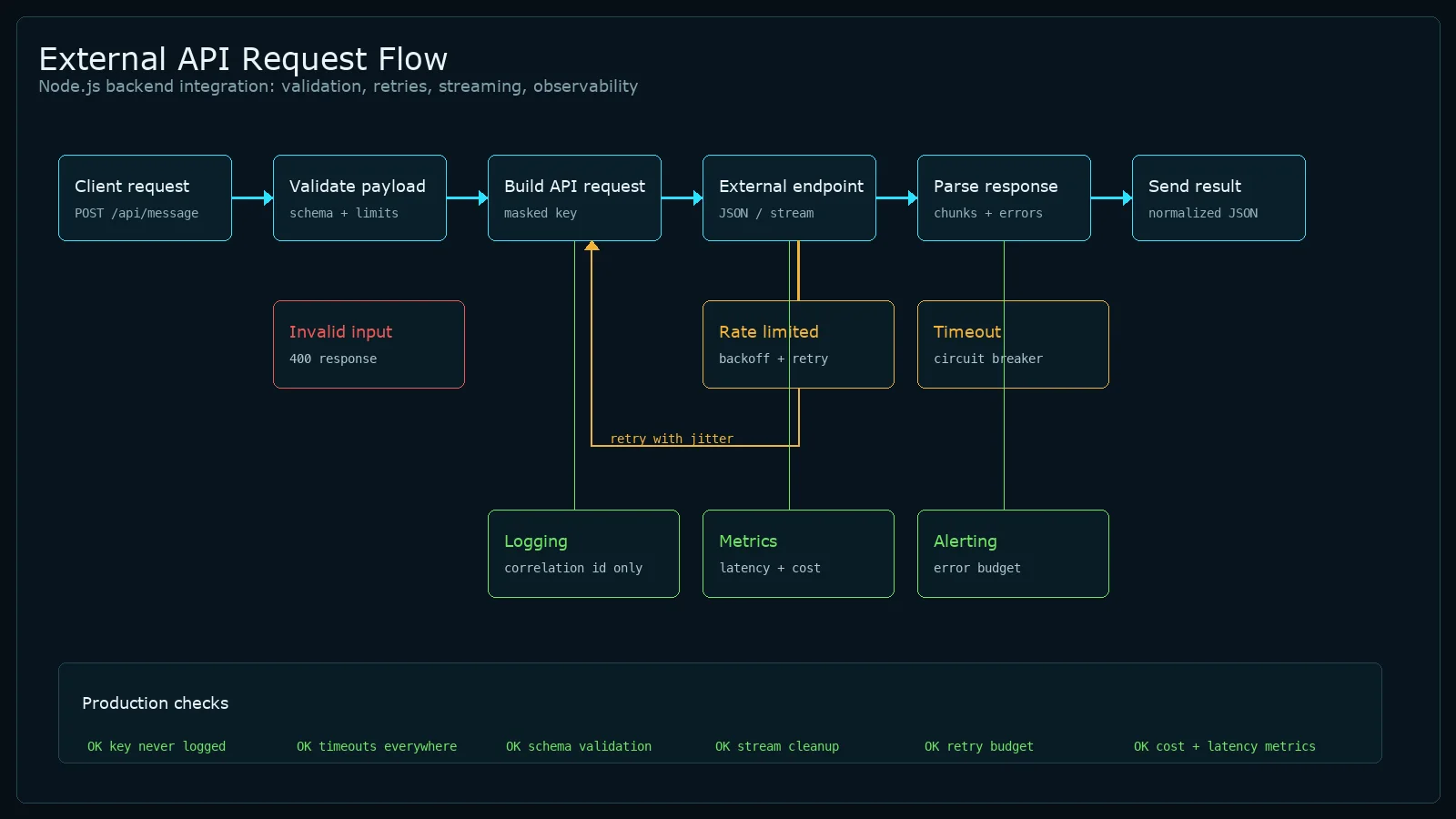
Project structure for an AI integration
src/
  ai/
    client.ts         # OpenAI client singleton + retry config
    chat.ts           # streaming chat with cost ceiling
    cost.ts           # token + dollar accounting
    tools.ts          # function calling tool definitions
    embeddings.ts     # embedding generation + similarity
    structured.ts     # Zod schemas for structured output
    prompts/          # system prompts as named exports
  routes/
    chat.ts           # SSE endpoint, abort handling
  env.ts              # zod-validated OPENAI_API_KEY etc.
Two rules that pay off the first time something breaks:
- One OpenAI client per process. The SDK reuses HTTP keep-alive — multiple instances mean multiple TCP pools.
- System prompts live in named files, not inline string concatenations. They become product surface area; treat them like code.
Environment setup: storing your API key correctly
Hard-coding sk-... in source is a repository leak waiting to happen. The pattern that never bites:
# .env (never committed — add to .gitignore)
OPENAI_API_KEY=sk-your-key-here
OPENAI_ORG_ID=org-optional// src/env.ts — Zod validates at startup; process exits with a clear error if missing
import { z } from 'zod';
const envSchema = z.object({
OPENAI_API_KEY: z.string().startsWith('sk-'),
OPENAI_ORG_ID: z.string().optional(),
NODE_ENV: z.enum(['development', 'test', 'production']).default('development'),
});
export const env = envSchema.parse(process.env);Install dotenv for local development (npm i dotenv) and call require('dotenv').config() at the entry point. In production, inject the variable directly via your deployment platform — never ship a .env file to a server.
Resilient client with retries and timeouts
The OpenAI SDK has retries built in but the defaults are conservative. For production you want explicit configuration:
// src/ai/client.ts
import OpenAI from 'openai';
import { env } from '../env';

export const openai = new OpenAI({
  apiKey:         env.OPENAI_API_KEY,
  organization:   env.OPENAI_ORG_ID,
  maxRetries:     3,                       // SDK does exponential backoff: 0.5s, 1s, 2s
  timeout:        60_000,                  // hard ceiling per request
});

export const MODELS = {
  default:    'gpt-4o-mini',              // cheap, fast, good enough for most things
  reasoning:  'gpt-4o',                  // when default fails twice in a row
  fallback:   'o3-mini',                 // when both above are degraded
} as const;
The SDK’s default retry logic handles 429 and 5xx automatically. For application-level fallback to a cheaper model when the primary fails, wrap the call:
// src/ai/chat.ts
import { openai, MODELS } from './client';

export async function chatWithFallback(messages: any[]) {
  for (const model of [MODELS.default, MODELS.reasoning, MODELS.fallback]) {
    try {
      return await openai.chat.completions.create({ model, messages });
    } catch (err: any) {
      // 429 / 503: try next model. 4xx (other): user error, surface it.
      if (err.status && err.status < 500 && err.status !== 429) throw err;
      console.warn(`Model ${model} failed (${err.status}), trying next`);
    }
  }
  throw new Error('All models exhausted');
}
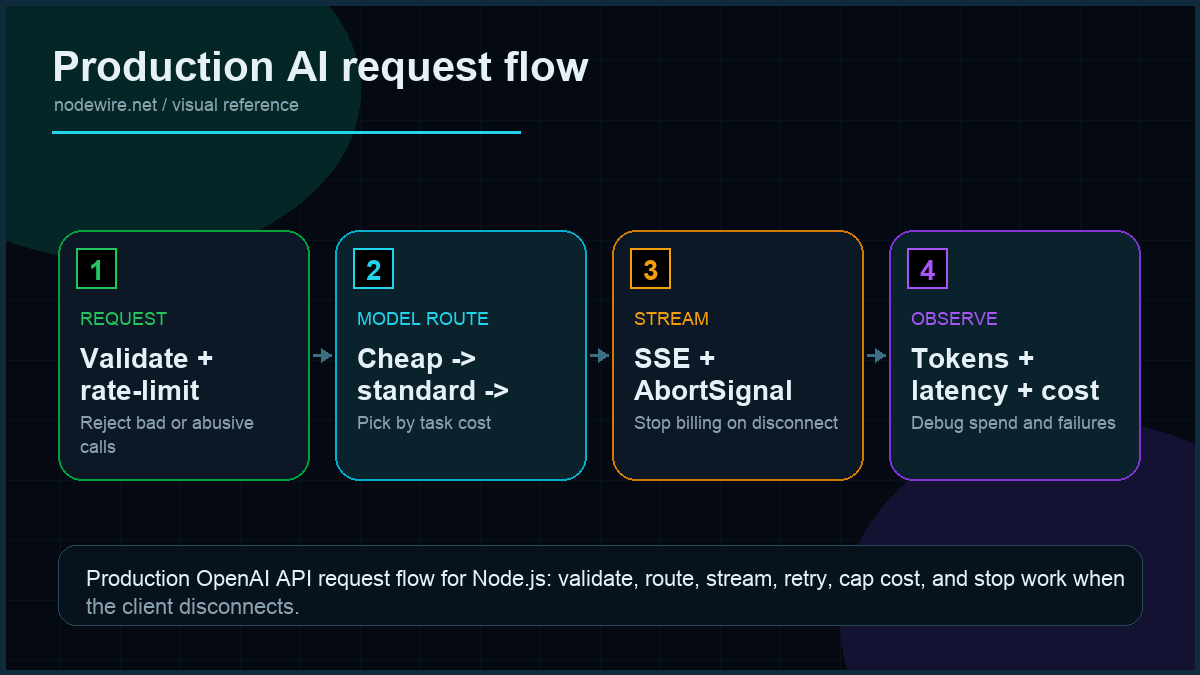
Cost-aware model routing
Not every task justifies GPT-4o. A classification call costs 15× less with gpt-4o-mini and produces the same answer for most inputs. I route by task tier:
// src/ai/client.ts — add to the MODELS block
export type TaskTier = 'complex' | 'standard' | 'simple';

export const TIER_MODELS: Record = {
  complex:   'gpt-4o',          // $2.50/1M input — multi-step reasoning, code gen >50 lines
  standard:  'gpt-4o-mini',     // $0.15/1M input — chatbot, summarisation, classification
  simple:    'o3-mini',         // $1.10/1M input (but fast) — structured extraction, embeddings
};

export async function tieredChat(prompt: string, tier: TaskTier) {
  return openai.chat.completions.create({
    model:    TIER_MODELS[tier],
    messages: [{ role: 'user', content: prompt }],
  });
}
In practice: route everything through standard by default, escalate to complex only when the user triggers an "analyse" or "explain in depth" path, and use simple for background batch jobs where latency doesn't matter.
Streaming via Server-Sent Events
The user wants the response to start appearing in the first second, not after 12 seconds when the full message arrives. SSE is the cheapest, most boring way to do that — works through every CDN, no WebSocket complexity, no client library needed.
// src/routes/chat.ts (Express)
import { Router } from 'express';
import { openai, MODELS } from '../ai/client';

export const chat = Router();

chat.post('/stream', async (req, res) => {
  res.setHeader('Content-Type', 'text/event-stream');
  res.setHeader('Cache-Control', 'no-cache');
  res.setHeader('Connection', 'keep-alive');
  res.flushHeaders();

  // Hook the request abort so we cancel the OpenAI call when user disconnects.
  const controller = new AbortController();
  req.on('close', () => controller.abort());

  try {
    const stream = await openai.chat.completions.create({
      model: MODELS.default,
      stream: true,
      max_tokens: 800,                 // hard cap per response
      messages: req.body.messages,
    }, { signal: controller.signal });

    for await (const chunk of stream) {
      const delta = chunk.choices[0]?.delta?.content ?? '';
      if (delta) res.write(`data: ${JSON.stringify({ delta })}nn`);
    }
    res.write('data: [DONE]nn');
    res.end();
  } catch (err: any) {
    if (err.name === 'AbortError') return;             // user closed tab
    res.write(`data: ${JSON.stringify({ error: err.message })}nn`);
    res.end();
  }
});
Three details that matter at scale:
- The
req.on('close')hook. Without it, when the browser disconnects, your server keeps streaming tokens and you pay for them. With it, the AbortController stops the OpenAI request immediately. max_tokens: 800per response. Hard ceiling. At GPT-4o pricing this caps any single completion at roughly $0.012 — survivable for any prompt-injection.res.flushHeaders()before the loop. Some proxies (nginx, CloudFront) buffer until the first byte; flushing forces the connection to open.
Client side is fifteen lines:
// client/chat.ts
const res = await fetch('/api/chat/stream', {
  method: 'POST',
  headers: { 'content-type': 'application/json' },
  body: JSON.stringify({ messages }),
  signal: AbortSignal.timeout(120_000),
});

const reader = res.body!.getReader();
const decoder = new TextDecoder();
let buffer = '';

while (true) {
  const { done, value } = await reader.read();
  if (done) break;
  buffer += decoder.decode(value, { stream: true });
  for (const line of buffer.split('nn')) {
    if (!line.startsWith('data: ')) continue;
    const data = line.slice(6);
    if (data === '[DONE]') return;
    const { delta } = JSON.parse(data);
    onToken(delta);                  // append to UI
  }
  buffer = buffer.split('nn').pop()!;
}
Function calling: giving the model access to your data
The model doesn't know your database, your prices, or today's date. Function calling (also called tool calling) is how you fix that. You define a tool as a JSON schema; the model decides when to call it; your code executes it and returns the result; the model continues with that data in context.
A real pattern: a chatbot that can look up an order status.
// src/ai/tools.ts
import OpenAI from 'openai';
import { openai } from './client';

// Step 1: define the tool schema
const tools: OpenAI.Chat.ChatCompletionTool[] = [
  {
    type: 'function',
    function: {
      name: 'get_order_status',
      description: 'Get the current status and estimated delivery for an order ID.',
      parameters: {
        type: 'object',
        properties: {
          order_id: {
            type: 'string',
            description: 'The order ID, e.g. ORD-12345',
          },
        },
        required: ['order_id'],
        additionalProperties: false,
      },
      strict: true,
    },
  },
];

// Step 2: your actual implementation
async function getOrderStatus(orderId: string) {
  // Real implementation queries your DB. This is the mock.
  return { order_id: orderId, status: 'shipped', delivery_estimate: '2026-05-10' };
}

// Step 3: the conversation loop
export async function chatWithTools(userMessage: string) {
  const messages: OpenAI.Chat.ChatCompletionMessageParam[] = [
    { role: 'user', content: userMessage },
  ];

  // First call — model may return a tool call
  const response = await openai.chat.completions.create({
    model: 'gpt-4o-mini',
    messages,
    tools,
    tool_choice: 'auto',
  });

  const assistantMsg = response.choices[0].message;
  messages.push(assistantMsg);

  // If the model called a tool, execute it and continue
  if (assistantMsg.tool_calls?.length) {
    for (const tc of assistantMsg.tool_calls) {
      const args = JSON.parse(tc.function.arguments);
      let result: any;

      if (tc.function.name === 'get_order_status') {
        result = await getOrderStatus(args.order_id);
      }

      messages.push({
        role: 'tool',
        tool_call_id: tc.id,
        content: JSON.stringify(result),
      });
    }

    // Second call — model generates final response with the tool output
    const finalResponse = await openai.chat.completions.create({
      model: 'gpt-4o-mini',
      messages,
      tools,
    });
    return finalResponse.choices[0].message.content;
  }

  return assistantMsg.content;
}
Two things to get right with function calling: always include additionalProperties: false and strict: true in your function schema — this forces the model to only pass arguments you defined. And handle the case where the model calls multiple tools in one turn (the tool_calls array can have more than one entry).
Structured outputs with Zod: type-safe model responses
The model returns freeform text. If you need it to return a specific shape — an object with known fields, an enum value, a validated date — you have two options. JSON mode with response_format: { type: 'json_object' } is the older approach: it guarantees valid JSON but not any specific schema. Structured outputs with strict: true and a Zod schema is the newer, better approach.
// src/ai/structured.ts
import { z } from 'zod';
import { zodResponseFormat } from 'openai/helpers/zod';
import { openai } from './client';

// Define the shape you want
const SentimentResult = z.object({
  sentiment:  z.enum(['positive', 'negative', 'neutral']),
  confidence: z.number().min(0).max(1),
  reason:     z.string(),
});

export type SentimentResult = z.infer;

export async function classifySentiment(text: string): Promise {
  const response = await openai.beta.chat.completions.parse({
    model:           'gpt-4o-mini',
    response_format: zodResponseFormat(SentimentResult, 'sentiment_result'),
    messages: [
      {
        role:    'system',
        content: 'Classify the sentiment of the user text. Return confidence as a decimal between 0 and 1.',
      },
      { role: 'user', content: text },
    ],
  });

  // .parse() throws if the model returns something that doesn't match the schema
  return response.choices[0].message.parsed!;
}

// Usage:
// const result = await classifySentiment('This API is giving me a headache');
// result.sentiment // 'negative'  — fully typed
// result.confidence // 0.92
This is the pattern I reach for whenever the model output feeds downstream logic. Zod schema means TypeScript types come for free, and the SDK validates the response before you see it — no manual JSON.parse, no defensive nullchecks.
For older models that don't support strict structured outputs (gpt-3.5-turbo), fall back to JSON mode:
const response = await openai.chat.completions.create({
  model: 'gpt-4o-mini',
  response_format: { type: 'json_object' },
  messages: [
    {
      role: 'system',
      content: 'Return valid JSON with fields: sentiment (positive|negative|neutral), confidence (0-1), reason (string)',
    },
    { role: 'user', content: text },
  ],
});

const data = JSON.parse(response.choices[0].message.content!);
// Validate manually with Zod after parsing
const result = SentimentResult.parse(data);
Embeddings: semantic search and similarity
Embeddings convert text to a vector of floats. Two pieces of text that mean similar things have vectors that point in similar directions — cosine similarity close to 1. Practical uses: semantic search over your docs, finding duplicate support tickets, recommendation systems.
// src/ai/embeddings.ts
import { openai } from './client';

export async function embed(text: string): Promise {
  const response = await openai.embeddings.create({
    model: 'text-embedding-3-small',       // 1536 dimensions, $0.02/1M tokens
    input: text,
  });
  return response.data[0].embedding;
}

// Cosine similarity — 1 = identical direction, 0 = orthogonal, -1 = opposite
export function cosineSimilarity(a: number[], b: number[]): number {
  const dot  = a.reduce((sum, ai, i) => sum + ai * b[i], 0);
  const magA = Math.sqrt(a.reduce((sum, ai) => sum + ai * ai, 0));
  const magB = Math.sqrt(b.reduce((sum, bi) => sum + bi * bi, 0));
  return dot / (magA * magB);
}

// Practical usage: find the most relevant document for a user query
export async function findBestMatch(query: string, documents: string[]) {
  const queryEmbedding = await embed(query);
  const docEmbeddings  = await Promise.all(documents.map(embed));

  const scores = docEmbeddings.map((docEmb, i) => ({
    index:     i,
    document:  documents[i],
    score:     cosineSimilarity(queryEmbedding, docEmb),
  }));

  return scores.sort((a, b) => b.score - a.score)[0];
}
For anything beyond a handful of documents, you need a vector database (Pinecone, Weaviate, or pgvector in Postgres) to avoid querying all embeddings on every request. The code above works for up to a few hundred documents before latency becomes a problem.
Embedding model choice: text-embedding-3-small for most use cases (fast, cheap), text-embedding-3-large when retrieval accuracy matters more than cost (3× more dimensions, 2× the price).
Cost control: token counting and per-request ceilings
Three layers of cost control in production. Skip any of them and the bill bites:
| Layer | Mechanism | Saves you from |
|---|---|---|
| Per-response cap | max_tokens on the request |
Prompt injections asking for huge outputs |
| Per-conversation cap | Track total tokens, refuse new turns past N | Looped conversations that grow unbounded |
| Per-user daily cap | Redis counter on tokens consumed today | Abuse, scraping, runaway integrations |
Token counting before sending — use tiktoken for exact numbers, or estimate at 1 token per 4 characters for budgeting:
// src/ai/cost.ts
import { encoding_for_model } from 'tiktoken';

const enc = encoding_for_model('gpt-4o-mini');

export function countTokens(messages: { role: string; content: string }[]) {
  return messages.reduce((sum, m) => sum + enc.encode(m.content).length + 4, 0);
}

const PRICING = {
  'gpt-4o-mini':  { in: 0.150 / 1e6, out: 0.600 / 1e6 },   // $/token, May 2026
  'gpt-4o':       { in: 2.50  / 1e6, out: 10.00 / 1e6 },
  'o3-mini':      { in: 1.10  / 1e6, out: 4.40  / 1e6 },
};

export function estimateCost(model: keyof typeof PRICING, inTokens: number, outTokens: number) {
  const p = PRICING[model];
  return inTokens * p.in + outTokens * p.out;
}
Refuse the request before sending if the user has blown their daily budget. rate-limiter-flexible against Redis is the one I use:
import { RateLimiterRedis } from 'rate-limiter-flexible';
import { redis } from '../db/redis';

const dailyTokenLimit = new RateLimiterRedis({
  storeClient: redis,
  keyPrefix: 'ai_tokens_daily',
  points: 50_000,                                        // tokens per user per day
  duration: 24 * 60 * 60,
});

export async function consumeBudget(userId: string, tokens: number) {
  await dailyTokenLimit.consume(userId, tokens);         // throws on exceed
}
Rate limiting your own endpoints
Cost budgets stop a user burning tokens. Rate limiting stops one user hammering your endpoint and degrading the experience for everyone else. Add express-rate-limit in front of your AI routes:
import rateLimit from 'express-rate-limit';

const aiRateLimiter = rateLimit({
  windowMs: 60 * 1000,        // 1-minute window
  max:       20,              // 20 requests per user per minute
  keyGenerator: (req) => req.user?.id ?? req.ip,  // per-user, not per-IP
  handler: (req, res) => res.status(429).json({ error: 'Too many AI requests. Try again in a minute.' }),
});

app.use('/api/chat', aiRateLimiter);
Keep this tighter than your OpenAI rate limit. You want your application to reject abusive traffic before it ever reaches OpenAI's API, not after you have already been charged for the tokens.
Conversation memory without burning the budget
The naive approach sends all 20 turns of history every request. By turn 10 you are paying for the full conversation on every message — quadratic cost growth.
Three patterns that work:
- Sliding window: keep last N turns. Simple, loses context.
- Summarisation: when total tokens exceed a threshold, replace older turns with a one-paragraph summary generated by gpt-4o-mini (cheap). Pattern of choice for chatbots.
- Embeddings + retrieval: store turn history as embeddings, retrieve relevant past turns at query time. Worth it only if conversations are long-lived (days, not hours).
async function trimHistory(messages: Message[], targetTokens = 4000) {
  if (countTokens(messages) <= targetTokens) return messages;

  const system = messages[0];                            // keep system prompt
  const recent = messages.slice(-6);                     // keep last 6 turns
  const older  = messages.slice(1, -6);

  const summary = await openai.chat.completions.create({
    model: 'gpt-4o-mini',
    messages: [
      { role: 'system', content: 'Summarise the conversation below in 3 sentences.' },
      { role: 'user', content: older.map(m => `${m.role}: ${m.content}`).join('n') },
    ],
  });

  return [
    system,
    { role: 'system', content: `Summary of earlier conversation: ${summary.choices[0].message.content}` },
    ...recent,
  ];
}
Logging for debugging and bill auditing
Every AI request in production should log: the model used, input token count, output token count, estimated dollar cost, and response latency. Without this you cannot reconstruct why a bill spiked or why a particular user's experience degraded.
app.use('/api/chat', async (req, res, next) => {
  const start = Date.now();
  res.on('finish', () => {
    // These values get populated by the route handler
    const { model, inputTokens, outputTokens } = res.locals;
    const cost = estimateCost(model, inputTokens, outputTokens);
    console.log(JSON.stringify({
      path:         req.path,
      model,
      inputTokens,
      outputTokens,
      costUsd:      cost.toFixed(6),
      latencyMs:    Date.now() - start,
      userId:       req.user?.id,
    }));
  });
  next();
});
Production checklist
- Single OpenAI client per process, reused across all requests for HTTP keep-alive.
max_tokensset on every request, sized to the realistic response length plus a little buffer.- AbortController wired to
req.on('close')so user disconnects stop the OpenAI call. - Per-user daily token budget enforced before the request goes out, backed by Redis.
- Rate limiting middleware on AI routes — reject abusive traffic before it reaches OpenAI.
- Conversation history trimmed via summarisation past 4k tokens.
- Model fallback chain from cheap → expensive → emergency, switching on 429/5xx only.
- Cost-aware model routing — don't default to GPT-4o for tasks that gpt-4o-mini handles at one-fifteenth the price.
- Streaming for any response longer than 1 second. User-perceived latency falls dramatically.
- Retries handled by SDK
maxRetries— don't add your own loop on top, you will create thundering herds. - Logs include model, input tokens, output tokens, dollar cost, latency. Without this you cannot debug bill shocks.
- System prompts in version control, not in environment variables, not in the database.
- API key in
.envvalidated by Zod at startup — process exits cleanly with a useful error if misconfigured.
When not to use the OpenAI API
Three cases where the right answer is something else:
- You need predictable latency under 200 ms. Even GPT-4o mini varies from 400 ms to 6 s depending on load. For UX-critical paths, fine-tune a smaller open-source model and self-host, or accept a different shape of feature.
- You handle data that cannot leave your network. Healthcare with HIPAA, EU data residency for some regulated sectors, internal trade secrets. Use AWS Bedrock with Claude or self-hosted Llama 3.
- You are doing structured extraction at high volume. Fine-tuned smaller models (or even regex + DOM parsing) are 10× cheaper and faster than asking GPT-4o to extract three fields from a page.
Troubleshooting FAQ
Why am I getting random 429 errors when I'm not anywhere near my rate limit?
OpenAI rate limits are per organisation per model, not per API key, and the dashboard often lags. Check x-ratelimit-remaining-tokens in the response headers — that is the live number. The SDK retries on 429 by default; if you are seeing them surface to your code, increase maxRetries or rate-limit your callers.
Should I use the Vercel AI SDK instead of the OpenAI SDK directly?
If you ship a chat UI in Next.js or React, yes. The Vercel AI SDK gives you typed React hooks and provider-agnostic abstraction. For backend-only or non-React frontends, the OpenAI SDK directly is one less layer of indirection.
How do I handle prompt injection?
Three layers: never include user input in the system prompt, validate any structured output the model returns (don't trust JSON it generates — use Zod), and cap max_tokens so an injected "repeat 1000 times" prompt cannot spend money. Full prevention is impossible; mitigation is doable.
Streaming or batch responses?
Stream when the user is watching. Batch when nothing watches — analytics jobs, summaries, embeddings backfills. OpenAI's Batch API is 50% cheaper for non-realtime workloads.
How do I store and version system prompts?
In src/ai/prompts/*.ts as named string exports. Treat them like code: PR review, tests against expected outputs, semantic versioning if changes affect behaviour. Storing them in the database means production prompt changes happen without a deploy — usually the wrong thing.
What about LangChain?
Useful for prototyping multi-step agent workflows. Heavy and opinionated for production single-shot completions. I have removed LangChain from two production codebases and replaced it with ~150 lines of explicit code; both got faster and easier to debug.
How do I test code that calls OpenAI?
Mock the client at the module boundary. Don't hit the real API from CI — flaky and expensive. For integration tests against the real API, gate them behind an environment flag and run on a schedule, not on every PR.
GPT-4o mini vs GPT-4o for production?
Default to mini. The 4o mini handles 80% of typical chatbot, summarisation, classification, and basic Q&A workloads at one-fifteenth the cost. Reserve full GPT-4o for tasks where mini visibly fails: complex reasoning, multi-step extraction, code generation longer than 50 lines.
How do I use function calling with streaming?
The model streams tool call arguments as deltas, just like it streams text content. Accumulate the delta.tool_calls chunks into a string, then JSON.parse at the end. The SDK's stream helpers handle this accumulation if you use stream.finalChatCompletion() after the loop.
When should I use structured outputs vs JSON mode vs function calling?
Structured outputs (Zod schema) when you need validated TypeScript types from the model's response. JSON mode (response_format: json_object) when you need valid JSON but don't want to define a strict schema — faster to prototype, less safe. Function calling when the model needs to trigger external actions or fetch data, not just return a shaped string.
What ships next
This article covers the OpenAI integration core: streaming, function calling, structured outputs, embeddings, and cost control. Two adjacent topics worth their own posts: a Redis-backed prompt cache that knocks 40% off cost for repeated questions, and building a multi-step agent loop that calls tools in sequence until it reaches a final answer. Both are queued. If your AI endpoint needs auth, the JWT pattern in that article drops in directly. If the SSE pattern above is your first taste of Node streams, the streams primer covers the rest of the API.
Related production checks
- Node.js API security checklist for request validation, secrets, and dependency safety.
- Express rate limiting for protecting expensive API calls.
- BullMQ background jobs for retries and async model work.
- Node.js API testing for keeping streaming and retry behavior honest.