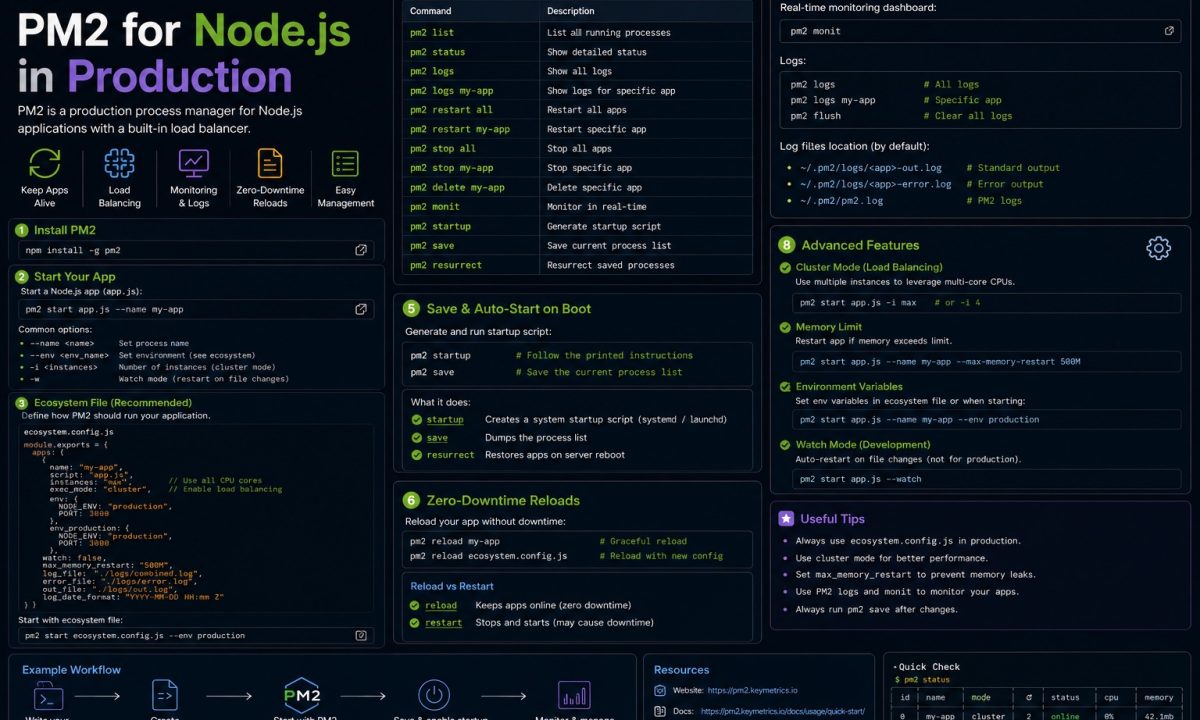
Your Node app crashed at 2 a.m. because an unhandled rejection slipped through, the process exited, and nothing brought it back. You found out when a customer emailed at 8. A bare node server.js on a VPS has no supervisor — when it dies, it stays dead. That’s the gap PM2 Node.js fills: it restarts crashed processes, runs one copy of your app per CPU core, streams logs to one place, and brings everything back after a reboot. On a single DigitalOcean or Hetzner box, it’s the fastest way from “runs on my laptop” to “survives a long weekend.”
Production setup
PM2 is useful on a VPS when you need a Node.js app to survive crashes and reboots, use multiple CPU cores, reload without downtime, and keep deploy commands simple. The production version should use ecosystem.config.js, pm2 reload, pm2 startup, log rotation, and memory limits — not one-off shell commands you cannot reproduce.
I run PM2 on a couple of small Fastify services that don’t justify an orchestrator. At last review the current line is PM2 7 (7.0.1, shipped early May), and the repo — Unitech/pm2 on GitHub, ~43k stars — now covers both Node.js and Bun. Below is the setup I actually use, plus the part most guides skip: when PM2 is the wrong answer.
Install PM2 and start an app
Install it globally, not as a project dependency — PM2 is infrastructure, like nginx, and shouldn’t live in your node_modules.
npm install -g pm2@latest
pm2 --version    # 7.0.1 as of June 2026

# start an app, name it so logs and reloads are addressable
pm2 start dist/server.js --name api

pm2 list         # status table: pid, cpu, mem, restarts, uptime
pm2 logs api     # tail stdout + stderr
pm2 monit        # live cpu/mem dashboard
--name matters more than it looks — every later command (reload, restart, logs, delete) takes it, and without one you’re juggling numeric ids that shift around. Watch the restart counter too: if ↺ restarts climbs while uptime stays low, PM2 is faithfully resurrecting an app that crashes on boot — it loops forever while you read the green status as “running.” Run pm2 logs api --err first.
Stop passing flags by hand: ecosystem.config.js
Starting apps with a wall of CLI flags falls apart the second you need two environments or a teammate. The fix is a config file — generate one and commit it:
pm2 ecosystem
// ecosystem.config.js
module.exports = {
  apps: [
    {
      name: 'api',
      script: 'dist/server.js',
      instances: 1,
      exec_mode: 'fork',
      max_memory_restart: '400M',
      env: {
        NODE_ENV: 'production',
        PORT: 3000,
      },
      env_staging: {
        NODE_ENV: 'staging',
        PORT: 3001,
      },
    },
  ],
};
Then pm2 start ecosystem.config.js, or add --env staging to pull the env_staging block. The config is the source of truth; the CLI is for one-offs.
Keep env for non-secret config only — ports, log levels, feature flags; real secrets belong in a .env file or the platform’s secret store, never committed here. And mind the staging trap: PM2 caches env vars from when the process first started, so editing the config and running a plain pm2 restart keeps serving the old env. Force a refresh with pm2 restart api --update-env. You won’t catch this in staging if you always start clean there — then it bites you in prod against a long-running process.
Use cluster mode to run across CPU cores
Node runs your JavaScript on a single thread. On an 8-vCPU server, a fork-mode app uses one core and leaves seven idle. Cluster mode fixes that — PM2 forks N copies behind a shared port using Node’s built-in cluster module and round-robins connections across them. No code changes.
// ecosystem.config.js — cluster across all cores
module.exports = {
  apps: [
    {
      name: 'api',
      script: 'dist/server.js',
      instances: 'max',   // one worker per CPU; or -1 to leave a core free
      exec_mode: 'cluster',
      max_memory_restart: '400M',
      env: { NODE_ENV: 'production', PORT: 3000 },
    },
  ],
};
instances: 'max' spawns a worker per core; -1 leaves one for the OS and PM2 itself, which I prefer on small boxes. Apply with pm2 reload ecosystem.config.js.
Cluster mode helps when you’re CPU-bound and your app is stateless. It does nothing for a slow database query — that’s I/O, and one Node process already handles thousands of concurrent I/O-bound requests fine. It actively hurts if your app holds state in memory: sessions, a local rate-limit counter, a WebSocket connection map. Across four workers a session lands on whichever worker round-robin picked, and one request in four “loses” the login. Move shared state to Redis or Postgres before you scale out.
The layer underneath is worth knowing. Node’s own cluster docs default to round-robin (every platform except Windows) because the OS-level alternative distributes badly — they cite observed loads where “over 70% of all connections ended up in just two processes, out of a total of eight.” PM2 uses the well-behaved default, but the takeaway holds: clustering balances connections, not CPU work inside a request. If your bottleneck is one heavy synchronous computation, each request still blocks its worker — reach for worker threads instead, a distinction I cover in Node cluster vs worker threads.
Deploys that drop requests: pm2 reload vs restart
pm2 restart api kills every worker and starts fresh. For a few hundred milliseconds your app answers nothing — in-flight requests get reset, a load-balancer health check might mark you down. On a busy endpoint that’s a visible blip on every deploy. pm2 reload api does it gracefully: in cluster mode it cycles workers one at a time, bringing a new one up and draining the old before killing it, so there’s always a live worker on the port. The docs call it “0-second-downtime.”
pm2 reload api      # rolling, zero-downtime (cluster mode)
pm2 restart api     # hard kill + start; brief outage
Reload only works if your app shuts down gracefully. PM2 sends SIGINT and waits; your code has to stop accepting connections, let in-flight requests finish, close the DB pool, and exit. Skip that and PM2 waits out its timeout (~1.6s) then hard-kills mid-request — you paid for reload and still dropped traffic.
// graceful shutdown — the half of zero-downtime that lives in your code
const server = app.listen(process.env.PORT);

function shutdown() {
  server.close(async () => {
    await db.end();   // close Postgres / Prisma pool
    process.exit(0);
  });
  // safety net: don't hang forever on a stuck socket
  setTimeout(() => process.exit(1), 5000).unref();
}

process.on('SIGINT', shutdown);
process.on('SIGTERM', shutdown);
This is the gap I see most. Reload “works” in staging because there’s no traffic to drop, so nobody notices the missing handler — then the first real deploy resets a few hundred live connections. Wire up shutdown first; the full version, signals for Docker and k8s included, is in graceful shutdown for Node.
The app’s gone after a reboot: pm2 startup + pm2 save
PM2 keeps your processes alive while it’s running. But reboot the server — kernel patch, crash, your hosting provider’s maintenance window — and PM2 itself is gone, taking your apps with it. The fix is two commands, in order:
pm2 startup          # prints a sudo command — copy and run THAT exact line
pm2 save             # snapshot the current process list to disk
pm2 startup detects your init system (systemd on every modern distro) and prints a sudo env ... command tailored to your user and paths. Run that printed line — don’t guess. Then pm2 save writes your running apps to ~/.pm2/dump.pm2, which the boot service replays.
The ordering catches everyone: save snapshots whatever is running right now. Add an app later, forget to re-run pm2 save, and after the next reboot it silently won’t come back — the dump is stale. Make pm2 save the last line of your deploy script; pm2 unstartup removes the boot hook. If apps didn’t return after a reboot, systemctl status pm2-$USER shows whether the service even tried, and pm2 resurrect replays the saved dump.
Rotate PM2 logs before they fill the disk
By default PM2 appends stdout and stderr to files under ~/.pm2/logs/, one pair per app, forever. A chatty service fills the disk in weeks, and a full disk takes the whole box down — PM2 included. Nothing trims them on its own. Install the rotation module once:
pm2 install pm2-logrotate
pm2 set pm2-logrotate:max_size 10M
pm2 set pm2-logrotate:retain 7        # keep 7 rotated files
pm2 set pm2-logrotate:compress true   # gzip the old ones
That caps each log at 10MB, keeps a week of history, and gzips the rest. Better still, log structured JSON to stdout and ship it to a real log store — PM2’s files are a fine local buffer, a poor search interface.
Memory leaks that take the server with them: max_memory_restart
A slow leak — an unbounded cache, an event listener you forgot to remove — grows your process until the OOM killer reaps it or the box swaps into the ground. It shows up as a 3 a.m. outage with no error, just a dead process. max_memory_restart is the seatbelt:
{
  name: 'api',
  script: 'dist/server.js',
  max_memory_restart: '500M',   // restart this worker past 500MB RSS
}
PM2 watches RSS and restarts any worker that crosses the line. In cluster mode it’s one worker, so the others keep serving and users see nothing. Set it well under your RAM divided by worker count, or several workers tripping at once will thrash. It’s a tourniquet, not a cure — a worker restarting like clockwork every few hours is PM2 telling you there’s a leak to hunt with --inspect and a heap snapshot, not that it fixed one.
Where PM2 is the wrong tool
If you’re already on Docker or Kubernetes, you usually don’t want PM2. The orchestrator is your process manager; stacking PM2 inside a container is an anti-pattern.
- Docker. A container should run one process so the runtime can see it. With PM2 as PID 1, Docker watches PM2 — which stays happily alive while your app crashes in a restart loop behind it. Health checks pass; your app is down. Drop PM2, use
CMD ["node", "dist/server.js"]withrestart: unless-stopped, and let Docker restart the container. That’s the supervisor. - Kubernetes. K8s already does it all, better: liveness/readiness probes replace
pm2 list, replicas replace cluster mode, rolling updates replacepm2 reload,restartPolicyreplaces crash recovery. One process per pod. PM2 inside a pod just hides the real process from the scheduler. - Serverless / PaaS. Lambda, Cloud Run, Render, Fly, Railway — the platform owns the lifecycle, so PM2 has nothing to do.
Where PM2 still earns its place in 2026: a long-running app on a plain VPS with no orchestrator. There the real competitor is systemd, which every Linux server already runs — a unit file gives you restarts, boot survival, and journald logging with zero extra dependencies. PM2 wins on ergonomics (pm2 reload, the live dashboard, built-in clustering and log rotation beat hand-rolling unit files); systemd wins on being already installed and supervising the rest of your box. For a couple of services I take PM2; for one critical service where I want the fewest moving parts, I write the systemd unit. Both are defensible — “PM2 inside Docker” rarely is. The full box setup is in deploy Node.js on DigitalOcean.
FAQ
Is PM2 still maintained in 2026?
Yes. The current line is PM2 7, with 7.0.1 shipping in early May 2026, and the project on GitHub is active at roughly 43k stars. PM2 7 extended support to Bun alongside Node.js. It’s mature and slow-moving — which for production infrastructure is exactly what you want.
What’s the difference between fork mode and cluster mode?
Fork mode runs a single instance on one CPU core — fine for low traffic, background workers, or anything holding in-process state. Cluster mode forks multiple instances behind a shared port and load-balances across them with Node’s cluster module, so you use every core. Use it only when your app is stateless; otherwise per-instance memory like sessions and caches drifts out of sync across workers.
Does pm2 reload really give zero downtime?
In cluster mode, yes — but only if your app shuts down gracefully. PM2 cycles workers one at a time and keeps a live worker on the port throughout, what the docs call 0-second-downtime. The catch: it sends SIGINT and waits for the old worker to drain in-flight requests. Without a SIGINT/SIGTERM handler that closes your server and DB pool, PM2 times out and hard-kills mid-request — so wire up graceful shutdown first.
Why don’t my apps start after rebooting the server?
Almost always one of two things: you never ran the sudo command pm2 startup printed (that’s what installs the boot service), or you added apps after your last pm2 save so the dump is stale. The flow is pm2 startup, run the printed line, then pm2 save after every change to your process list. To recover now, pm2 resurrect replays the last dump.
Should I run PM2 inside a Docker container?
Usually no. Docker’s model is one process per container so the runtime can supervise it directly; PM2 as PID 1 stays alive while your app crashes behind it, so the container looks healthy when it isn’t. Let Docker restart the container (restart: unless-stopped) and run Node directly. The rare exception is deliberately consolidating several small Node processes into one container — reach for that knowingly, not by habit.
How do I roll back a bad deploy with PM2?
PM2 doesn’t version your code, so rollback lives in your deploy process. Keep the previous build — a releases/ directory with a current symlink, or the prior git tag — point your script back at it, and pm2 reload api to swap workers with no downtime. Re-run pm2 save so a reboot doesn’t resurrect the broken version. If the app is crash-looping and you need air to debug, pm2 stop api halts the restart cycle without removing the process.