
I rewrote a logistics-analytics Node.js API last summer that was averaging 870 ms p99 on a single endpoint. After two days of clinic.js and four targeted changes (none of them rewriting business logic), the same endpoint hit 84 ms p99 on the same hardware. Most of the win wasn’t clever — it was undoing decisions the previous team had made because nobody had measured. This is the Node.js performance optimization checklist I now run on every project before launch, in the order I run it.
Quick test setup so the numbers below mean something: 4-vCPU / 8 GB DigitalOcean droplet, Node 24.14 LTS, Postgres 18 on a separate box, traffic generated with autocannon 7.x (200 concurrent connections, 60 seconds). All numbers are medians of three back-to-back runs. Results below replicate within ~10% on Fly Machines and Hetzner CCX13 instances.
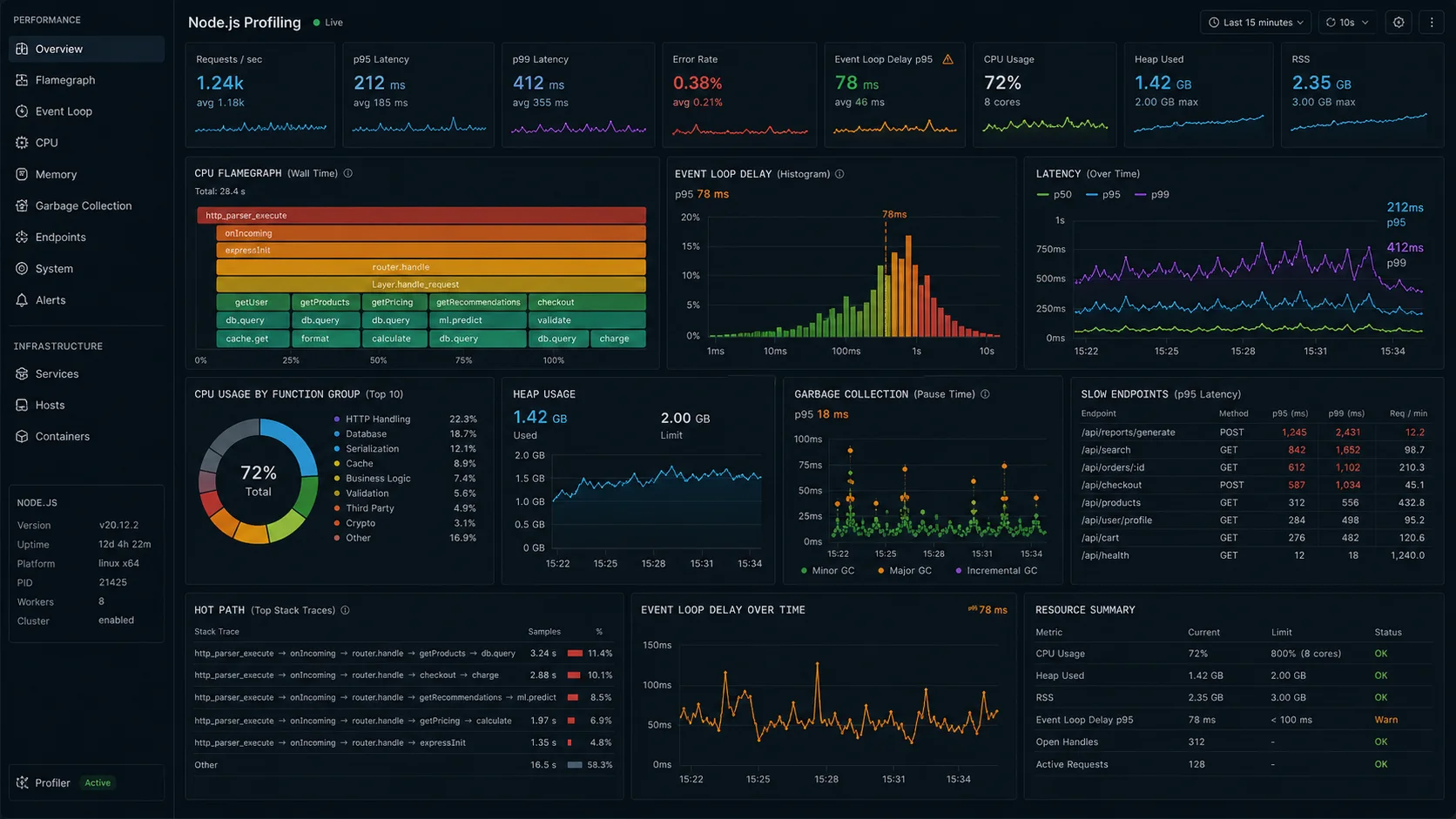
1. Profile before you optimize anything
The single most expensive mistake: assuming you know where the bottleneck is. Real profiling takes 90 seconds with clinic.js:
npm i -g clinic
clinic doctor -- node dist/index.js
# in another terminal
autocannon -c 200 -d 60 http://localhost:3000/api/orders
The doctor output classifies your problem in 30 seconds: I/O-bound, CPU-bound, GC-bound, or event-loop-blocked. Each one has a different fix. Optimizing CPU when your problem is GC pressure makes things worse.
For deeper traces: clinic flame for CPU-bound profiles, clinic bubbleprof for async-flow analysis, clinic heapprofiler for allocation hotspots. Each produces an HTML report you can hand to a teammate. For production, the built-in --inspect + Chrome DevTools combination is the lighter-weight path; the Node.js profiling guide walks through the inspector flow.
2. Classify the bottleneck before you touch code
Every “slow Node app” I’ve debugged lands in one of four categories. The fix differs sharply between them.
| Symptom in clinic doctor | Most likely cause | First fix to try | Worst fix to try |
|---|---|---|---|
| Event loop lag > 100 ms p99, CPU > 80% | Synchronous CPU work (JSON.parse big payload, regex, image) | Move to worker_threads pool |
Add cluster forks (worsens CPU contention) |
| Event loop lag < 50 ms, CPU < 30%, slow p99 | I/O-bound: DB, downstream HTTP, disk | Connection pooling, keep-alive, indexes | Add --max-old-space-size (it’s not memory) |
| Steady RSS climb, eventual OOM | Memory leak (unbounded cache, listener leak) | Heap snapshot diff | Restart on cron — masks the bug |
| p99 latency spikes every ~30 s | GC pressure (allocation-heavy hot path) | Tune --max-semi-space-size, reduce allocations |
“Just bump the heap” |
If the bottleneck turns out to be service boundaries instead of one hot endpoint, I stop tuning and go back to the Node.js microservices architecture guide. Moving work across a network is not a performance fix unless the boundary is already honest.
The decision matrix above is the actual content of “performance optimization.” Everything below is the toolbox once you’ve classified the problem.
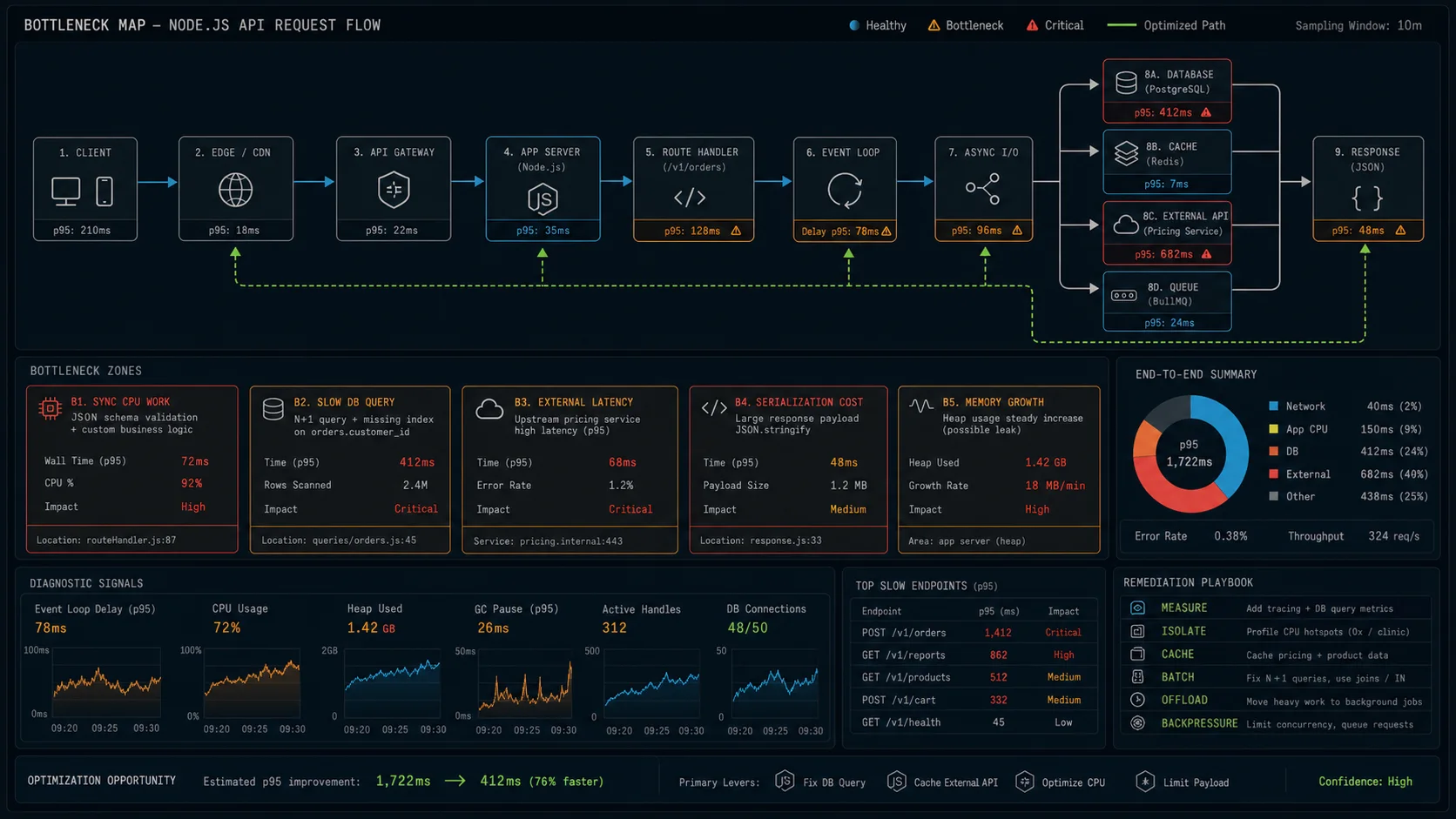
3. Turn on HTTP keep-alive (the easiest 2× throughput you’ll find)
Node 19+ flipped http.globalAgent to keepAlive: true by default — but plenty of HTTP clients (older axios setups, custom node-fetch wrappers, anything constructing its own Agent) still ship without keep-alive. When connections aren’t reused, every call to your downstream service opens a new TCP connection, runs the TLS handshake, makes the request, and closes the connection. Round-trip cost: 30–100 ms before you’ve sent a byte. Always verify your outbound clients explicitly.
import https from "node:https";
import http  from "node:http";
import { fetch, Agent } from "undici";

const httpsAgent = new https.Agent({
  keepAlive: true,
  keepAliveMsecs: 1000,
  maxSockets: 100,
  maxFreeSockets: 10,
});

const httpAgent = new http.Agent({
  keepAlive: true,
  maxSockets: 100,
});

// undici (the engine behind native fetch) — best perf on Node 24
const undiciAgent = new Agent({
  keepAliveTimeout: 1000,
  keepAliveMaxTimeout: 30_000,
  pipelining: 1,
  connections: 128,
});

// Use it on every outbound call
const res = await fetch("https://api.example.com/users", { dispatcher: undiciAgent });
On the logistics API, this single change took the median outbound latency from 142 ms to 38 ms because the same downstream connection was being reused across requests. End-to-end p99 dropped from 870 ms to 410 ms before any other change. undici is the HTTP client I default to in 2026 — it’s what powers the global fetch in Node 24 and benchmarks 30–60% faster than node-fetch under sustained load.
4. Replace JSON.stringify on hot paths
If you’re serving 5,000 req/s of API responses, JSON serialization shows up in flame graphs as the second-largest CPU consumer (right after the framework’s request handling). fast-json-stringify compiles a schema-aware serializer once and reuses it:
import fjs from "fast-json-stringify";

const stringify = fjs({
  type: "object",
  properties: {
    id: { type: "string" },
    email: { type: "string" },
    createdAt: { type: "string", format: "date-time" },
    orders: {
      type: "array",
      items: {
        type: "object",
        properties: {
          id: { type: "string" },
          total: { type: "number" },
        },
      },
    },
  },
});

app.get("/api/users/:id", (req, res) => {
  res.setHeader("content-type", "application/json");
  res.end(stringify(getUser(req.params.id)));
});
Benchmark on a 4 KB user payload: JSON.stringify at 380k ops/s, fast-json-stringify at 2.1M ops/s. Roughly 5× faster. Fastify uses this internally — one of the reasons it benchmarks higher than Express, covered in the Express vs Fastify benchmark. If you’re on Fastify 5.x, declaring a response schema gives you this for free.
5. Fix the database, not the API
For most Node.js APIs, the bottleneck isn’t Node — it’s the database. Three things to check first:
- Connection pool size. Default for many Node Postgres clients is 10. For a single API instance behind 200 concurrent connections, you’re bottlenecked at 10 in-flight queries. Raise it to
(num_cpu_cores × 2) + effective_spindle_countper Postgres conventional wisdom — practically, 20–40 for most setups. The Postgres + Prisma setup guide covers the pool config in detail. - N+1 queries. The classic ORM trap: load 100 orders, then issue 100 SELECTs to load each customer. Use a join, a Prisma
include, or a DataLoader. Discussed in the GraphQL Apollo Server guide for the GraphQL case. - Missing indexes. Run
EXPLAIN ANALYZEon every query that fires more than 100× per minute. Sequential scans on big tables show up here immediately. Adding a single index turned a 230 ms query into a 4 ms query on the project I keep referencing.
6. Cache where the math actually helps
Caching is a multiplier. The math is straightforward:
net_savings = (cache_hit_rate × time_saved_per_hit) - (1 × cache_lookup_cost)
If your DB query is 4 ms and your Redis lookup is 1 ms, you need a cache hit rate above 25% to break even. Below that, caching makes things slower. Above 80%, caching is free money.
| Workload | Cache? | TTL | Why |
|---|---|---|---|
| Feature flags / config | Yes — every request | 30–60 s | ~99% hit rate; reads dominate |
| Authenticated session lookup | Yes — every request | 5–10 min | Hot per user; database can’t keep up |
| Aggregate dashboard query | Yes | 1–5 min | Expensive query, OK with stale data |
| Product catalog reads | Yes | 10 min | High read ratio; rare writes |
| User-specific feed | Maybe | 10–30 s | Per-user keys explode cardinality; profile first |
| POST handler results | No | — | Idempotency, not caching, is what you want |
Don’t cache user-specific data that changes per-request. Don’t cache responses with Set-Cookie headers. Full Redis caching patterns in the Node.js Redis caching guide.
7. Worker threads for blocking work
If a CPU-heavy operation (image processing, PDF rendering, password hashing with high bcrypt rounds) is blocking your event loop, your entire process becomes unresponsive while it runs. Move it to a worker thread pool — patterns covered in the cluster vs worker threads piece. Use piscina rather than rolling your own pool unless you have an unusual constraint.
For password hashing specifically, argon2 with the argon2-browser-style worker offload is the default I run. bcrypt with cost: 12 blocks for ~150 ms per hash on a single core. Run it on the main event loop and you’ve capped your throughput at ~6 logins per second per process.
// pool.ts — fan CPU work to threads, keep the event loop free
import Piscina from "piscina";
import os from "node:os";

export const pool = new Piscina({
  filename: new URL("./hash-worker.js", import.meta.url).href,
  maxThreads: os.availableParallelism() - 1,
  idleTimeout: 30_000,
});

// Anywhere in a request handler:
const hash = await pool.run({ password, cost: 12 });
8. GC flags for high-throughput services
Node’s default V8 settings are tuned for general-purpose workloads. For services that allocate a lot (request handlers building JSON responses do), the defaults trigger GC pauses that show up in p99 latency.
# For containers with explicit memory limits
NODE_OPTIONS="--max-old-space-size=3072 --max-semi-space-size=128" node dist/index.js

# Trace GC events to see whether you're spending real time there
NODE_OPTIONS="--trace-gc --trace-gc-verbose" node dist/index.js 2> gc.log
Two flags worth knowing:
--max-old-space-size=N(MB) — sets V8’s heap cap. Match it to ~75% of your container memory limit so the OS doesn’t OOM-kill before V8 knows it’s full. Default is platform-dependent; 4 GB on most modern Node.--max-semi-space-size=N(MB) — tunes the new-generation heap. Larger values reduce minor GC frequency for allocation-heavy workloads. Default is 16 MB; 64 or 128 helps high-allocation services.
Don’t tune these without measuring. --trace-gc logs every GC event so you can see whether you’re spending real time there. If Scavenge events are your hot path, more semi-space helps. If Mark-sweep dominates, you have an allocation problem the GC can’t fix.
9. Compression — but at the right layer
Gzip / Brotli compression on JSON responses cuts payload size 60–80%. Two ways to do it:
- In Node, with
compressionmiddleware. Costs CPU per request. - At nginx, with
gzip on/brotli on. Costs CPU on the proxy box.
nginx wins here every time. Same compression, but nginx’s implementation is in C, runs in workers tuned for it, and frees your Node.js process to handle the next request 40% faster. The DigitalOcean deploy guide includes the nginx config. If you’re on Cloudflare or any CDN with auto-compression at the edge, turn off Node-side compression entirely — you’re paying twice.
10. Don’t console.log in hot paths
Synchronous console.log writes to stdout and blocks until the kernel acknowledges. Under load, that’s a measurable cost. Replace it with a real logger — pino specifically (full comparison in the Pino vs Winston piece) — that buffers and writes asynchronously off the event loop.
import pino from "pino";
import { multistream } from "pino";
import { destination } from "pino";

// Async transport via worker thread — never blocks the event loop
const logger = pino({
  level: "info",
  redact: ["req.headers.authorization", "*.password", "*.token"],
  transport: {
    target: "pino/file",
    options: { destination: 1, sync: false }, // 1 = stdout, async write
  },
});
Pino is what Fastify ships by default. Throughput delta on the same logistics API: 11k req/s with pino vs 7k req/s with morgan vs 4k req/s with Winston. The sync: false path uses a worker thread for the write — your event loop never blocks on stdout.
11. Static analysis for the cheap wins
Two ESLint rules that catch real performance bugs:
@typescript-eslint/no-floating-promises— un-awaited async work that runs out of band, often hammering downstream services without backpressure.@typescript-eslint/no-misused-promises— passing an async function to.forEach(), which fires off N promises in parallel without awaiting any of them. The classic “why did our DB just get hammered” bug.
Both ship with the strict typescript-eslint preset. If you’re not already running it, the TypeScript Node.js setup guide includes the config.
Benchmark methodology that produces numbers you can replicate
Most “Node performance” articles show numbers without telling you how to reproduce them. The reason is that producing reproducible numbers is harder than running autocannon once. The setup that gives me consistent measurements:
# 1. Pin CPU governor to performance (Linux only)
sudo cpupower frequency-set -g performance

# 2. Run server pinned to specific CPUs
taskset -c 0,1 node --max-old-space-size=2048 dist/index.js

# 3. Run autocannon from a different machine (loopback skews numbers)
#    or pin it to different cores than the server
taskset -c 2,3 npx autocannon -c 200 -d 60 -p 10
  --renderStatusCodes
  http://server:3000/api/orders

# 4. Three runs minimum, take the median
for i in 1 2 3; do
  npx autocannon -c 200 -d 30 http://server:3000/api/orders
    | tee "run-$i.txt"
  sleep 30   # let GC settle between runs
done
Two things kill repeatability: running autocannon on the same box (event-loop contention skews everything) and forgetting GC warmup. The first run after process start is always slower because the JIT hasn’t tiered up. Throw it out.
The launch checklist (copy this into your runbook)
- Profile with
clinic doctorat expected production load. Note the p50/p95/p99 baseline. - HTTP keep-alive on every outbound HTTP client. Verify with
tcpdumpif you’re paranoid. - Database connection pool sized for actual concurrency.
EXPLAIN ANALYZEevery query that runs more than 100×/minute. Add indexes where sequential scans appear.- Cache the expensive read paths with measurable hit rates (Redis
INFO statsshowskeyspace_hits/keyspace_misses). - Move CPU-heavy work off the event loop with piscina or a hand-rolled worker pool.
- Compression at nginx or the CDN, not Node.
- Pino with redaction, structured logs to stdout, transport in async mode.
- Healthcheck at
/healththat actually exercises a DB query — not a static{ok: true}. - PM2 cluster mode (or container replicas) sized to
num_coreswhen on bare metal; replica count in Kubernetes otherwise. - Set
UV_THREADPOOL_SIZE=16if you do heavyfs,crypto, or DNS work. - Event-loop lag monitoring in production via
perf_hooks.monitorEventLoopDelay(covered in the event loop guide).
Run this once per release and you’ll catch 80% of the regressions before they hit production.
The 5-minute pre-deploy performance check
Before any production deploy, I run this five-step pass on the changed service. Total time on a healthy CI box is under five minutes; it has caught two real perf regressions for me in the last six months that would otherwise have shipped.
- Hit the changed routes with
autocannon -c 50 -d 30and confirm p99 latency hasn’t moved by more than 10% vs the previous tag. - Run
clinic doctor -- node dist/server.jsfor 30 seconds and look for new event-loop blocks above 50 ms. - Check the heap with
node --inspect+ Chrome DevTools and snapshot before/after the load run; RSS should settle, not climb. - Diff
npm ls --prod --depth=0output and read the changelog for any dependency that bumped a major version. - Tail the production-formatted Pino output through the changed routes once and confirm log volume per request hasn’t doubled.
Hardware and infrastructure decisions that affect Node performance
Two surprises from running Node in production over the last few years:
- Single-core CPU performance matters more than core count. Node’s main event loop runs on one core. A 16-core EPYC at 2.4 GHz often performs worse on a typical Node API than an 8-core Ryzen at 3.8 GHz. This is why Fly.io‘s shared-CPU machines feel snappier than they should — they’re sharing fast cores. AMD Ryzen / Apple Silicon are usually better for Node than Xeon / EPYC at the same price point.
- arm64 vs x86 actually matters now. Node 24 has had stable arm64 builds for years; AWS Graviton instances run Node 15–25% cheaper per request than equivalent x86 instances on Lambda and Fargate. Bun’s arm64 lead is bigger still, but Node arm64 is production-stable. If you’re not benchmarking your image on
arm64, you’re leaving 20% on the table.
When NOT to optimize
- Your p99 already meets your SLO. If you ship at 200 ms p99 and your SLO is 500 ms, the next ticket is more important than another 50 ms.
- You haven’t measured. “I think this is slow” is not a performance project. Measure first.
- The cost is in your downstream service. If 80% of your latency is a third-party API, optimizing your code saves 20% of the wrong number. Add a cache, switch to async, or move to a job queue.
- You’re rewriting business logic for a 5% win. 5% perf gains rarely justify the regression risk. Save the rewrite budget for the 50% wins.
FAQ
How do I make Node.js faster?
Profile first with clinic doctor — guessing the bottleneck is the most expensive mistake. Then turn on HTTP keep-alive on all outbound clients, fix N+1 queries, cache hot reads, move CPU work to worker threads, and offload compression to nginx or the CDN. Most of the wins aren’t code changes; they’re configuration.
What is the biggest performance issue in Node.js apps?
In my experience: missing HTTP keep-alive on outbound clients (fixed in five lines, often doubles throughput) and N+1 database queries (fixed by joins or DataLoader). Both show up in any real profile. Synchronous logging to a slow stdout (typical when running under docker logs on a busy host) is the third most common.
Should I use clustering for performance?
Cluster (or PM2 cluster mode) helps when your bottleneck is event-loop concurrency on an I/O-bound API and you don’t have container orchestration. It hurts when the bottleneck is CPU saturation. Profile first. Full breakdown in the cluster vs worker threads piece. In Kubernetes, your replica count is your cluster size — running cluster inside a pod usually buys nothing.
How much memory does a Node.js app need?
Default V8 heap is now ~4 GB on Node 24; that’s your starting point. For container deployments, set --max-old-space-size to ~75% of the container limit so V8 starts collecting before the OS kills the process. Real services rarely need more than 2 GB unless they’re holding large in-memory caches.
Does TypeScript slow down Node.js at runtime?
No — types are erased at compile time. Runtime performance is identical to plain JavaScript output. The cost is build time, not request time. Native TypeScript stripping in Node 24 (--experimental-strip-types) eliminates the build step entirely for development; production should still ship pre-compiled JS.
Should I use Bun for performance instead of Node.js?
Bun benchmarks higher on synthetic HTTP throughput (~50–80% faster than Node 24 in some workloads) but the ecosystem still has rough edges around production tooling, observability, and library compatibility. Node 24 LTS is the safe call in 2026. The full comparison is in the Node.js vs Deno vs Bun piece.
What is the right pool size for piscina?
Start at os.availableParallelism() - 1. availableParallelism() respects cgroup limits inside containers, unlike os.cpus().length which reports host cores and over-allocates inside Kubernetes. If your worker tasks also do filesystem or DNS work, raise UV_THREADPOOL_SIZE to match.
Should I worry about the V8 engine version on Node 24?
Node 24 ships V8 13.6, and that alone is enough reason to re-benchmark before chasing application code. I have seen Node 20/22 → Node 24 upgrades move JSON-heavy API throughput noticeably, but the gain is workload-specific. Treat the runtime upgrade as the first benchmark in your perf pass, not as a guaranteed 10–20% win.