
I inherited a Node.js codebase last March that had a 600-line tsconfig.json, three different runners (ts-node, tsx, and a nodemon + tsc --watch combo), and a build step that took 47 seconds for a 9,000-line API. The team had stopped trusting their own setup. I rebuilt their TypeScript with Node.js setup in an afternoon, the dev loop dropped to 280 ms, and the production build now finishes in 4.1 seconds on the same droplet. This is the version I now ship on every freelance project — same shape, same tools, every time.
If you’re starting a new Node 24 LTS project (or looking sideways at Node 26), this is the configuration I’d lift wholesale. None of it is clever. All of it has survived production. Pair it with whichever HTTP framework fits your team — the trade-offs are in the Express vs Fastify benchmark.
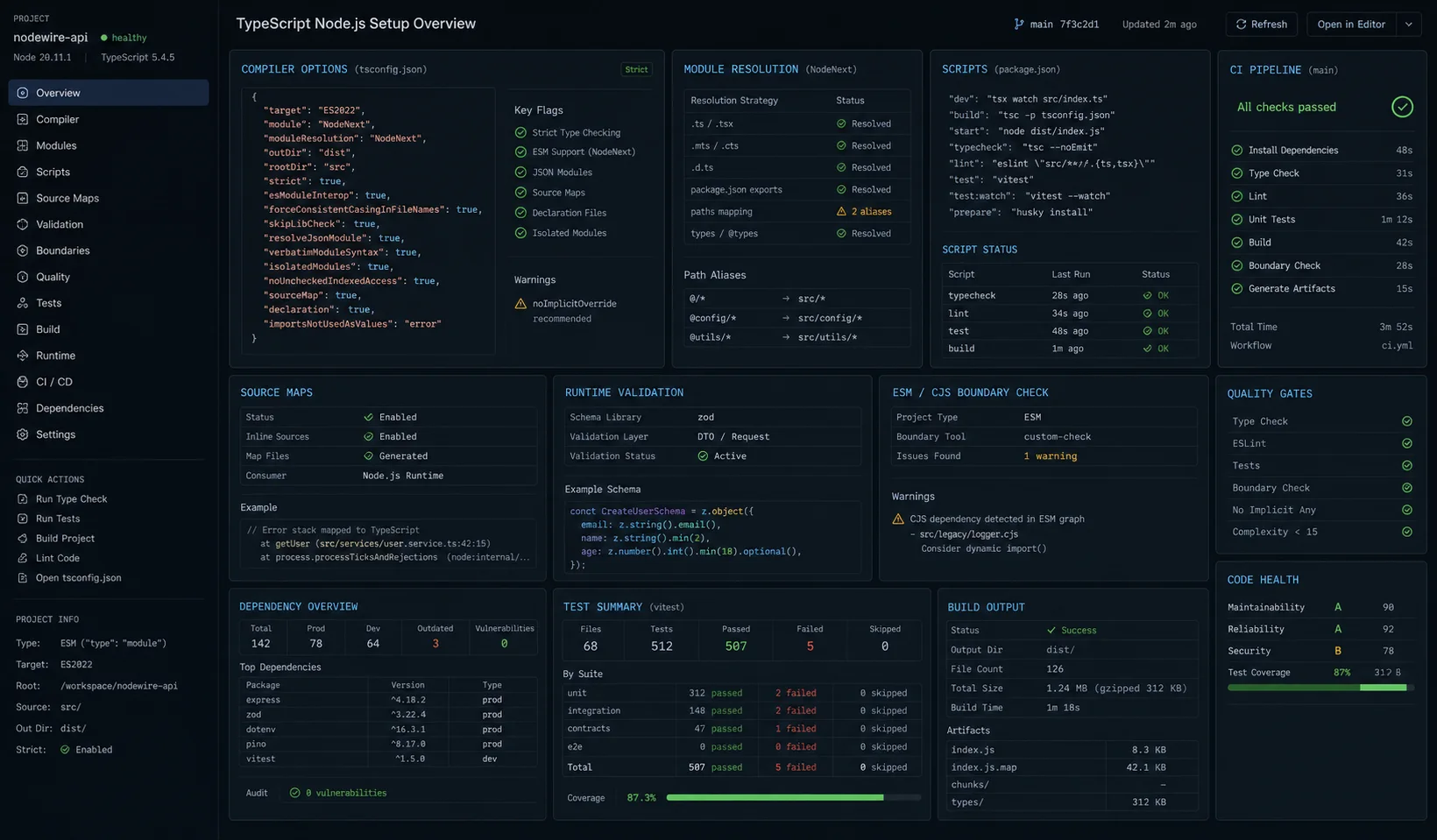
TL;DR — the call I’d make today
- Runner in dev:
tsx(Node 24’s native type-stripping is fine for one-off scripts, not yet for a watch-mode dev server with full feature support). - Runner in CI / type checks:
tsc --noEmit. Always. - Production build:
tscfor services,tsupfor libraries. Skip esbuild bundling unless you have a measured reason. - Module system: ESM (
"type": "module"+module: "NodeNext"). The CJS escape hatch costs you more in friction than it saves in compatibility in 2026. - Strictness:
strict: true+noUncheckedIndexedAccess+verbatimModuleSyntax. Non-negotiable on any new project.
Step 1: pick your runner first, not your tsconfig
The single biggest waste of time in a TypeScript Node setup is debating tsconfig.json options before you’ve decided how you actually run the code in dev. The runner determines what your config has to support.
Four serious options in 2026:
| Runner | Cold start | Type checks | ESM/CJS | Watch mode | My take |
|---|---|---|---|---|---|
| tsx 4.20 | ~150 ms | No (esbuild strip) | Both, in one project | Built-in --watch |
My default. Zero config. |
| ts-node 10.9 | ~900 ms | Optional, opt-in | ESM needs flags | Via nodemon | Legacy. Don’t start new projects on it. |
@swc-node/register |
~80 ms | No | Both | Via nodemon | Fastest, but ESM edges still bite. |
Node 24 native (node --watch file.ts) |
~110 ms | No (strip-only) | Both | Built-in --watch |
Great for scripts. Not yet my pick for a dev server. |
Quick clarification on the last row, because it’s where most 2026 articles get fuzzy: Node 24’s native TypeScript is type-stripping — it removes : string annotations and runs the result. It does not check types, it ignores your tsconfig.json, and it refuses to run code that uses enums, namespaces, or parameter properties unless you flip on --experimental-transform-types. For one-off scripts and migrations, this is fantastic. For a 9,000-line API with a watch mode, decorators in your DI container, and path aliases, tsx is still the calmer pick.
I run tsx in dev and the actual tsc for type-checking on commit and in CI. They are different jobs. If type checks block your dev loop, you lose the only feel-good thing about TypeScript.
npm i -D typescript@~5.7 tsx @types/node@~24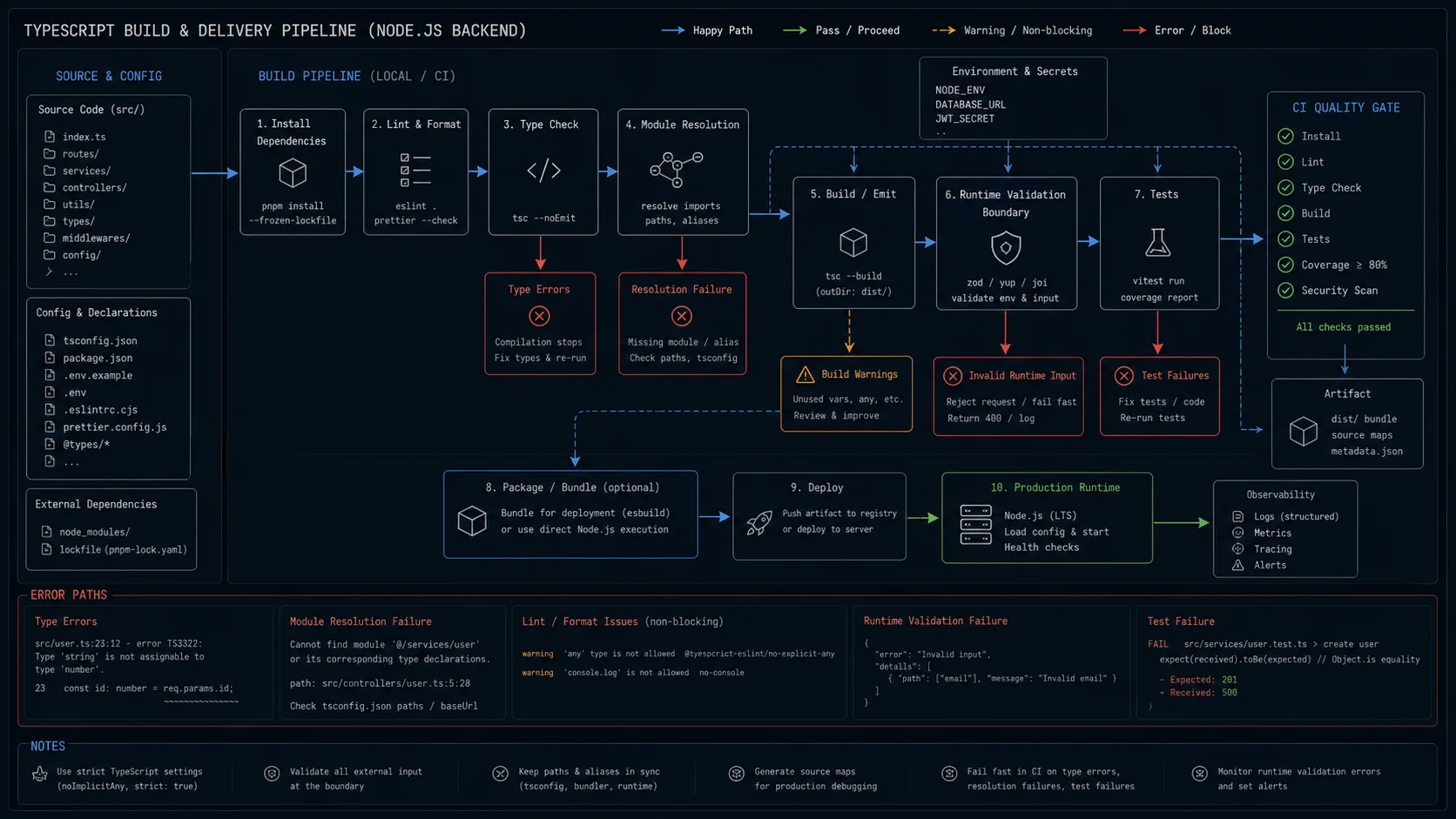
tsx vs ts-node: the call I make on every project
Concrete reasons I default to tsx on new projects:
- Cold start: 150 ms vs ts-node’s 900 ms on the same 60-file project. Multiply by how many times you restart in a day.
- ESM: tsx supports ESM, CJS, and mixed projects without configuration flags. ts-node needs
NODE_OPTIONS=--loader ts-node/esm, which then breaks if you also want to import a CJS module that uses dynamicrequire. - Watch mode is built-in.
tsx watch src/index.tsreloads on save with no nodemon configuration. - Stack traces: tsx remaps stack traces to your
.tssource by default. ts-node does too, but only if you remembered to enable source maps.
The honest case for ts-node in 2026: you have an existing project that uses --type-check mode, your CI runs against the same execution path, and your team has built rules around it. Don’t migrate just to migrate. tsx is faster, but ts-node is not broken.
Step 2: a tsconfig.json that doesn’t fight you
The default TypeScript template ships a config aimed at frontend bundlers. For Node.js you want something tighter:
{
  "compilerOptions": {
    "target": "ES2024",
    "module": "NodeNext",
    "moduleResolution": "NodeNext",
    "lib": ["ES2024"],
    "outDir": "dist",
    "rootDir": "src",

    "strict": true,
    "noUncheckedIndexedAccess": true,
    "exactOptionalPropertyTypes": true,
    "noImplicitOverride": true,
    "noFallthroughCasesInSwitch": true,
    "noPropertyAccessFromIndexSignature": true,

    "isolatedModules": true,
    "verbatimModuleSyntax": true,
    "moduleDetection": "force",
    "allowJs": false,
    "resolveJsonModule": true,
    "esModuleInterop": true,
    "forceConsistentCasingInFileNames": true,
    "skipLibCheck": true,

    "declaration": false,
    "sourceMap": true,
    "removeComments": false,
    "incremental": true,
    "tsBuildInfoFile": "./node_modules/.cache/tsc/.tsbuildinfo"
  },
  "include": ["src/**/*"],
  "exclude": ["node_modules", "dist", "**/*.test.ts"]
}
A handful of those flags are non-obvious so I’ll name what they buy you:
noUncheckedIndexedAccess— array and object index access returnsT | undefined. Catches the class of bug where you readusers[0]from an empty array and get a runtime crash. TypeScript docs walk through the trade-offs.exactOptionalPropertyTypes— distinguishes{ a?: string }from{ a: string | undefined }. Prevents a whole pattern of bugs where missing properties round-trip through an API differently than explicit-undefined ones.verbatimModuleSyntax— forcesimport typefor type-only imports. This is the one that actually catches you when Node 24’s native stripping refuses to run your code because you imported a value that turns out to be a type. Turn it on now, take the small pain, never debug that runtime error.isolatedModules— required when you usetsx,swc, or Node 24 native execution. They transpile each file in isolation and need to know it.module: "NodeNext"— Node’s actual module resolution, not the bundler one. If you writeimport "./foo"and forget the.jsextension, this catches it at compile time instead of at runtime in production.moduleDetection: "force"— treats every file as a module. Avoids the “cannot redeclare block-scoped variable” error that hits projects with stand-alone scripts insrc/.incremental: true— TypeScript caches the type graph between runs. On a 12,000-line codebase the secondtsc --noEmitdrops from 4.1 s to 0.9 s.
One thing that surprises people: set declaration: false for an application. .d.ts files are for libraries you publish to npm. For a service, they bloat your build for nobody. Flip to true only if you’re publishing.
Path aliases without a runtime tax
Six layers of ../../../ in an import is a bug factory. Path aliases fix that, and tsx understands them out of the box if you wire them in tsconfig.json:
{
  "compilerOptions": {
    "baseUrl": ".",
    "paths": {
      "@/*": ["src/*"],
      "@/db/*": ["src/db/*"],
      "@/lib/*": ["src/lib/*"]
    }
  }
}
The catch: tsc does not rewrite the alias in the emitted JavaScript. Production code that runs node dist/index.js will throw ERR_MODULE_NOT_FOUND. Two ways out, both fine:
- Use tsconfig-paths at runtime with
node -r tsconfig-paths/register dist/index.js. Zero build changes. - Use tsc-alias as a post-build step to rewrite aliases to relative paths in
dist/. My preference — runtime stays clean.
Native Node 24 type-stripping ignores aliases entirely. If you go that route, stick to relative imports and you save yourself one whole category of error.
Step 3: package.json scripts that match how you actually work
{
  "type": "module",
  "engines": { "node": ">=24.0.0" },
  "scripts": {
    "dev": "tsx watch src/index.ts",
    "build": "tsc && tsc-alias",
    "start": "node dist/index.js",
    "typecheck": "tsc --noEmit",
    "lint": "eslint .",
    "lint:fix": "eslint . --fix",
    "format": "prettier --write .",
    "test": "vitest run",
    "test:watch": "vitest"
  }
}
"type": "module" at the top is the line that flips your project to ESM. With module: "NodeNext" in tsconfig, your imports now have to look like:
import { db } from "./db.js";
import { z } from "zod";
import express from "express";
import type { Request, Response } from "express";
Three things to internalise:
- The
.json local imports is the price of doing native ESM in Node. Worth it — you’re shipping the same thing in dev and prod, no surprise behaviour. import typeis mandatory underverbatimModuleSyntax.import { Request, Response } from "express"as a value import will passtscbut blow up at runtime because Node has no idea whatRequestis at module load time."engines"with a hard floor at Node 24 stops a teammate from bootingnvm use 18and getting confusing failures fromES2024output.
Step 4: env var validation with Zod (so production doesn’t crash at 2 a.m.)
Untyped process.env access is the biggest crime I see in junior Node code. Wrap it once at boot, validate everything, fail fast if something is missing. I covered the full pattern in the Node.js dotenv guide — short version:
import "dotenv/config";
import { z } from "zod";

const Env = z.object({
  NODE_ENV: z.enum(["development", "test", "production"]),
  DATABASE_URL: z.string().url(),
  JWT_SECRET: z.string().min(32),
  PORT: z.coerce.number().int().positive().default(3000),
  REDIS_URL: z.string().url().optional(),
  LOG_LEVEL: z.enum(["fatal", "error", "warn", "info", "debug", "trace"]).default("info"),
});

const parsed = Env.safeParse(process.env);
if (!parsed.success) {
  console.error("Invalid environment:", z.prettifyError(parsed.error));
  process.exit(1);
}
export const env = parsed.data;
Now env.PORT is a number, env.JWT_SECRET is at least 32 chars, and a missing DATABASE_URL kills the process at boot with a useful error — not three requests later from a broken Postgres handshake. Pair this with the redaction patterns in the JWT authentication guide so the secret never ends up in your logs.
Step 5: linting that doesn’t argue with you
I run typescript-eslint with the strict-type-checked preset and Prettier for formatting. Two configs, no overlap. ESLint 9 is the default since 2024 and uses flat config — a single eslint.config.js file that exports an array of config objects:
npm i -D eslint typescript-eslint prettier eslint-plugin-n// eslint.config.js
import tseslint from "typescript-eslint";
import nodePlugin from "eslint-plugin-n";
export default tseslint.config(
...tseslint.configs.strictTypeChecked,
...tseslint.configs.stylisticTypeChecked,
nodePlugin.configs["flat/recommended-module"],
{
languageOptions: {
parserOptions: {
projectService: true,
tsconfigRootDir: import.meta.dirname,
},
},
rules: {
"@typescript-eslint/no-floating-promises": "error",
"@typescript-eslint/no-misused-promises": "error",
"@typescript-eslint/consistent-type-imports": "error",
"@typescript-eslint/no-unused-vars": ["error", { argsIgnorePattern: "^_" }],
"n/no-missing-import": "off",
"n/no-process-exit": "off",
},
},
{ ignores: ["dist", "coverage", "node_modules"] },
);no-floating-promises alone has saved me from at least four production incidents. It catches the case where you forgot to await a database write and the response shipped before the data persisted. The same rule pays back inside route handlers — both Express and Fastify swallow unhandled rejections quietly otherwise (background in the Express async error handling guide).
projectService: true is the 2025 replacement for project: "./tsconfig.json". It lets typescript-eslint pick the right tsconfig per file in monorepos without you maintaining a list. Use it.
Step 6: the build for production
For a service, the production build is just tsc + tsc-alias. Don’t reach for esbuild or rollup unless you have a measured reason — the extra complexity buys you nothing on a server that runs once and stays running.
npm run build       # tsc → dist/, tsc-alias rewrites @/ paths
node dist/index.js  # production start
Build time on a 12,000-line codebase: about 4.1 seconds on a 2-core droplet, 0.9 seconds with incremental cache. Acceptable. If you genuinely need it faster, swap to swc or tsup for the build and keep tsc --noEmit for the check — that drops cold builds to about 800 ms. I have never had that bottleneck in a real Node service.
Library projects: a different config
If you’re publishing to npm, the rules invert. The build step has to emit clean ESM + CJS + types, and tsup is the path of least resistance:
// tsup.config.ts
import { defineConfig } from "tsup";

export default defineConfig({
  entry: ["src/index.ts"],
  format: ["esm", "cjs"],
  dts: true,
  clean: true,
  sourcemap: true,
  target: "node20",
  splitting: false,
});
Set declaration: true in tsconfig for type emission, drop "type": "module" if you want dual-publish, and add exports in package.json:
{
  "main": "./dist/index.cjs",
  "module": "./dist/index.js",
  "types": "./dist/index.d.ts",
  "exports": {
    ".": {
      "types": "./dist/index.d.ts",
      "import": "./dist/index.js",
      "require": "./dist/index.cjs"
    }
  }
}
This is a different problem from a service. Don’t try to use the same tsconfig for both.
Decision matrix: which runner and build to pick
| Project shape | Dev runner | Build | Module | Note |
|---|---|---|---|---|
| HTTP API (Express, Fastify) | tsx watch | tsc | ESM | The default. Don’t overthink it. |
| One-off script / cron job | node –watch file.ts | none (run .ts directly) | ESM | Native Node 24 strip-only is fine here. |
| npm library | tsx | tsup (dual ESM/CJS) | Both | Need declaration: true + exports map. |
CLI tool (npm i -g) |
tsx | tsup with shims: true |
ESM | Mind the shebang; chmod +x dist/cli.js. |
| Serverless function (Lambda, Vercel) | tsx | esbuild bundle | ESM | Bundle to one file to cut cold start. |
| NestJS app | nest start –watch | nest build | CJS (still default) | Stay on Nest’s tooling. verbatimModuleSyntax off. |
| Bun runtime | bun –hot | bun build (or tsc) | Either | See Node vs Deno vs Bun. |
When NOT to use this setup
- You’re shipping a CLI tool to npm. Then you want
declaration: true, dual ESM/CJS output, and tooling liketsuporunbuild. Different problem, covered above. - You’re on Bun. Bun runs TypeScript natively — skip
tsx, skip thetscbuild, ship.tsfiles. Different runtime, different rules. The trade-offs live in the Node.js vs Deno vs Bun comparison. - You need ESM but a critical dep is CommonJS-only. Stay on CJS for now. The dynamic
import()escape hatch works but is friction every day. Setmodule: "Node16"and keep going. - You need decorator metadata for NestJS / TypeORM / class-validator.
verbatimModuleSyntax+isolatedModulescan break runtime decorator metadata. Use Nest’s official tsconfig as the base, not this one. - Frontend / SSR app. Use the bundler’s TypeScript pipeline.
module: "preserve"+noEmit: trueis the right shape there.
Common errors during setup, and the fix
| Error | Why | Fix |
|---|---|---|
ERR_MODULE_NOT_FOUND on local import |
You wrote import "./foo" without .js |
Add the .js extension. Full fix. |
Cannot use import statement outside a module |
Missing "type": "module" |
Add it to package.json. Restart the runner. |
The requested module ... does not provide an export named 'default' |
CJS package imported with default syntax under ESM | Use import * as foo from "foo" or set esModuleInterop: true. |
error TS5097: An import path can only end with .ts extension when allowImportingTsExtensions is enabled |
Wrote import "./foo.ts" |
Use .js in the source. TypeScript prefers it. Native Node strip-only requires it. |
| Decorators silently emit no metadata | You enabled experimentalDecorators without emitDecoratorMetadata |
Add both, or use the standard ECMAScript decorators (TS 5.0+) without metadata. |
tsx watch ignores tsconfig path aliases |
It doesn’t — but Node does, after build | Use tsc-alias in the build step. |
FAQ
Should I use tsx or ts-node in 2026?
tsx for new projects. Faster startup (~150 ms vs ~900 ms), less configuration, native ESM support, built-in watch mode. Stay on ts-node only if you have an existing setup that works and you don’t want to migrate. Don’t start a new project on it.
Can I just use Node 24’s native TypeScript and skip tsx?
For scripts and small CLIs, yes — node --watch src/script.ts works on Node 24. For an HTTP API with path aliases, decorators, or enums, you’ll hit limitations fast. Native execution is type-stripping, not transpilation; it ignores tsconfig and refuses non-erasable syntax. tsx handles that and is barely slower.
Do I need “type”: “module” in package.json?
Yes if you want native ESM in Node. With module: "NodeNext" in tsconfig, this is what tells Node to interpret your .js output files as ESM. Without it, Node treats them as CommonJS and your imports break.
Why is my import failing with “Cannot find module ‘./foo'”?
Native ESM in Node requires the file extension on local imports. Write import "./foo.js" even when the source is foo.ts. The TypeScript compiler emits .js, and Node needs it. The full fix list lives in the Cannot find module guide.
What is verbatimModuleSyntax and do I need it?
Yes. It forces you to write import type for type-only imports. Under Node 24’s native type-stripping, a value import that turns out to be a type-only export will throw at runtime. verbatimModuleSyntax catches that at compile time. The pain on day one is small; the bug it prevents is annoying to find.
Should I use declaration: true for a Node.js service?
No. Declaration files are for npm libraries that other people import. For a service, they double your build output and nobody reads them. Flip to true only when publishing.
How do I run a single TypeScript file without a build step?
Two options. npx tsx path/to/script.ts works on any Node version and supports your tsconfig. node path/to/script.ts works on Node 24+ for files that use only erasable TypeScript syntax. Use tsx if you want predictable behaviour across machines; use Node native if you’re shipping the script as part of an npm package and want to avoid the dependency.
Is strict: true worth the noise?
Yes. You take the pain once when you turn it on, and then your codebase stops accepting the bug-prone patterns. I won’t start a project without it. Add noUncheckedIndexedAccess on top — that’s the one that catches the off-by-one bugs that strict alone misses.
How does this setup play with Vitest?
Vitest reads your tsconfig directly, so the same tsx + strict tsconfig works out of the box. No vitest.config.ts needed for a basic project. Add "test": "vitest run" and "test:watch": "vitest" to scripts and you’re done.
Can I mix CommonJS and ESM in the same project?
You can, but every team I’ve seen try this regrets it. Pick one. If a critical dependency is CJS-only, stay on CJS until they ship ESM. The mixed mode works in the docs and breaks in real codebases.