

The first Express.js async error handling bug I shipped to production took down the API for about ninety seconds before our health check restarted the process. The handler called an async function, the function threw, the throw propagated as an unhandled rejection, and the process died. Total visible damage: a 502 spike on the dashboard and a Slack message from the on-call engineer that started with «uh.»
That bug is the canonical Express trap. Async functions throw promises, not exceptions. Express 4 never noticed. Express 5 finally fixed the default. The story below is what actually works in 2026 — Express 5 native, the express-async-errors fallback for legacy apps, typed errors, a single error middleware that handles every shape, and the integration with Sentry that survives a bad deploy.
The error in 90 seconds: why your async handler crashed the server
The classic trap, in Express 4:
// THIS CRASHES THE SERVER on Express 4
app.get('/users/:id', async (req, res) => {
  const user = await db.user.findUnique({ where: { id: req.params.id } });
  if (!user) throw new Error('Not found');     // unhandled rejection
  res.json(user);
});
Express 4’s router only catches synchronous throws. When the async function rejects, Node sees an unhandled promise rejection. Default behaviour in Node 15+: log a warning and (in stricter configs) crash the process. Either way, the request hangs until your client times out.
The wrong fix everyone tries first: wrap every handler in a try/catch.
// Works. Also: 200 routes, 200 try/catch blocks, easy to miss one.
app.get('/users/:id', async (req, res) => {
  try {
    const user = await db.user.findUnique({ where: { id: req.params.id } });
    if (!user) return res.status(404).json({ error: 'Not found' });
    res.json(user);
  } catch (err) {
    res.status(500).json({ error: 'Internal' });
  }
});
Two failures with that pattern: error handling lives in every handler instead of one place, and the response shape drifts route by route until your API has six different error contracts. We can do better in three different ways depending on which Express major you are on.
Express 5: native async support, with one caveat
Express 5 shipped in late 2024 and finally catches rejected promises from async route handlers. You write the handler, throw whatever you want, and Express forwards the error to your error middleware automatically.
npm install express@5// app.ts — Express 5
import express from 'express';
const app = express();
app.use(express.json());
app.get('/users/:id', async (req, res) => {
const user = await db.user.findUnique({ where: { id: req.params.id } });
if (!user) throw new Error('Not found'); // caught automatically in Express 5
res.json(user);
});
// Error middleware (4-arg signature is required for Express to recognise it)
app.use((err, req, res, next) => {
console.error(err);
res.status(500).json({ error: err.message });
});
app.listen(3000);The caveat: Express 5’s automatic catching only applies when the handler returns a promise. If you call setTimeout(() => { throw new Error() }, 100) from inside a handler, that throw still escapes Express’s net — it executes after the route function has already returned. The fix for that case is the same as Express 4: route async work through the promise chain, never via fire-and-forget timers.
Express 4 with express-async-errors: the one-line patch
If you cannot upgrade to Express 5 (some apps have decade-old middleware that breaks on the upgrade), express-async-errors monkey-patches the router to do exactly what Express 5 does natively. One import, top of your entry file:
// app.ts — Express 4 with the patch
import 'express-async-errors';                  // must come before express
import express from 'express';

const app = express();
// ... rest is identical to Express 5 example above
The patch is twelve lines of code, has been stable since 2018, and has zero runtime cost. There is no good reason to write try/catch in every Express 4 handler.
The asyncHandler wrapper: when neither option fits
Some teams will not add a monkey-patch dependency and cannot upgrade Express. Third option: a tiny wrapper that catches the rejection and forwards to next().
// src/lib/async-handler.ts
import type { Request, Response, NextFunction, RequestHandler } from 'express';

type AsyncHandler = (req: Request, res: Response, next: NextFunction) => Promise<unknown>;

export const asyncHandler = (fn: AsyncHandler): RequestHandler => (req, res, next) =>
Promise.resolve(fn(req, res, next)).catch(next);app.get('/users/:id', asyncHandler(async (req, res) => {
const user = await db.user.findUnique({ where: { id: req.params.id } });
if (!user) throw new Error('Not found');
res.json(user);
}));There is also the express-async-handler npm package which does the exact same thing if you prefer not to maintain the helper yourself. Works on every Express version. Adds one wrapper per route. I default to express-async-errors instead because the syntactic noise is lower, but for codebases that already use the wrapper, there is no reason to change.
Typed errors: stop returning 500 for everything
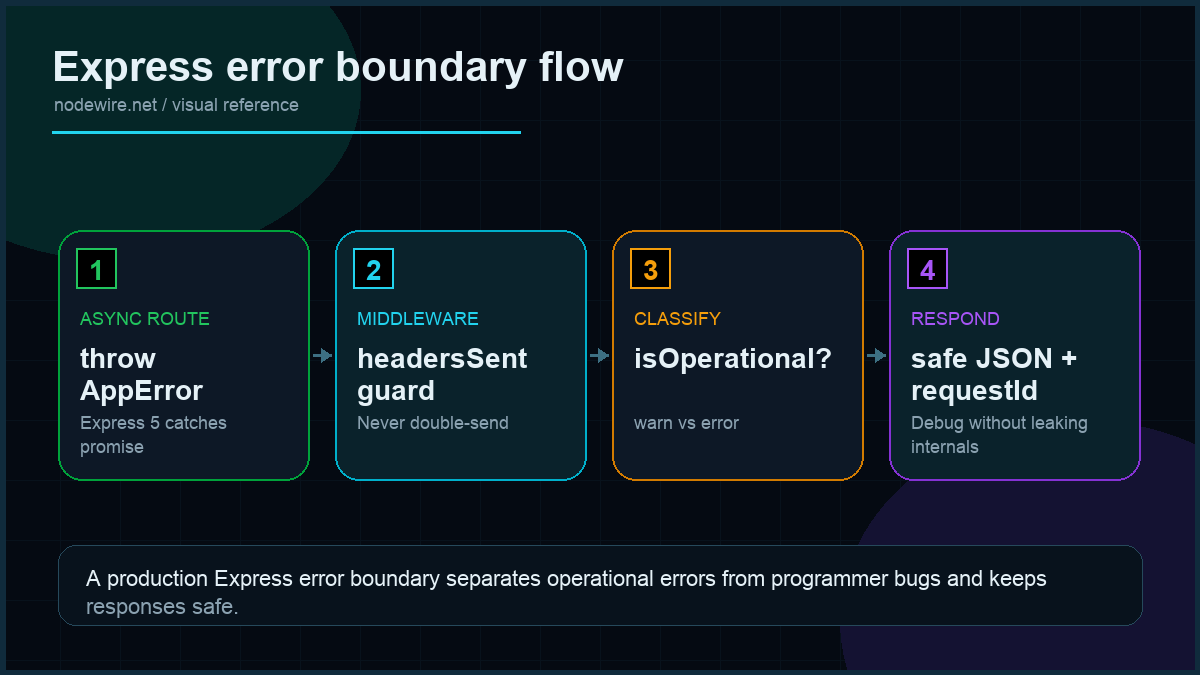
The single biggest quality jump in any Express error story comes from a typed error hierarchy. Make HTTP status codes part of the throw, not part of the catch.
// src/lib/errors.ts
export class HttpError extends Error {
  constructor(public status: number, message: string, public code?: string) {
    super(message);
    this.name = 'HttpError';
  }
}

export class NotFoundError extends HttpError {
  constructor(message = 'Not found') { super(404, message, 'NOT_FOUND'); }
}

export class UnauthorisedError extends HttpError {
  constructor(message = 'Unauthorised') { super(401, message, 'UNAUTHORISED'); }
}

export class ValidationError extends HttpError {
  constructor(message: string, public issues?: unknown) {
    super(400, message, 'VALIDATION');
  }
}

export class ConflictError extends HttpError {
  constructor(message = 'Conflict') { super(409, message, 'CONFLICT'); }
}

export class RateLimitError extends HttpError {
  constructor(message = 'Too many requests') { super(429, message, 'RATE_LIMIT'); }
}
Now route handlers throw the right thing:
app.get('/users/:id', async (req, res) => {
  const user = await db.user.findUnique({ where: { id: req.params.id } });
  if (!user) throw new NotFoundError(`User ${req.params.id}`);
  res.json(user);
});

app.post('/users', async (req, res) => {
  const parsed = CreateUserSchema.safeParse(req.body);
  if (!parsed.success) throw new ValidationError('Invalid body', parsed.error.issues);

  try {
    const user = await db.user.create({ data: parsed.data });
    res.status(201).json(user);
  } catch (err: any) {
    if (err.code === 'P2002') throw new ConflictError('Email already exists');
    throw err;     // unknown DB error, let the middleware surface it
  }
});
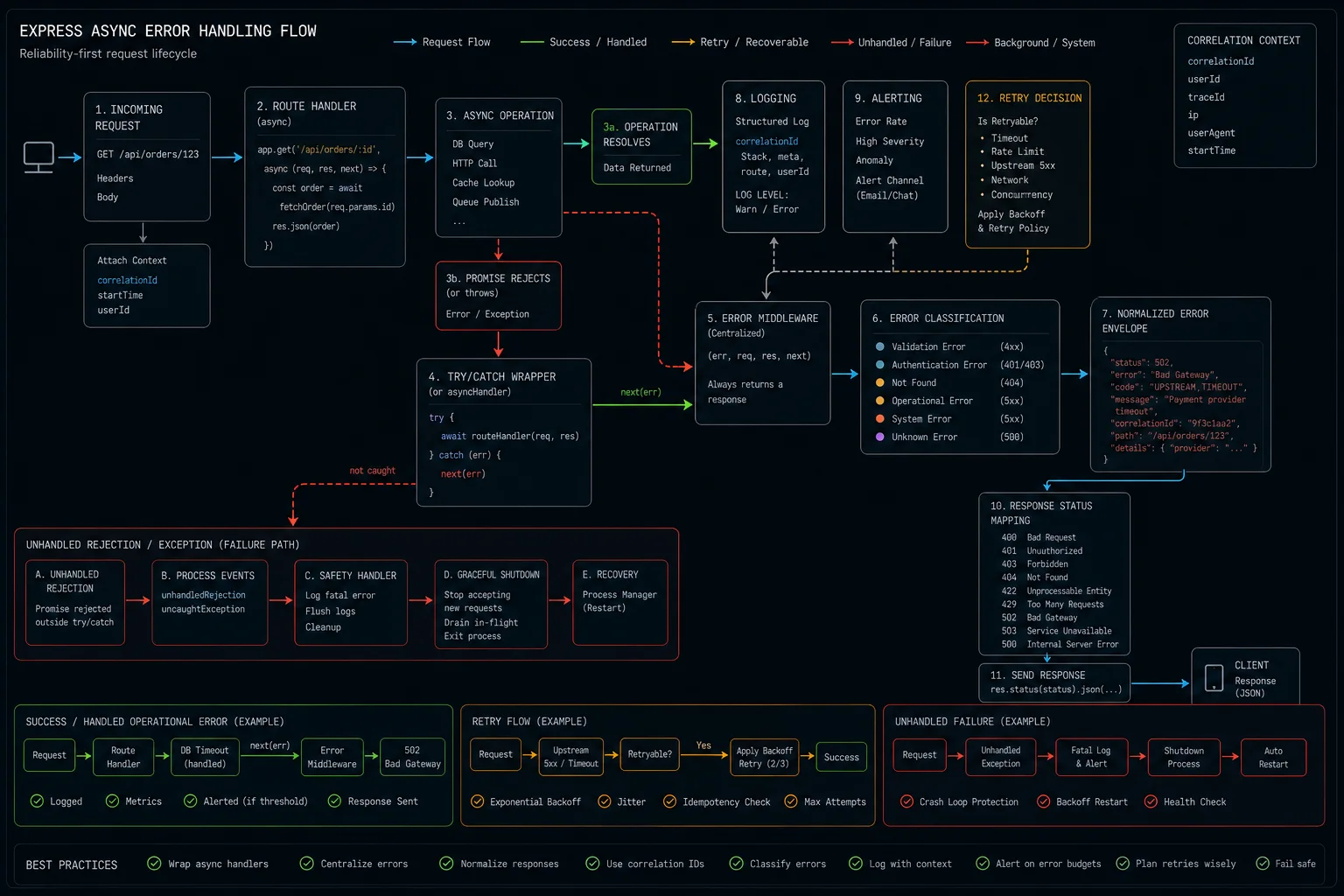
Operational vs programming errors: the distinction that matters
Not all errors are equal. Two categories with different response strategies:
- Operational errors are expected failure modes — user sends a bad request, a resource isn’t found, an upstream API returns 503. These are part of normal operation. Log at
warnlevel. Return a 4xx or 503 to the client. - Programming errors are bugs in your code —
TypeError,ReferenceError, hitting an unhandled code path. These should never happen. Log aterrorlevel, capture to Sentry, and include the stack trace.
The isOperational flag makes this distinction explicit:
// src/lib/errors.ts (extended)
export class HttpError extends Error {
  isOperational = true;    // mark as expected — won't page the on-call engineer

  constructor(public status: number, message: string, public code?: string) {
    super(message);
    this.name = 'HttpError';
  }
}

// Programming errors don't extend HttpError, so isOperational is undefined/false
One error middleware to handle everything:
// src/middleware/error-handler.ts
import type { ErrorRequestHandler } from 'express';
import { HttpError } from '../lib/errors';
import { ZodError } from 'zod';
import { logger } from '../lib/logger';

export const errorHandler: ErrorRequestHandler = (err, req, res, _next) => {
  // Guard against double-send if headers were already flushed (streaming responses)
  if (res.headersSent) {
    logger.warn({ err }, 'Error after headers sent');
    return;
  }

  err.statusCode = err.statusCode || err.status || 500;

  // Known typed errors — operational, expected
  if (err instanceof HttpError) {
    if (err.isOperational) {
      logger.warn({ code: err.code, message: err.message, path: req.path }, 'Operational error');
    } else {
      logger.error({ err, path: req.path, method: req.method }, 'Programming error in HttpError');
    }
    return res.status(err.status).json({
      error: {
        code: err.code ?? 'ERROR',
        message: err.message,
        ...(err instanceof ValidationError && { issues: err.issues }),
      },
    });
  }

  // Zod errors that escaped a handler
  if (err instanceof ZodError) {
    return res.status(400).json({ error: { code: 'VALIDATION', issues: err.issues } });
  }

  // JSON body parse errors from express.json()
  if (err.type === 'entity.parse.failed') {
    return res.status(400).json({ error: { code: 'INVALID_JSON' } });
  }

  // Programming errors — unknown, unexpected
  logger.error({ err, path: req.path, method: req.method }, 'Unhandled error');

  // Show stack trace in development; hide it in production
  const response: Record<string, unknown> = {
    error: { code: 'INTERNAL', message: 'Something went wrong' },
  };
  if (process.env.NODE_ENV === 'development') {
    response.stack = err.stack;
  }

  res.status(500).json(response);
};
Wire it last:
app.use(errorHandler); // must come after all routesWhere each piece lives, at a glance
| File | Owns |
|---|---|
src/lib/errors.ts |
Typed error classes (HttpError, NotFoundError, etc.) with isOperational flag |
src/middleware/error-handler.ts |
Single 4-arg middleware that maps every error to an HTTP response |
src/lib/async-handler.ts |
(Express 4 only) wrapper that catches promise rejections |
src/lib/logger.ts |
pino logger with request ID context |
| Routes | Throw typed errors. Never write try/catch except around third-party calls. |
Request ID for tracing errors back to their source
In production, «there was an error» is useless without being able to trace which request caused it. A request ID middleware solves this in 15 lines:
// src/middleware/request-id.ts
import type { RequestHandler } from 'express';
import { randomUUID } from 'crypto';
import { logger } from '../lib/logger';

export const requestId: RequestHandler = (req, res, next) => {
  const id = (req.headers['x-request-id'] as string) ?? randomUUID();
  res.setHeader('x-request-id', id);
  // Attach a child logger with the request ID bound to every log line
  req.log = logger.child({ requestId: id, method: req.method, path: req.path });
  next();
};

// Wire it first — before routes and before error middleware
app.use(requestId);
Now req.log.error({ err }, 'unhandled') in the error middleware automatically includes the request ID, method, and path in every log line. When a client reports an error with an x-request-id header value, you can find the full trace in your log aggregator in about ten seconds.
Sentry integration: the bit that actually saves you in production
@sentry/node with the Express integration captures errors before your handler can swallow them, plus sets up automatic transaction tracing.
npm install @sentry/node// src/sentry.ts — must be imported FIRST in your entry file
import * as Sentry from '@sentry/node';
Sentry.init({
dsn: process.env.SENTRY_DSN,
environment: process.env.NODE_ENV,
tracesSampleRate: 0.1, // 10% of requests get a trace
beforeSend(event, hint) {
// Don't send 4xx errors — they are expected, not bugs
const err = hint.originalException as any;
if (err?.status && err.status < 500) return null;
return event;
},
});// app.ts
import './sentry'; // FIRST
import express from 'express';
import * as Sentry from '@sentry/node';
import { errorHandler } from './middleware/error-handler';
const app = express();
// ... your routes here
Sentry.setupExpressErrorHandler(app); // BEFORE your error middleware
app.use(errorHandler); // LAST
app.listen(3000);Sentry’s middleware sees the error first, captures it, and passes it down the chain to your error handler — which still formats the HTTP response. The order matters: Sentry → your formatter → done.
The two unhandled cases that still bite
Two error sources Express never sees, no matter what version:
// 1. Fire-and-forget async work
app.post('/upload', async (req, res) => {
  res.status(202).json({ queued: true });
  processInBackground(req.body);              // throws? you'll never know.
});

// 2. setImmediate / setTimeout / setInterval
app.get('/scheduled', (req, res) => {
  setTimeout(() => {
    throw new Error('boom');                  // Express has long since returned
  }, 100);
  res.json({ scheduled: true });
});
Catch them at the process level:
// src/process-handlers.ts
import { logger } from './lib/logger';
import * as Sentry from '@sentry/node';

process.on('unhandledRejection', (reason) => {
  logger.error({ reason }, 'Unhandled rejection');
  Sentry.captureException(reason);
  // Don't exit. Log, alert, fix.
});

process.on('uncaughtException', (err) => {
  logger.fatal({ err }, 'Uncaught exception');
  Sentry.captureException(err);
  // Process state is unknown. Restart cleanly.
  process.exit(1);
});
Different shutdown behaviour by design: rejections are usually recoverable (one async branch failed), uncaught synchronous exceptions are not (your process state is corrupt). PM2 or systemd brings you back up after the exit. If you are deploying behind PM2, the restart is invisible to clients — assuming the next process can bind the port (EADDRINUSE on restart is the most common reason it can’t).
Production checklist
- Express 5, or Express 4 with
express-async-errorsimported first. - One error middleware, 4-argument signature, registered last.
- Typed error hierarchy in
src/lib/errors.tscovering 400, 401, 403, 404, 409, 429 at minimum. isOperationalflag on all expected errors — drives log level and on-call alerting thresholds.- Routes throw typed errors; they don’t write try/catch except around external API calls.
- Zod validation errors get a dedicated 400 response shape so your frontend can map them to fields.
- Sentry integrated via
setupExpressErrorHandler, withbeforeSendfiltering out 4xx noise. - Process-level handlers for
unhandledRejection(log + alert) anduncaughtException(log + exit). - Logger includes request ID so you can trace a single failed request across logs.
- Stack traces in development only — never expose
err.stackto production clients. - Health check endpoint never throws and never depends on the database.
res.headersSentguard in error middleware to avoid double-send on streaming responses.
When not to use this pattern
Two cases where you should reach for something else:
- You are starting greenfield in 2026. Fastify’s error handler is built around schema validation and typed errors from day one. The Express patterns in this article are catching up to what Fastify shipped years ago.
- You need GraphQL-style errors with multiple errors per response. Express’s error middleware returns one error at a time. For batch operation responses, return 200 with a per-item result array — don’t try to fit it into the error pipeline.
Troubleshooting FAQ
Why doesn’t my error middleware run?
Two usual causes: it’s registered before some routes (must be last), or the middleware function has three arguments instead of four. Express identifies error middleware by the 4-arg signature; the first arg name doesn’t matter, the count does.
What is the difference between throw err and next(err)?
In an async handler on Express 5 or with express-async-errors, they are equivalent. In a sync handler, throw err works. In an async handler on stock Express 4, throw err becomes an unhandled rejection — use next(err) or wrap with asyncHandler.
Should I exit the process on uncaught exception?
Yes. The Node.js docs are explicit: process state after an uncaught exception is undefined, and continuing risks data corruption. Log first, then process.exit(1). Your supervisor (PM2 or systemd) restarts you in seconds.
Does express-async-errors work with TypeScript?
Yes. The import is a side-effect import (import 'express-async-errors';), no types needed. Place it before the Express import in your entry file.
How do I send different error formats to different clients?
Branch on req.accepts() in your error middleware: HTML for browser-driven routes, JSON for application/json requests. Most APIs only need JSON.
What about error handling in async middleware (not just routes)?
Same rules apply. Express 5 and express-async-errors both catch rejections from middleware too. If you write a custom auth middleware that calls await db.session.findUnique(), it works.
Should I retry failed requests inside the handler?
Almost never. Retries belong at the boundary — your HTTP client retrying a downstream API, or the user’s frontend retrying a transient 503. Retrying inside a request multiplies latency and can amplify a downstream incident.
How do I test the error middleware?
Use supertest to make a real HTTP request through your app instance, throw a known error from a test route, assert the response shape and status. Mocking is overkill — Express is small enough to spin up per test.
What’s the difference between express-async-errors and express-async-handler?
express-async-errors is a one-time import that patches the Express router globally — all async handlers in your app automatically forward rejections to next. express-async-handler is a per-route wrapper you explicitly call for each handler. Both work, but the global patch has less boilerplate.
Why should I show stack traces in development but hide them in production?
Stack traces expose your internal file paths, dependency versions, and code structure — information useful to attackers. In development you want them for fast debugging. In production, log them server-side and return only the error code and message to the client.
What ships next
This article fixes the catching side. The next layer is structured logging that ties an error in production back to the exact request that caused it — pino with a request ID middleware and a log shipper. If you are weighing Fastify, its error story is built on similar principles with less ceremony. Validating environment variables at boot kills another whole class of «why did this throw» bugs before the first request lands.