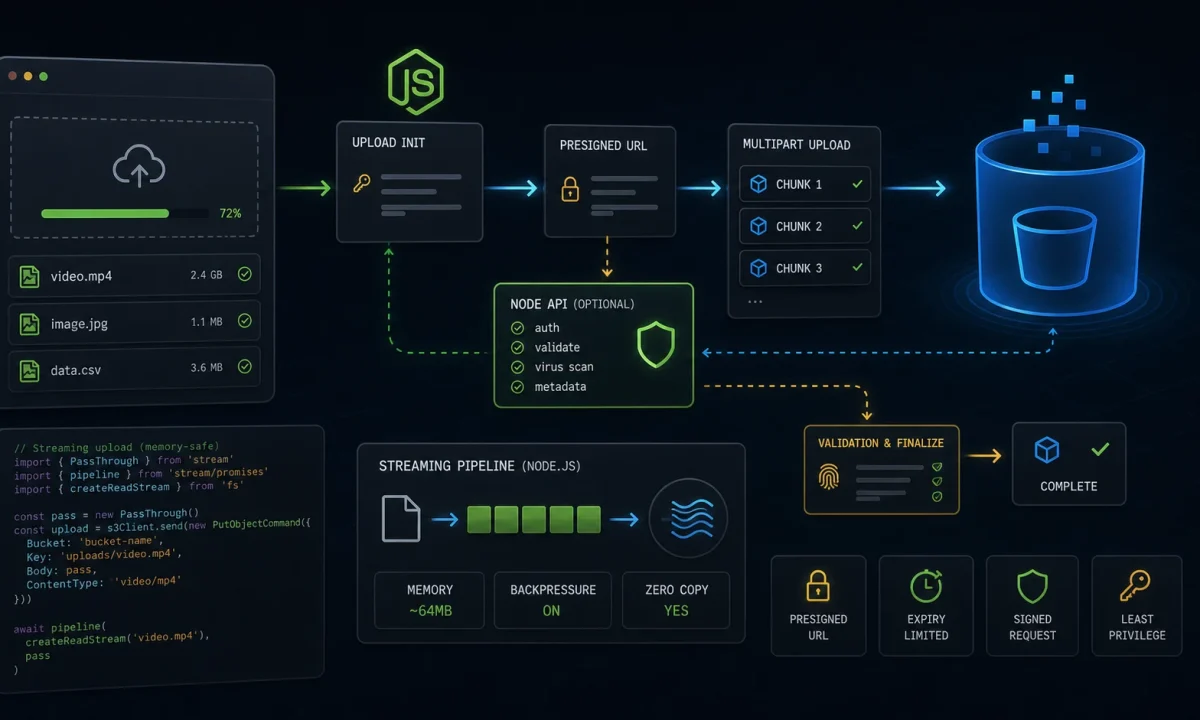
The upload bug that still makes me twitch was a profile-photo endpoint that worked perfectly in staging. In production, one customer uploaded a 280 MB video to a route that used memory storage “temporarily”. The Node process did exactly what we told it to do: it held the whole file in RAM, then the container died.
This is the Node.js file uploads to S3 setup I use now. Default to direct browser-to-S3 uploads with presigned URLs. If the file must pass through your API, stream it with backpressure and hard limits. Never buffer the whole thing just because the sample code is shorter.

The upload path you pick decides where memory fails
| Pattern | Best for | Tradeoff |
|---|---|---|
| Presigned PUT/POST | User uploads directly to S3 | API must validate before and after upload |
| Server streaming | API needs to inspect or transform bytes | Your server pays bandwidth and memory risk |
| Small buffered upload | Avatars under a strict tiny limit | Easy to accidentally raise limit later |
| Background import | CSV/video/archive processing | Needs queue and async status UI |
For normal product uploads, I prefer presigned direct-to-S3. The API creates an upload record, returns a constrained URL, and later verifies the object exists before marking it usable.
The presigned URL endpoint should stay narrow
The AWS SDK for JavaScript v3 S3 examples are the primary reference I check for current client patterns. This endpoint returns a short-lived PUT URL for an object key the server controls.
npm install @aws-sdk/client-s3 @aws-sdk/s3-request-presignerimport { S3Client, PutObjectCommand } from "@aws-sdk/client-s3";
import { getSignedUrl } from "@aws-sdk/s3-request-presigner";
import crypto from "node:crypto";
const s3 = new S3Client({ region: process.env.AWS_REGION });
const bucket = process.env.S3_UPLOAD_BUCKET!;
const allowedTypes = new Set(["image/png", "image/jpeg", "application/pdf"]);
app.post("/uploads/presign", async (req, res) => {
const user = req.user;
const { fileName, contentType, size } = req.body;
if (!allowedTypes.has(contentType)) {
return res.status(400).json({ error: "Unsupported file type" });
}
if (!Number.isInteger(size) || size > 25 * 1024 * 1024) {
return res.status(400).json({ error: "File too large" });
}
const rawExtension = fileName.split(".").pop()?.toLowerCase() ?? "bin";
const extension = /^[a-z0-9]{1,10}$/.test(rawExtension) ? rawExtension : "bin";
const uploadId = crypto.randomUUID();
const key = `user-uploads/${user.id}/${uploadId}.${extension}`;
await db.uploads.create({
id: uploadId,
userId: user.id,
key,
contentType,
expectedSize: size,
status: "pending",
});
const command = new PutObjectCommand({
Bucket: bucket,
Key: key,
ContentType: contentType,
Metadata: {
uploadId,
userId: user.id,
},
});
const url = await getSignedUrl(s3, command, { expiresIn: 60 * 5 });
res.json({ uploadId, key, url });
});The browser uploads directly to S3 with that URL. Then it calls your API to finalize. The finalize step should verify object metadata/size with S3 before trusting the upload record.
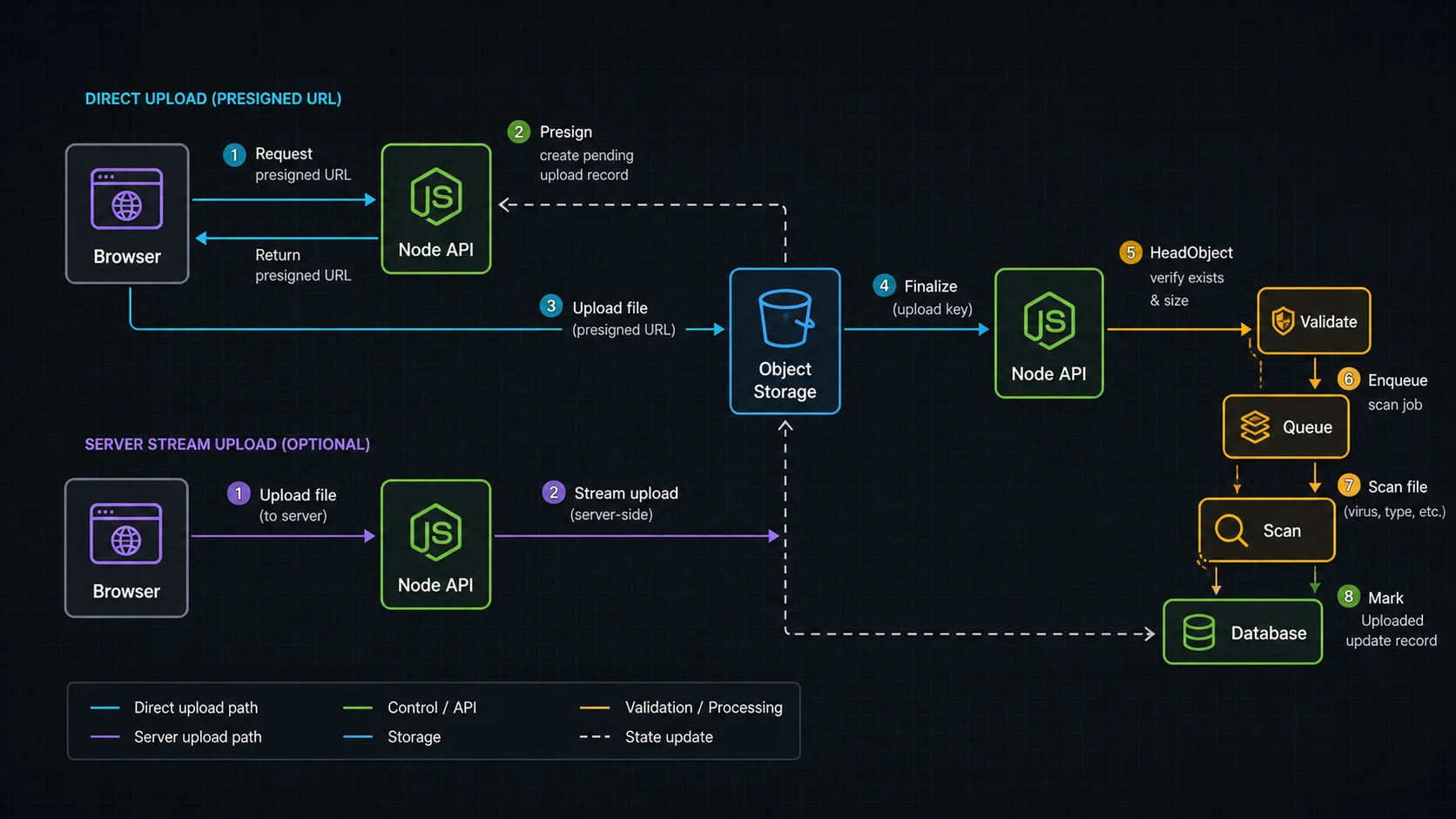
The finalize step is where the app takes ownership
import { HeadObjectCommand } from "@aws-sdk/client-s3";

app.post("/uploads/:id/complete", async (req, res) => {
  const upload = await db.uploads.findForUser(req.params.id, req.user.id);
  if (!upload) return res.status(404).json({ error: "Upload not found" });

  const head = await s3.send(new HeadObjectCommand({
    Bucket: bucket,
    Key: upload.key,
  }));

  if (head.ContentLength !== upload.expectedSize) {
    return res.status(400).json({ error: "Size mismatch" });
  }

  if (head.ContentType !== upload.contentType) {
    return res.status(400).json({ error: "Type mismatch" });
  }

  await db.uploads.update(upload.id, { status: "uploaded" });
  await queue.add("scan-upload", { uploadId: upload.id });

  res.json({ ok: true });
});
I usually scan or process files in a background job, not inside the user request. The queue pattern in the BullMQ guide fits this perfectly.
When the API must stream to S3
Sometimes direct upload is not enough. Maybe you need to inspect the stream, attach server-side metadata, route to different buckets, or support a client that cannot upload to S3. In that case, stream. Busboy is still a practical low-level parser for multipart uploads, and @aws-sdk/lib-storage handles multipart upload to S3.
npm install busboy @aws-sdk/client-s3 @aws-sdk/lib-storage
npm install -D @types/busboyimport Busboy from "busboy";
import { Upload } from "@aws-sdk/lib-storage";
import { PassThrough } from "node:stream";
import crypto from "node:crypto";
app.post("/uploads/stream", (req, res) => {
const bb = Busboy({
headers: req.headers,
limits: {
files: 1,
fileSize: 50 * 1024 * 1024,
},
});
let uploadPromise: Promise<unknown> | null = null;
let uploadedKey: string | null = null;
bb.on("file", (_field, file, info) => {
const { filename, mimeType } = info;
if (!allowedTypes.has(mimeType)) {
file.resume();
return bb.emit("error", new Error("Unsupported file type"));
}
const rawExtension = filename.split(".").pop()?.toLowerCase() ?? "bin";
const extension = /^[a-z0-9]{1,10}$/.test(rawExtension) ? rawExtension : "bin";
uploadedKey = `user-uploads/${req.user.id}/${crypto.randomUUID()}.${extension}`;
const pass = new PassThrough();
file.pipe(pass);
const upload = new Upload({
client: s3,
params: {
Bucket: bucket,
Key: uploadedKey,
Body: pass,
ContentType: mimeType,
},
queueSize: 4,
partSize: 8 * 1024 * 1024,
leavePartsOnError: false,
});
req.on("aborted", () => {
upload.abort();
file.destroy(new Error("Client aborted upload"));
});
uploadPromise = upload.done();
});
bb.on("error", (err) => {
console.error({ err }, "upload failed");
if (!res.headersSent) res.status(400).json({ error: "Upload failed" });
});
bb.on("finish", async () => {
try {
if (!uploadPromise || !uploadedKey) {
return res.status(400).json({ error: "Missing file" });
}
await uploadPromise;
res.json({ key: uploadedKey });
} catch (err) {
console.error({ err }, "S3 upload failed");
res.status(500).json({ error: "Upload failed" });
}
});
req.pipe(bb);
});This route does not store the entire file in memory. The file stream flows through the process and into S3. You still need limits, timeouts, logging, and backpressure-friendly code. Streams are useful, not magical; the Node streams tutorial covers the mechanics.
Validation that actually matters
- Size limit: enforce before upload when possible and during streaming always.
- Content type: treat browser-provided MIME as a hint, then inspect later if the file matters.
- Object key: generate it server-side; never trust user paths.
- Authorization: check who can create, complete, read, and delete each upload.
- Scanning: run malware/content checks before making files public or processed.
- Lifecycle: expire abandoned pending uploads with S3 lifecycle rules or scheduled cleanup.
PUT URLs are not the same promise as POST policies
The AWS SDK v3 docs show both S3 operations and presigned URL patterns. The S3 JavaScript examples are the place I check for current package names, and the S3 v3 considerations call out @aws-sdk/lib-storage for multipart upload and @aws-sdk/s3-request-presigner for presigned URLs.
| Upload method | Use it when | Why |
|---|---|---|
| Presigned PUT | Simple app upload to one known key | Smallest client code, easy server presign |
| Presigned POST | Browser upload needs policy constraints | Can enforce conditions like content length range |
| Server stream + multipart | API must inspect/transform bytes | Backpressure-aware and avoids full buffering |
When a team asks for “upload through the API”, I ask why. If the answer is just “because the API owns auth”, a presigned URL is usually cleaner: authenticate the request, create a pending upload record, issue the short-lived URL, and verify the object after upload.
Abandoned uploads become storage debt
Uploads fail halfway. Browsers close. Mobile networks lie. Users start a 600 MB upload and never finish. That means the app needs cleanup rules, not just upload code.
- Expire pending upload records after a short window.
- Delete S3 objects that never pass the finalize step.
- Keep private uploads private until scanning/processing passes.
- Move large post-processing to BullMQ workers.
- Log upload IDs and object keys with the structured logging setup, not raw user filenames.
The stream mechanics are in the Node.js streams tutorial. The security model belongs with the Node.js API security checklist.
The security boundary: presign is not permission forever
A presigned URL is a short-lived capability. I keep it narrow: one user, one key prefix, one content type when possible, and a short expiry. If I need an upload-time content-length range in the browser contract, I use a presigned POST policy instead of a plain PUT URL. The app still owns the final decision after upload. The object can exist in S3 and still be unusable until the finalize step validates metadata, size, ownership, and processing state.
- Generate object keys on the server; do not trust client filenames for paths.
- Use a pending upload record with user ID, expected size, content type, and expiry.
- Finalize by checking S3 object metadata before marking the file usable.
- Run antivirus, image processing, or document parsing in a worker when the product needs it.
- Apply lifecycle cleanup for abandoned pending uploads and failed multipart uploads.
The AWS SDK v3 examples cover the mechanics, but the product boundary lives in your database. That boundary is what keeps a leaked URL, a retried browser upload, or a half-finished multipart upload from becoming a permanent file in the app.
FAQ
Should I use Multer for S3 uploads?
Multer is fine for small uploads and simple forms, but be careful with memory storage. For large files, prefer presigned S3 uploads or streaming.
Are presigned URLs safe?
They are safe when short-lived, scoped to one key, generated after authorization, and verified after upload. They are not a replacement for validation.
Can I upload directly from browser to S3?
Yes. That is my default for user uploads because the file bypasses the Node server and reduces memory and bandwidth pressure.
How do I limit file size with presigned uploads?
For strict browser form constraints, presigned POST policies are better. For presigned PUT, keep an expected size in your DB and verify with HeadObject before accepting the upload.
Why does my Node upload route run out of memory?
The usual cause is buffering the file in memory. Stream the file or send it directly to S3.
When uploading through Node.js is the wrong call
If the server does not need to touch the bytes, keep it out of the path. Presign, upload to S3, finalize, scan, process. If the server does need the stream, treat memory like a production budget and make every limit explicit.