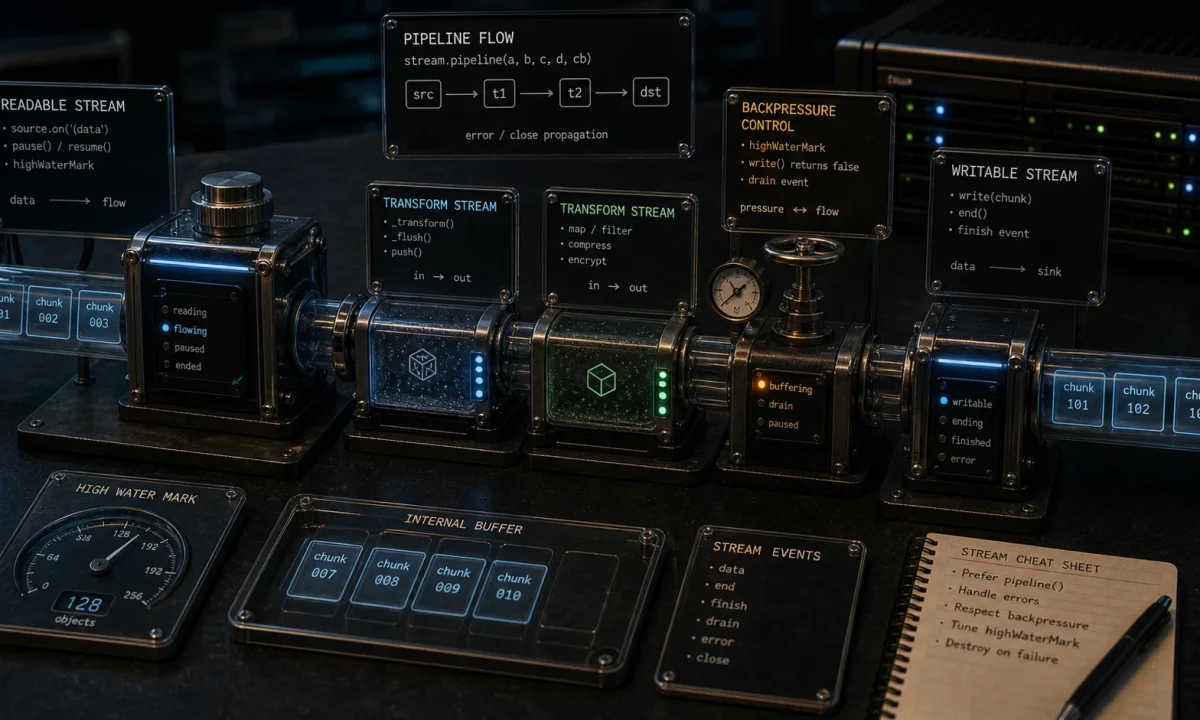
The first time I needed Node.js streams in production, I was uploading 4 GB CSV exports from a logistics SaaS into S3 nightly. The naive version — read the file into memory, parse it, post the result — worked on the dev machine and OOM-killed the production worker the first night it ran. Switching to a stream pipeline (file → CSV parser → S3 upload) ran the same job in 90 seconds with peak memory of 30 MB. That gap is the entire reason streams exist.
The article below is what I wish someone had handed me before that incident. Practical, working code on Node 24 LTS and Node 26, focused on the workloads streams actually solve in 2026: large file processing, S3 uploads, HTTP response transformation, and live data feeds. Async iterators and the Web Streams API get equal attention because in current Node both are first-class. Custom stream implementations, flowing vs paused mode, encryption pipelines, and video streaming with range requests are all covered because competitors rank for those and our previous version skipped them.

Quick start: stream a 1 GB file through a transform in 30 lines
Working baseline. The rest of the article hardens this for production.
npm install csv-parse// quickstart.ts
import { createReadStream, createWriteStream } from 'node:fs';
import { pipeline } from 'node:stream/promises';
import { Transform } from 'node:stream';
import { parse } from 'csv-parse';
await pipeline(
createReadStream('orders.csv'),
parse({ columns: true }), // CSV row → object
new Transform({
objectMode: true,
transform(row, _enc, cb) {
// your business logic per row
const out = { id: row.id, amount: Number(row.amount) * 1.1 };
cb(null, JSON.stringify(out) + 'n');
},
}),
createWriteStream('orders.jsonl')
);
console.log('done');npx tsx quickstart.tsOne million rows, peak memory ~50 MB regardless of input size. The trick is pipeline() — it wires the streams together with backpressure handled and errors propagated.
What is wrong with the typical “streams in Node” tutorial
Five things most stream tutorials get wrong:
- They show
.pipe(), which silently swallows errors. A failure in any link of the chain leaves you with a half-written file and no exception. - They skip backpressure. The whole point of streams is to slow the producer when the consumer can’t keep up. Tutorials that
readable.on('data', ...)without honouringwritable.write()return values defeat this. - They don’t explain object mode. Streams default to byte mode; for “row-shaped” data (CSV records, JSON lines, parsed events), you need
objectMode: true. - They predate async iterators. Node 10+ supports
for await (const chunk of stream)— usually clearer than callback-based event handlers. - They never mention Web Streams. Node 18+ ships the standards-compliant Web Streams API. Bridging between Node streams and Web streams is needed if you call
fetch().
The four stream types in 30 seconds
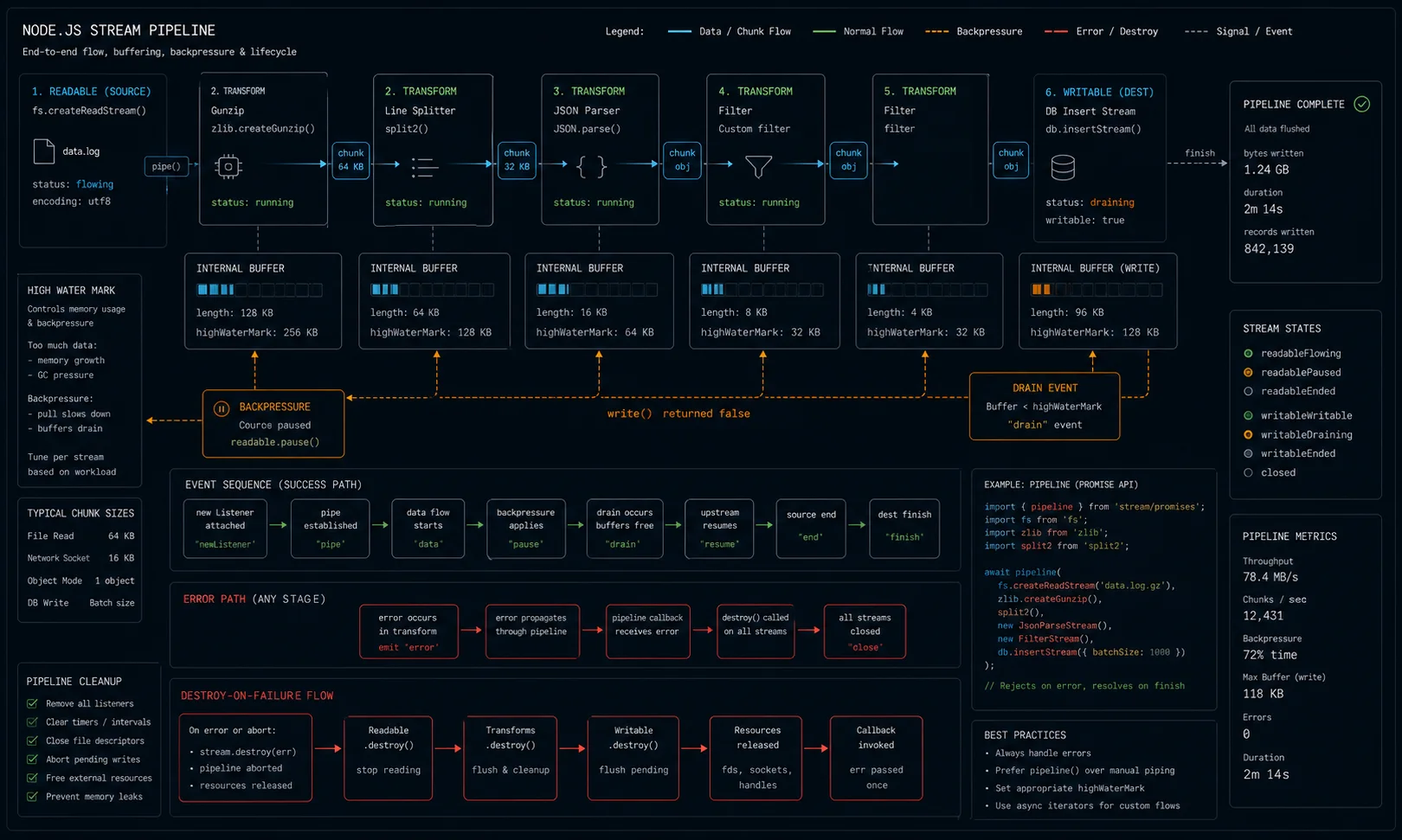
| Type | Direction | Examples |
|---|---|---|
| Readable | Source — produces data | createReadStream, process.stdin, HTTP request body |
| Writable | Sink — consumes data | createWriteStream, process.stdout, HTTP response |
| Duplex | Both — read and write are independent | TCP socket, WebSocket |
| Transform | Duplex where output depends on input | gzip, CSV parser, JSON encoder |
You will spend 90% of your time on Readable and Transform. Duplex appears when you write low-level network code; Writable usually shows up as the final destination of a pipeline.
Flowing mode vs paused mode
Readable streams have two operating modes and the distinction matters when you are debugging unexpected buffering behaviour.
In flowing mode, data is pushed to you automatically as fast as it arrives. You enter flowing mode when you attach a 'data' event listener, call .resume(), or call .pipe().
import { createReadStream } from 'node:fs';

const stream = createReadStream('./big.log', { encoding: 'utf8' });

// Attaching 'data' immediately switches to flowing mode
stream.on('data', (chunk: string) => {
  console.log('Received', chunk.length, 'bytes');
});

stream.on('end', () => console.log('Done'));
stream.on('error', (err) => console.error(err));
In paused mode, data sits in the internal buffer until you explicitly call .read(). The stream starts paused; you switch to paused-mode consumption via the 'readable' event:
const stream = createReadStream('./data.json', { encoding: 'utf8' });

stream.on('readable', () => {
  let chunk: string | null;
  // Drain the internal buffer — read() returns null when empty
  while ((chunk = stream.read()) !== null) {
    console.log('Pulled', chunk.length, 'bytes');
  }
});

stream.on('end', () => console.log('Done'));
You can pause and resume manually:
stream.on('data', (chunk) => {
  console.log('Got chunk');
  stream.pause();                            // stop receiving data
  setTimeout(() => stream.resume(), 1000);  // resume after 1 second
});
In practice, you will almost never manage modes manually. pipeline() and for await handle it for you — but understanding the model saves you when a stream sits silently doing nothing and you cannot figure out why.
pipeline() vs pipe(): use pipeline, every time
The single biggest-impact upgrade in any streams codebase: replace .pipe() with pipeline().
// .pipe() — error in any step is swallowed
createReadStream('big.csv')
  .pipe(parse())
  .pipe(transform)
.pipe(createWriteStream('out.json')); // if transform throws, what happens?import { pipeline } from 'node:stream/promises';
// pipeline — errors propagate, returns a promise
try {
await pipeline(
createReadStream('big.csv'),
parse(),
transform,
createWriteStream('out.json'),
);
} catch (err) {
console.error('Pipeline failed:', err);
// partial files cleaned up automatically
}The promise-based pipeline from node:stream/promises is the API you want. It auto-destroys all streams on failure and prevents the leak-the-file-descriptor pattern that .pipe() creates.
Backpressure: what it is and how to honour it
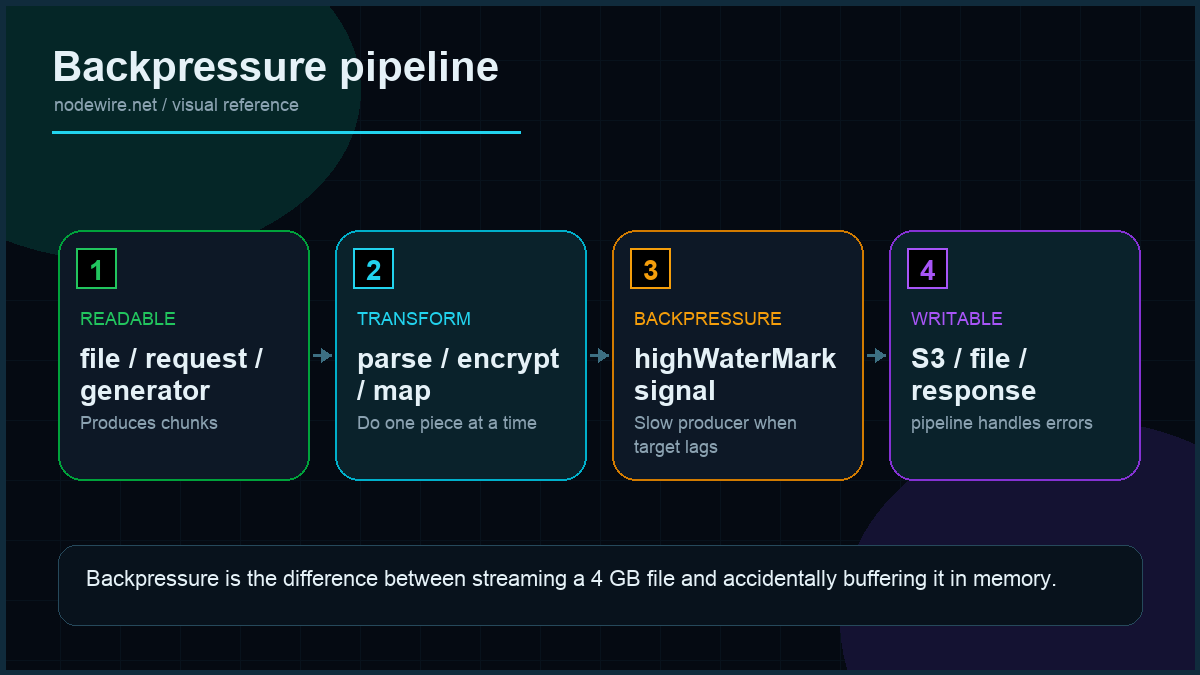
Backpressure is the mechanism that prevents a fast producer from drowning a slow consumer. Read a 10 GB file faster than you can write it; without backpressure, you buffer 10 GB in memory.
The contract is simple: writable.write(chunk) returns false when the writer’s internal buffer is full. The producer must stop writing until the writer emits 'drain'. pipeline() handles all of this automatically.
Manual demonstration of why it matters:
// WRONG — ignores backpressure, buffers everything
readable.on('data', (chunk) => {
  writable.write(chunk);                       // no check, no wait
});

// RIGHT — honours backpressure
readable.on('data', (chunk) => {
  if (!writable.write(chunk)) {
    readable.pause();                          // tell upstream to stop
    writable.once('drain', () => readable.resume());
  }
});

// BEST — pipeline handles all of this
import { pipeline } from 'node:stream/promises';
await pipeline(readable, writable);
You almost never need to write the second pattern by hand. pipeline() exists exactly so you don’t have to.
Async iterators: the modern way to consume a stream
Any Readable stream is an async iterable in Node 10+. Two consumption patterns side by side:
// Old — event listeners
function readFile(path: string): Promise<string[]> {
  return new Promise((resolve, reject) => {
    const lines: string[] = [];
    const stream = createReadStream(path, { encoding: 'utf8' });
    let buffer = '';
    stream.on('data', (chunk) => {
      buffer += chunk;
      const parts = buffer.split('n');
      buffer = parts.pop() ?? '';
      lines.push(...parts);
    });
    stream.on('end', () => resolve(lines));
    stream.on('error', reject);
  });
}// New — async iteration with for-await
import { createReadStream } from 'node:fs';
import { createInterface } from 'node:readline';
async function readFile(path: string): Promise<string[]> {
const lines: string[] = [];
const rl = createInterface({ input: createReadStream(path), crlfDelay: Infinity });
for await (const line of rl) lines.push(line);
return lines;
}Same correctness. Half the code. Errors throw out of the for await like any normal exception. The async iterator pattern is what I default to for any read-heavy logic in 2026.
Custom streams: building your own
Most articles stop at built-in streams. The moment you need domain-specific sources, sinks, or transforms, you need to build your own. Here is each type.
Custom Readable — a number generator
import { Readable } from 'node:stream';

class NumberStream extends Readable {
  private current = 0;
  private max: number;

  constructor(max: number) {
    super();
    this.max = max;
  }

  // _read() is called whenever the consumer wants more data.
  // Push chunks into the buffer; push null to signal end.
  _read(): void {
    if (this.current <= this.max) {
      this.push(String(this.current) + 'n');
      this.current++;
    } else {
      this.push(null);   // EOF
    }
  }
}

// Usage
const ns = new NumberStream(5);
ns.pipe(process.stdout);
// 0n1n2n3n4n5n
Custom Writable — a batch writer
import { Writable } from 'node:stream';
import { createWriteStream } from 'node:fs';

// Accumulates chunks and flushes in batches to reduce I/O syscalls
class BatchWriter extends Writable {
  private batch: string[] = [];
  private readonly batchSize: number;
  private readonly filePath: string;

  constructor(filePath: string, batchSize = 100) {
    super();
    this.filePath = filePath;
    this.batchSize = batchSize;
  }

  _write(chunk: Buffer, _enc: string, callback: (err?: Error | null) => void): void {
    this.batch.push(chunk.toString());
    if (this.batch.length >= this.batchSize) {
      this.flush(callback);
    } else {
      callback();
    }
  }

  _final(callback: (err?: Error | null) => void): void {
    // Flush remaining items when stream ends
    this.flush(callback);
  }

  private flush(done: (err?: Error | null) => void): void {
    const data = this.batch.join('');
    this.batch = [];
    // In practice use async fs.appendFile here
    done();
  }
}
The _final() hook is the one people always forget. It runs after the last _write() and before the 'finish' event fires — the right place to flush a buffer, close a file descriptor, or send a trailing delimiter.
Custom Transform — JSON lines to CSV, with _flush()
import { Transform, TransformCallback } from 'node:stream';

class JsonToCsv extends Transform {
  private headerWritten = false;
  private buffer = '';

  constructor() {
    super();   // byte-in, byte-out
  }

  _transform(chunk: Buffer, _enc: string, callback: TransformCallback): void {
    this.buffer += chunk.toString();
    const lines = this.buffer.split('n');
    // Keep the last (possibly incomplete) line in the buffer
    this.buffer = lines.pop() ?? '';

    for (const line of lines) {
      if (!line.trim()) continue;
      const obj = JSON.parse(line) as Record<string, unknown>;

      if (!this.headerWritten) {
        this.push(Object.keys(obj).join(',') + 'n');
        this.headerWritten = true;
      }

      const values = Object.values(obj).map((v) => {
        const s = String(v);
        return s.includes(',') ? `"${s}"` : s;
      });
      this.push(values.join(',') + 'n');
    }
    callback();
  }

  // _flush runs once at stream end — process remaining buffered bytes
  _flush(callback: TransformCallback): void {
    if (this.buffer.trim()) {
      try {
        const obj = JSON.parse(this.buffer) as Record<string, unknown>;
        const values = Object.values(obj).map(String);
        this.push(values.join(',') + 'n');
      } catch {
        // Ignore malformed trailing fragment
      }
    }
    callback();
  }
}

// Usage
import { pipeline } from 'node:stream/promises';

await pipeline(
  createReadStream('./data.jsonl'),
  new JsonToCsv(),
  createWriteStream('./data.csv'),
);
_flush() is the equivalent of _final() for Transform streams. Without it, the last buffered line silently vanishes when the input ends mid-line — a bug that only shows up with files whose size is not a clean multiple of your chunk size.
Readable.from(): the shortcut for arrays and generators
Creating a Readable from an array or an async generator does not require subclassing:
import { Readable } from 'node:stream';
import { pipeline } from 'node:stream/promises';

// From array
const arrayStream = Readable.from(['line 1n', 'line 2n', 'line 3n']);

// From async generator — lazy, memory-efficient
async function* generateRecords() {
  for (let i = 0; i < 1_000_000; i++) {
    yield JSON.stringify({ id: i, value: Math.random() }) + 'n';
    if (i % 10_000 === 0) await new Promise(r => setTimeout(r, 0)); // yield to event loop
  }
}

await pipeline(
  Readable.from(generateRecords()),
  createWriteStream('million-records.jsonl'),
);
The generator version produces records on demand — the file is written without ever holding a million records in memory. I reach for this pattern whenever I need to stream synthetic or computed data to a file or HTTP response.
Real workload: parse a 4 GB CSV and upload to S3
The job from the opening, hardened. Streams the file through CSV parsing, transforms each row, and uploads to S3 — peak memory under 100 MB no matter how big the input.
npm install csv-parse @aws-sdk/client-s3 @aws-sdk/lib-storage// upload-csv-to-s3.ts
import { createReadStream } from 'node:fs';
import { Transform, PassThrough } from 'node:stream';
import { pipeline } from 'node:stream/promises';
import { parse } from 'csv-parse';
import { S3Client } from '@aws-sdk/client-s3';
import { Upload } from '@aws-sdk/lib-storage';
const s3 = new S3Client({ region: 'us-east-1' });
const passthrough = new PassThrough();
const rowToJson = new Transform({
objectMode: true,
transform(row, _enc, cb) {
const out = { id: row.id, total: Number(row.amount) * 1.1 };
cb(null, JSON.stringify(out) + 'n');
},
});
// Start the upload in parallel — Upload reads from passthrough as it gets data
const upload = new Upload({
client: s3,
params: {
Bucket: 'orders-export',
Key: `${new Date().toISOString().slice(0, 10)}.jsonl`,
Body: passthrough,
},
});
const uploadPromise = upload.done();
await pipeline(
createReadStream('orders.csv'),
parse({ columns: true }),
rowToJson,
passthrough,
);
await uploadPromise;
console.log('uploaded');Three details that matter at scale:
- @aws-sdk/lib-storage’s
Uploadhandles multipart upload automatically — required for files larger than 5 GB on S3. PassThroughas the bridge betweenpipelineand the upload. Pipeline owns one writable;Upload.bodywants a readable. PassThrough is both.- Start the upload before pipeline finishes. The two run concurrently — bytes flow through pipeline → passthrough → upload while the file is still being read.
HTTP body streaming: don’t load the request into memory
Express, Fastify, and the native http module all expose request and response as streams. Use them.
// Stream a large request body to disk without ever buffering in memory
import { createWriteStream } from 'node:fs';
import { pipeline } from 'node:stream/promises';

app.post('/upload', async (req, res) => {
  await pipeline(req, createWriteStream(`/tmp/${Date.now()}`));
  res.json({ ok: true });
});// Stream a large response from a downstream API back to the client
app.get('/proxy', async (req, res) => {
const upstream = await fetch('https://example.com/big-file');
res.setHeader('Content-Type', upstream.headers.get('content-type') ?? 'application/octet-stream');
// upstream.body is a Web ReadableStream; convert to Node stream:
const { Readable } = await import('node:stream');
await pipeline(Readable.fromWeb(upstream.body!), res);
});The Readable.fromWeb bridge is the line most people miss. fetch() returns Web Streams; Express expects Node streams. The conversion is one method call.
Streaming file uploads with checksum calculation
A pattern that comes up whenever you accept user-generated files: stream the upload directly to disk while simultaneously computing a checksum — no second pass required.
import { createHash, randomUUID } from 'node:crypto';
import { createWriteStream, unlink } from 'node:fs';
import { Transform } from 'node:stream';
import { pipeline } from 'node:stream/promises';
import express from 'express';

const app = express();

app.post('/upload', async (req, res) => {
  const uploadId = randomUUID();
  const outputPath = `/tmp/uploads/${uploadId}`;
  let bytesReceived = 0;
  const hash = createHash('sha256');

  // Pass-through transform that tracks size and feeds the hash
  const tracker = new Transform({
    transform(chunk: Buffer, _enc, cb) {
      bytesReceived += chunk.length;
      hash.update(chunk);
      cb(null, chunk);
    },
  });

  try {
    await pipeline(req, tracker, createWriteStream(outputPath));

    res.json({
      uploadId,
      size: bytesReceived,
      sha256: hash.digest('hex'),
    });
  } catch (err) {
    unlink(outputPath, () => {});  // clean up partial file
    res.status(500).json({ error: (err as Error).message });
  }
});
The trick is the single-pass transform: bytes flow from the request through the tracker (which feeds the hash and counts bytes) to the file, all at once, without buffering anything in memory beyond the current chunk.
Video streaming with range requests
Streaming video is a stream workload that looks exotic but follows the same pattern as file streaming. The extra piece is honouring Range headers so the browser can seek.
import { createServer } from 'node:http';
import { createReadStream, stat } from 'node:fs';
import { promisify } from 'node:util';

const statAsync = promisify(stat);

createServer(async (req, res) => {
  if (req.url !== '/video') { res.end(); return; }

  const videoPath = './video.mp4';
  const stats = await statAsync(videoPath);
  const fileSize = stats.size;
  const range = req.headers.range;

  if (range) {
    const [startStr, endStr] = range.replace(/bytes=/, '').split('-');
    const start = parseInt(startStr, 10);
    const end = endStr ? parseInt(endStr, 10) : fileSize - 1;
    const chunkSize = end - start + 1;

    res.writeHead(206, {
      'Content-Range': `bytes ${start}-${end}/${fileSize}`,
      'Accept-Ranges': 'bytes',
      'Content-Length': chunkSize,
      'Content-Type': 'video/mp4',
    });

    // Stream only the requested byte range
    createReadStream(videoPath, { start, end }).pipe(res);
  } else {
    res.writeHead(200, {
      'Content-Length': fileSize,
      'Content-Type': 'video/mp4',
    });
    createReadStream(videoPath).pipe(res);
  }
}).listen(3000);
The Range header is what lets the browser scrub to the middle of a video without re-downloading from the start. Without 206 support, the browser can not seek — it only plays from the beginning. This pattern scales to audio, PDFs, and any large binary served over HTTP.
Encryption pipeline: AES-256 on large files
The Node.js crypto module’s cipher objects are Transform streams. Plugging them into a pipeline gives you streaming encryption with no memory penalty:
import { createCipheriv, createDecipheriv, randomBytes } from 'node:crypto';
import { createReadStream, createWriteStream } from 'node:fs';
import { pipeline } from 'node:stream/promises';

const ALGORITHM = 'aes-256-gcm';

async function encryptFile(inputPath: string, outputPath: string) {
  const key = randomBytes(32);   // store securely — losing this loses the file
  const iv = randomBytes(16);

  const cipher = createCipheriv(ALGORITHM, key, iv);

  await pipeline(
    createReadStream(inputPath),
    cipher,
    createWriteStream(outputPath),
  );

  // Return key + iv + auth tag so you can decrypt later
  return { key, iv, authTag: cipher.getAuthTag() };
}

async function decryptFile(
  inputPath: string,
  outputPath: string,
  key: Buffer,
  iv: Buffer,
  authTag: Buffer,
) {
  const decipher = createDecipheriv(ALGORITHM, key, iv);
  decipher.setAuthTag(authTag);

  await pipeline(
    createReadStream(inputPath),
    decipher,
    createWriteStream(outputPath),
  );
}

// Usage
const { key, iv, authTag } = await encryptFile('./secret.txt', './secret.enc');
await decryptFile('./secret.enc', './secret-decrypted.txt', key, iv, authTag);
AES-256-GCM is the right algorithm here: authenticated encryption (the auth tag catches tampering), hardware-accelerated on modern CPUs, and no padding issues. The encryption pipeline processes an arbitrarily large file in constant memory — 30 MB for a 4 GB source is the same as it would be for a 100 MB source.
Web Streams: when you need them
Node 18+ ships the standards-compliant Web Streams API. You will encounter them when you call fetch(), when you ship code that runs on Cloudflare Workers or Deno, or when you use libraries built on Web standards.
| Concept | Node Streams | Web Streams |
|---|---|---|
| Readable | Readable |
ReadableStream |
| Writable | Writable |
WritableStream |
| Transform | Transform |
TransformStream |
| Pipe | pipeline() |
readable.pipeTo(writable) |
| Iterate | for await (chunk of readable) |
for await (chunk of readable) |
Bridge functions: Readable.fromWeb(), Readable.toWeb(), Writable.fromWeb(), Writable.toWeb(). Node’s Web Streams docs cover the surface.
Error handling deep dive
The behaviour difference between .pipe() and pipeline() on error is not just academic. Here is what actually happens:
// .pipe() — error handling is your problem
const read = createReadStream('./input.txt');
const write = createWriteStream('./output.txt');

read.on('error', (err) => {
  console.error('Read error:', err);
  write.destroy(err);   // must manually propagate
});

write.on('error', (err) => {
  console.error('Write error:', err);
  read.destroy();       // must manually clean up source
});

read.pipe(write);

// pipeline() — errors handled automatically, all streams destroyed
try {
  await pipeline(
    createReadStream('./input.txt'),
    createWriteStream('./output.txt'),
  );
} catch (err) {
  const e = err as NodeJS.ErrnoException;
  if (e.code === 'ENOENT') {
    console.error('Input file not found');
  } else if (e.code === 'EACCES') {
    console.error('Permission denied');
  } else {
    console.error('Unexpected error:', e.message);
  }
}
For cases where you want to wait for a single stream to finish without piping it:
import { finished } from 'node:stream/promises';
import { createWriteStream } from 'node:fs';

const write = createWriteStream('./out.txt');
write.write('hellon');
write.end();

await finished(write);   // resolves when 'finish' fires, rejects on 'error'
console.log('Flushed to disk');
Performance tips
highWaterMark: tune it, don’t guess
// Default: 16 KB for byte streams, 16 objects for object mode
// For large sequential file reads, bigger buffers mean fewer syscalls
const fastRead = createReadStream('./big.bin', {
  highWaterMark: 1024 * 1024,   // 1 MB chunks — ~64x fewer reads than default
});

// For memory-constrained environments or many concurrent streams
const smallRead = createReadStream('./small.csv', {
  highWaterMark: 16 * 1024,    // 16 KB — stay below L1/L2 cache
});
Avoid synchronous operations inside _transform
// BAD — synchronous CPU work blocks the event loop for every chunk
const badTransform = new Transform({
  transform(chunk, _enc, cb) {
    const result = expensiveSyncOperation(chunk);   // blocks!
    cb(null, result);
  },
});

// GOOD — yield to the event loop between heavy chunks
const goodTransform = new Transform({
  transform(chunk, _enc, cb) {
    setImmediate(() => {
      const result = expensiveSyncOperation(chunk);
      cb(null, result);
    });
  },
});
Combine operations when possible
// Inefficient: four transforms, four buffer boundaries
source
  .pipe(parseJson)
  .pipe(filterRecords)
  .pipe(transformFields)
  .pipe(stringify);

// Better: one transform does all four things — fewer allocations, fewer wakeups
source.pipe(new Transform({
  objectMode: true,
  transform(chunk, _enc, cb) {
    const record = JSON.parse(chunk) as Record<string, unknown>;
    if (record.status !== 'active') return cb();   // filter
    record.transformed = true;                      // transform
    cb(null, JSON.stringify(record));               // stringify
  },
}));
Production checklist
pipeline()fromnode:stream/promisesfor any multi-step stream chain. Never.pipe().- Use async iteration for read-only consumers; clearer code, real exceptions.
objectMode: truewhen chunks are JS objects (parsed CSV rows, JSON lines, events).- Set
highWaterMarkintentionally. Default is 16 KB for byte streams, 16 objects for object mode. Tune for your workload — too small and you context-switch constantly; too large and you defeat backpressure. - Always destroy streams on error.
pipeline()does this automatically; manual code must. - Implement
_flush()in Transform streams. Without it, any data buffered at the end of the input is silently dropped. - Set timeouts on stream operations. A hung upstream can leave a stream waiting forever; wrap in
AbortSignal.timeout()for HTTP-driven streams. - Profile peak memory under realistic load. A “stream pipeline” with a hidden buffer-everything step looks like streams and costs like the naive version.
- Bridge Web Streams ↔ Node Streams with the helper methods. Mixing the two without conversion silently breaks.
- Use
Readable.from()for arrays and async generators — no need to subclass Readable for simple cases.
When not to use streams
- The data fits in memory comfortably. Reading a 100 KB JSON config file and parsing it is one line:
JSON.parse(readFileSync(path)). Streams are overkill. - You need random access to the data. Streams are sequential by design. If you need to seek, slice, or re-read, load it into memory or use a database.
- The transformation depends on the whole dataset. Sorting, deduplicating, computing averages — streams can do these, but it is awkward and slower than loading into memory if memory allows. Use streams for filtering and per-row transforms; switch to in-memory or DB for aggregations.
Troubleshooting FAQ
Why is my stream slow even though it should be fast?
Three usual causes: missing objectMode when you expect objects (each chunk gets serialised to a string), highWaterMark too small (constant context switches), or a synchronous operation in your transform blocking the event loop.
What happens to memory when a stream errors mid-flow?
With pipeline(): every stream is destroyed, file descriptors close, partial files remain on disk (clean up explicitly). With .pipe(): the broken stream stops, the others may keep buffering forever — file descriptor leak.
Should I use Highland.js or most?
No, in 2026. The native streams API plus async iterators covers what these libraries used to add. The smaller dependency footprint matters; the API ergonomics gap closed.
Can I use streams with TypeScript ergonomically?
Yes. Readable<T>-style generic typing is patchy in @types/node; use a thin wrapper or community type packages for typed object-mode streams.
I get “Cannot find module ‘node:stream/promises'” — what version of Node do I need?
Node 16.0+. The error usually means an outdated Node binary on the server; the resolution diagnostic tree covers the broader pattern.
How do I stream from a database query?
Most Postgres clients support a streaming mode. pg.Cursor gives you a row-at-a-time iterator. Prisma 7+ supports findMany with cursor-based pagination — not technically a stream, but functionally equivalent for chunked exports. My Postgres + Prisma setup covers cursor pagination.
What is the difference between readable and data events?
data is push-based — fires whenever a chunk is available, puts stream in flowing mode. readable is pull-based — you get notified that data is available, then you call .read(). For 95% of code, async iteration is clearer than either.
Are Node streams compatible with Bun and Deno?
Bun supports them natively. Deno does in compatibility mode (deno run --node or node: imports). For maximum portability across all three runtimes, write Web Streams and bridge to Node streams only at the edges.
How do I test stream code?
Convert the readable to an array of chunks and assert on the array. Array.fromAsync(stream) in Node 26+ does this in one call. In earlier versions: const chunks: Buffer[] = []; for await (const c of stream) chunks.push(c); Buffer.concat(chunks).toString().
What is finished() and when do I use it instead of pipeline()?
finished(stream) from node:stream/promises returns a promise that resolves when the stream emits 'finish' or 'end', and rejects on 'error'. Use it when you are not chaining multiple streams — for example, waiting for a single writable to flush before closing your app. For multi-stream chains, pipeline() is always the right tool.
What ships next
This article covers the core Node streams API. The natural next steps: a deep dive on backpressure tuning under real load, and a comparison of Web Streams vs Node Streams when you need to ship the same code on Cloudflare Workers and Node. If your stream code leaks memory, the diagnosis pattern is the same as any other Node memory leak — heap snapshots, retainer tree, fix the unbounded buffer.