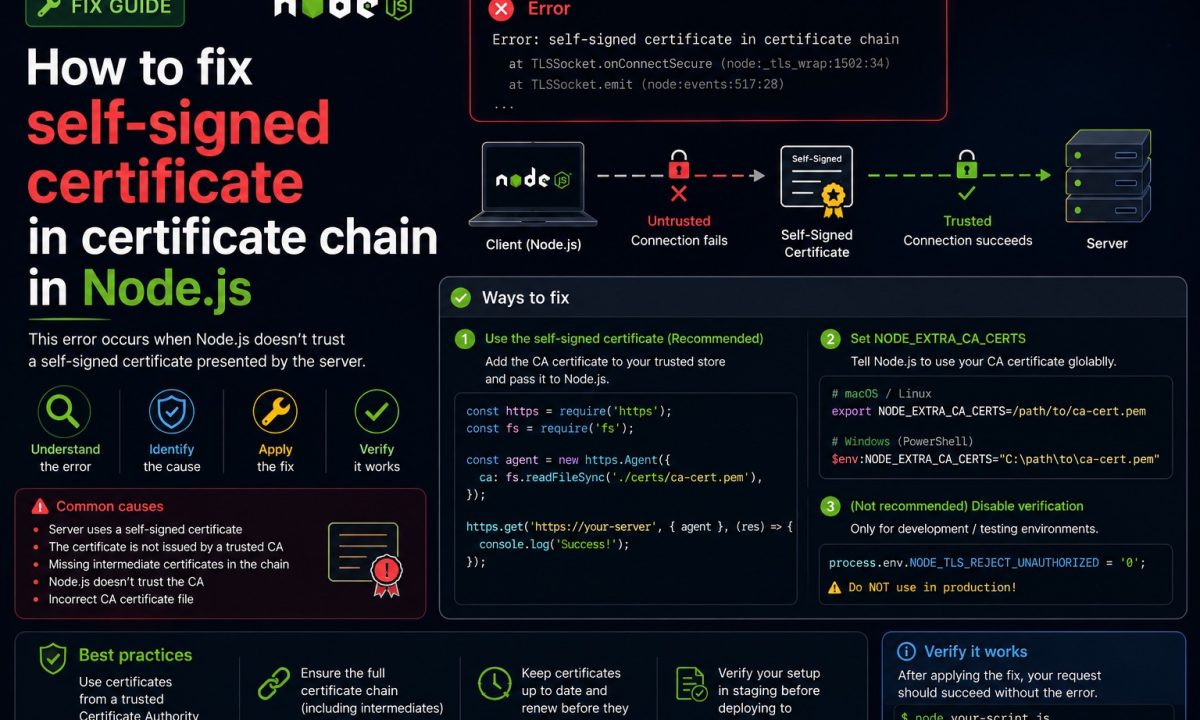
You ship a service that calls an internal billing API over HTTPS. Works on your laptop at home. Monday morning you’re back on the office VPN, you npm run dev, and the first outbound request blows up with self signed certificate in certificate chain. Nothing changed in your code. The remote API still has a perfectly valid certificate. So what flipped?
Safe fix
Do not set NODE_TLS_REJECT_UNAUTHORIZED=0. Export the corporate or private root CA, point Node at it with NODE_EXTRA_CA_CERTS, and configure npm, yarn, or pnpm to trust the same CA. On newer Node setups, using the system certificate store may be enough, but the safe fix is always to trust the right CA, not to disable TLS verification.
Your company did. A TLS-inspecting proxy — Zscaler, Netskope, a Palo Alto box — now sits between your machine and the internet, re-signing every HTTPS connection with the company’s own root CA so security can read the traffic. Your browser trusts that CA because IT pushed it into the OS store. Node doesn’t. When you hit self signed certificate in certificate chain, Node walked the chain the proxy handed it, reached a root it’s never heard of, and refused. Self-hosted services with their own CA — a private registry, an internal Vault, a homelab Postgres behind a self-issued cert — trigger the exact same thing.
Here’s the error you pasted into a search box to land here:
Error: self signed certificate in certificate chain
    at TLSSocket.onConnectSecure (node:_tls_wrap:1678:34)
    at TLSSocket.emit (node:events:519:28)
    at TLSSocket._finishInit (node:_tls_wrap:1085:8) {
  code: 'SELF_SIGNED_CERT_IN_CHAIN'
}
And the npm flavor, which is the same failure one layer up:
npm error code SELF_SIGNED_CERT_IN_CHAIN
npm error errno SELF_SIGNED_CERT_IN_CHAIN
npm error request to https://registry.npmjs.org/ failed, reason: self signed certificate in certificate chain
Why Node rejects a cert your browser accepts
Node ships its own bundled CA list, compiled into the binary from Mozilla’s root program, and by default it ignores the OS trust store entirely. That’s deliberate — it makes a Node program behave identically on your Mac, in a scratch Docker image, and on a CI runner, none of which share a certificate store. The trade-off: the company root your browser quietly picked up from the OS is invisible to Node.
So the chain looks like leaf cert (the proxy minted it) → company intermediate → company root CA. Node validates leaf and intermediate fine, reaches the root, finds it’s self-signed and absent from the bundle, and stops. SELF_SIGNED_CERT_IN_CHAIN literally means “the chain ends at a self-signed certificate I don’t trust.” It isn’t saying your code is wrong or the target server is misconfigured. It’s saying you never told Node about this CA.
The fix is to make that one missing root trusted — not to switch validation off.
The tempting shortcut that wastes time
You’ll find this in the first three Stack Overflow answers, and someone on your team has it in their .zshrc right now:
export NODE_TLS_REJECT_UNAUTHORIZED=0
Or the in-code cousin:
// Don't.
const res = await fetch(url, {
  // @ts-expect-error agent option, illustrative
  agent: new https.Agent({ rejectUnauthorized: false }),
});
It works. The error vanishes. And it “works” the way unplugging a smoke detector makes the beeping stop. You haven’t taught Node to trust your company CA — you’ve told Node to trust every certificate, from anyone, including the attacker on coffee-shop Wi-Fi handing you a forged cert for your bank’s API. The whole point of TLS is gone. More on the blast radius below; it’s worse than most people think.
Safe fix: point Node at the real CA
Get the CA certificate as a PEM file. On macOS the root usually lives in Keychain Access — find the company root, export it as .pem. On Windows it’s in certmgr.msc under Trusted Root Certification Authorities, exported Base-64. Or just ask your platform team; they have the bundle on a wiki page. Then hand Node the path:
export NODE_EXTRA_CA_CERTS=/etc/ssl/certs/company-root-ca.pem
node app.js
NODE_EXTRA_CA_CERTS loads one or more PEM certificates and appends them to Node’s built-in bundle. You keep every public CA you already trusted, plus your company root. Validation stays fully on. Per the Node CLI docs, the certs in that file are used in addition to the default store, not instead of it — so a public API and your internal one both work in the same process.
Put it where it survives restarts. In a Dockerfile:
COPY company-root-ca.pem /etc/ssl/certs/company-root-ca.pem
ENV NODE_EXTRA_CA_CERTS=/etc/ssl/certs/company-root-ca.pem
One caveat that costs people an afternoon: NODE_EXTRA_CA_CERTS is read once at process startup. Export it, then start Node. Setting it after the process is running, or from inside your app, does nothing.
Node 22+: just trust the system store
If you’re on Node 20, NODE_EXTRA_CA_CERTS is your tool. But starting in Node v22.19.0 and v24.6.0, Node can read the operating system’s trust store directly — the same one your browser uses, where IT already installed the company root. No exporting PEM files by hand:
# flag form
node --use-system-ca app.js

# env form, handy for tools you don't launch directly
export NODE_USE_SYSTEM_CA=1
node app.js
On macOS it reads Keychain, on Windows the Crypto API store, on Linux the OpenSSL defaults. It’s additive too, so you can combine it with NODE_EXTRA_CA_CERTS when one CA is in the OS store and another isn’t. The enterprise network configuration guide walks through the platform paths. If your whole team is on 22.19+, this is the lowest-friction answer there is — nobody hunts for a .pem file again.
When does it bite you? CI and slim containers. A node:22-alpine image has no OS trust store and no company root in it, so --use-system-ca finds nothing. For those, bake the PEM in with NODE_EXTRA_CA_CERTS. System store on dev machines, explicit file in the pipeline.
Fixing npm, yarn, and pnpm
npm install hitting SELF_SIGNED_CERT_IN_CHAIN is the same proxy, intercepting your traffic to the registry. npm has its own config for it — point it at the same PEM:
npm config set cafile "/etc/ssl/certs/company-root-ca.pem"
That writes cafile to your ~/.npmrc. Per the npm config docs, cafile takes a path to a file holding one or more CA certs — the file-based sibling of the inline ca setting, and the one you want for a real bundle. NODE_EXTRA_CA_CERTS works for npm too since npm runs on Node, but cafile is explicit. pnpm reads the same .npmrc, so it inherits this for free.
The line you’ll see suggested and should refuse:
npm config set strict-ssl false
Same disease as NODE_TLS_REJECT_UNAUTHORIZED=0, scoped to npm: every package now arrives over an unverified connection, which is a supply-chain hole, not a config tweak.
Per-request, when you can’t set env vars
Sometimes you only want one client to trust an internal CA — a single service-to-service call — without touching global trust. Pass ca on the request agent:
import { readFileSync } from "node:fs";
import { Agent, request } from "node:https";

const agent = new Agent({
  ca: readFileSync("/etc/ssl/certs/company-root-ca.pem"),
  // rejectUnauthorized stays true — that's the point
});

request("https://internal.api.example/health", { agent }, (res) => {
  console.log(res.statusCode);
}).end();
Validation is still on; you’ve just extended trust to one more CA for this agent. If you’re staring at a wider “fetch failed” wall and aren’t sure the cert is even the cause, the fetch failed in Node walkthrough covers the other branches — DNS and IPv6 among them.
What NOT to do: NODE_TLS_REJECT_UNAUTHORIZED=0
Worth its own section, because the damage is bigger than the line looks.
NODE_TLS_REJECT_UNAUTHORIZED=0 is process-wide. It doesn’t relax validation for the one internal host giving you trouble — it disables certificate checking for every TLS connection that process makes. Your Stripe calls, your database TLS, your outbound webhooks, the npm fetch: all of them stop verifying who’s on the other end. The Node docs flag it plainly as a security risk meant for testing only.
The realistic attack: anyone who can sit between your app and a server it talks to — compromised Wi-Fi, a poisoned route, a malicious sidecar — presents a certificate they signed themselves, and your app accepts it without a blink. They now read and rewrite traffic you believed was encrypted. That’s the literal man-in-the-middle TLS exists to stop, and you opened the door with one env var.
Two rules that have saved me:
- It must never reach a production image or a
Dockerfile. Grep your repo for it before every release; treat a hit as a build failure. - If you genuinely need it for sixty seconds of local poking, set it inline for that one command —
NODE_TLS_REJECT_UNAUTHORIZED=0 node poke.js— neverexportit into your shell profile, where it silently weakens every Node process for months. The Node API security checklist covers the rest of the TLS and header surface.
You almost never need it. A missing CA is a five-minute NODE_EXTRA_CA_CERTS fix. Reach for the env var and you’re not fixing the certificate problem — you’re deleting the feature that made the connection safe.
FAQ
What does SELF_SIGNED_CERT_IN_CHAIN actually mean?
It means Node followed the certificate chain the server (or your proxy) presented, reached a root certificate that signed itself, and couldn’t find that root in its trusted store. The cert isn’t necessarily broken — most often it’s a corporate TLS-inspection proxy or a self-hosted service using a private CA that your browser trusts via the OS but Node doesn’t.
Why does it work in my browser but fail in Node?
Your browser reads the operating system’s trust store, where IT installed the company root CA. Node ships its own bundled CA list and ignores the OS store by default, so the company root is invisible to it. You bridge the gap with NODE_EXTRA_CA_CERTS, or with --use-system-ca on Node 22.19+ which tells Node to read the OS store like the browser does.
Is NODE_TLS_REJECT_UNAUTHORIZED=0 safe for local development?
Only for a throwaway, one-off command, and even then I’d rather point at the real CA. The problem is it disables certificate validation for the entire process, so it’s easy to forget it in a shell profile or leak it into a Dockerfile. Set it inline for a single run if you must, never export it, and never let it near production.
How do I fix the same error in npm?
Run npm config set cafile "/path/to/company-root-ca.pem" pointing at your company CA in PEM format. That writes the path into your .npmrc, and pnpm picks it up from the same file. Avoid npm config set strict-ssl false — it’s the npm equivalent of disabling TLS and turns every package download into an unverified fetch.
What’s the difference between NODE_EXTRA_CA_CERTS and –use-system-ca?
NODE_EXTRA_CA_CERTS points Node at a specific PEM file you provide and works on every Node version, which makes it the right call for CI and slim Docker images that have no OS trust store. --use-system-ca (Node v22.19.0 / v24.6.0 and later) tells Node to trust the operating system store, which is ideal on developer machines where IT already installed the root. They stack, so you can use both.
The cert is in my OS store but Node still rejects it — why?
Almost always a version issue: reading the OS store only landed in Node v22.19.0 and v24.6.0, so on anything older the flag does nothing and you need NODE_EXTRA_CA_CERTS instead. If you are on a new enough version, confirm you actually passed --use-system-ca (or NODE_USE_SYSTEM_CA=1) and that the certificate sits in the right store — on Linux that means the OpenSSL default paths, not just wherever your distro’s GUI dropped it.