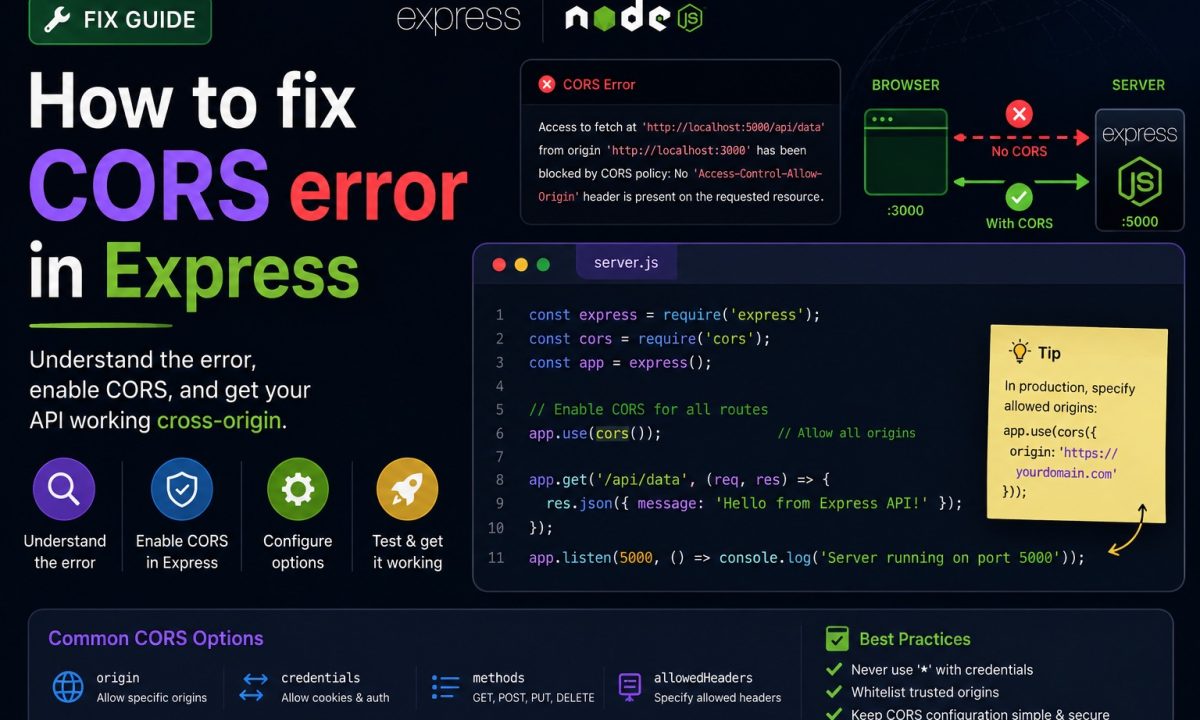
It’s 4 on a Friday, the API works perfectly in Postman, and your React dev server on localhost:5173 calling the Express API on localhost:3000 throws a wall of red. That’s an Express CORS error, and it wrecks so many afternoons because the symptom shows up in the browser — so that’s where everyone goes to fix it. Wrong layer. CORS is a server response-header problem, and almost always the fix is three lines.
Fast fix
The Express CORS error is fixed on the server, not in fetch(). Install cors, allow the exact frontend origin, make sure OPTIONS preflight requests reach the middleware, and only enable credentials with a specific origin. If the browser shows a CORS message but the API is returning 500, fix the server error first.
The error you pasted into a search box to land here:
Access to fetch at 'http://localhost:3000/api/users' from origin
'http://localhost:5173' has been blocked by CORS policy: No
'Access-Control-Allow-Origin' header is present on the requested resource.
Read it literally: the response from localhost:3000 didn’t include an Access-Control-Allow-Origin header, so the browser blocked your JavaScript from reading it. The server didn’t crash and the network is fine — the browser is enforcing the same-origin policy and waiting for a header your server never sent. That’s the whole article: CORS is enforced by the browser, but the fix lives on the server. Only the server can add it.
The tempting shortcut that wastes time
First you set the header on the client: fetch(url, { headers: { 'Access-Control-Allow-Origin': '*' } }). It does nothing — that’s a response header the server sends back, not something a request can set.
Next you find mode: 'no-cors'. The red error vanishes — until response.json() returns nothing and response.status is 0. no-cors doesn’t disable CORS; it hands you an opaque response your script can’t read. The third dead end, a browser extension that injects Allow-Origin: * locally, works on your machine and nobody else’s. Only the server can send the header.
The copy-paste Express fix with the cors package
Don’t hand-write CORS headers. The cors middleware (v2.8.6) is maintained by the Express team and handles preflight automatically. Register it before any routes:
npm install cors
npm install --save-dev @types/cors   # TypeScript types live separately
import express from 'express';
import cors from 'cors';

const app = express();

// Allow exactly your frontend origin. Not '*' — see the credentials section.
app.use(cors({ origin: 'http://localhost:5173' }));
app.use(express.json());

// ...your routes here
app.listen(3000);
That’s the simple case done — registered before your routes, cors sends Access-Control-Allow-Origin on every response and the error is gone. Keep it above the routes it covers: Express middleware runs top-to-bottom, so a cors call after a route never runs for it.
Simple GETs work but a JSON POST gets blocked
You add CORS, GET requests flow, then a JSON POST fails again. The browser splits cross-origin requests into two classes. A simple request — GET, HEAD, or a POST whose Content-Type is text/plain, multipart/form-data, or application/x-www-form-urlencoded — goes straight to your server. Anything else (a PUT, DELETE, JSON POST, or a custom header like Authorization) is preflighted: the browser fires an automatic OPTIONS first, and only sends the real request if the server approves.
Good news: app.use(cors()) answers that preflight for you — per the README, “pre-flight requests are already handled for all routes.” You write no OPTIONS handling.
The trap is old tutorials telling you to add:
app.options('*', cors()); // Express 4 idiom — THROWS on Express 5
On Express 5 that line crashes at startup with Missing parameter name from path-to-regexp, because bare * is no longer a valid route pattern. If you genuinely need an explicit catch-all handler, name the wildcard:
app.options('/{*splat}', cors()); // Express 5 syntax for "any path"
Most apps don’t need that line — app.use(cors(options)) covers preflight on its own.
You need cookies, or several origins, and now nothing works
The hardest variant. Your API uses session cookies, so you set credentials: 'include' on the client — and now GET fails too:
The value of the 'Access-Control-Allow-Origin' header in the response must
not be the wildcard '*' when the request's credentials mode is 'include'.
Two rules collide. You cannot use origin: '*' with credentials — the browser refuses to send cookies to a wildcard origin, since that would let any site make authenticated requests as your users. And the server must opt in with Access-Control-Allow-Credentials: true. So you need a concrete origin plus credentials: true — and since production, staging, and localhost:5173 are three origins one string can’t cover, pass a function:
const allowlist = new Set([
  'https://app.example.com',
  'https://staging.example.com',
  'http://localhost:5173',
]);

app.use(
  cors({
    origin(origin, callback) {
      // `origin` is undefined for same-origin / curl / server-to-server — allow those
      if (!origin || allowlist.has(origin)) return callback(null, true);
      callback(new Error(`Origin ${origin} not allowed by CORS`));
    },
    credentials: true, // sends Access-Control-Allow-Credentials
  }),
);
// Client — opt in to sending cookies
const res = await fetch('https://api.example.com/me', { credentials: 'include' });
Miss either half and it breaks: no credentials: true and the cookie is dropped silently; a wildcard origin and the whole response is blocked. The !origin branch lets curl and server-to-server calls (no Origin header) through. And treat the allowlist as a security control: a lazy origin: true reflecting any caller back is the foot-gun in Node API security best practices. Authenticating with bearer tokens instead? The JWT authentication guide sidesteps most of this.
Headers and methods that matter in production
The basic origin setting gets most apps working, but production CORS usually needs one more pass: allowed methods, allowed headers, and cache correctness. If your frontend sends Authorization, Content-Type: application/json, or a custom header, the preflight request has to see those headers allowed by the server. The cors middleware will reflect common request headers by default, but for stricter APIs it is better to be explicit:
app.use(cors({
  origin: 'https://app.example.com',
  methods: ['GET', 'POST', 'PUT', 'PATCH', 'DELETE', 'OPTIONS'],
  allowedHeaders: ['Content-Type', 'Authorization'],
  credentials: true,
  maxAge: 600,
}));
One small cache detail matters when you allow several origins: responses should vary by Origin. The cors package handles this for dynamic origins, but if you ever hand-write headers, add Vary: Origin or a CDN can cache one origin’s response and serve it to another. That is how a correct local CORS config becomes a broken production-only bug.
The “CORS error” that’s actually a 500
This one costs the most time because the console lies. Your handler throws, Express returns a 500 without CORS headers, the browser sees no Access-Control-Allow-Origin, and reports “blocked by CORS policy.” You spend an hour tuning origins while the real bug is a crash.
The tell: open the Network tab and read the status code on the failed request. A red CORS message on top of a 500 or 404 means CORS is a red herring — fix the crash first. A common culprit is an unhandled async rejection that bypasses your error middleware entirely, the failure mode covered in Express async error handling. Fix the route and the headers ride along again.
Skip CORS in dev: the proxy
Sometimes the right move is to make the request same-origin so CORS never engages. Vite, Next.js, and CRA all proxy /api to your backend in dev — the browser only talks to localhost:5173, which forwards to localhost:3000 server-side, where same-origin policy doesn’t apply:
// vite.config.ts
export default defineConfig({
  server: {
    proxy: { '/api': { target: 'http://localhost:3000', changeOrigin: true } },
  },
});
Now fetch('/api/users') is same-origin and CORS is a non-issue locally. The catch: a proxy is a dev convenience, not a production answer. Your frontend and API still sit on different hosts in production and need real CORS headers — leaning on the proxy alone ships a build that works on every laptop and breaks behind a domain.
FAQ
Is a CORS error a frontend or backend problem?
Backend. It appears in the browser console, but it’s caused by a missing Access-Control-Allow-Origin response header that only the server can send. Editing your fetch() options won’t fix it — you add the cors middleware to your Express server.
Why does setting Access-Control-Allow-Origin in my fetch headers do nothing?
Because Access-Control-* are response headers the server sends, not request headers the client sets. On an outgoing fetch they’re the wrong direction and the browser ignores them.
Does app.use(cors()) handle the preflight OPTIONS request?
Yes — registered before your routes, it answers the preflight OPTIONS for every route, so you write no OPTIONS handler. On Express 5 the old app.options('*', cors()) line throws, so leave it out unless you name the wildcard as '/{*splat}'.
Why can’t I use origin: '*' with credentials?
Browsers block sending cookies or Authorization headers to a wildcard origin, because that would let any site make authenticated requests as your users. Set origin to a specific URL (or an allowlist function) and add credentials: true on the server, plus credentials: 'include' on the client.
Why do I still get a CORS error after adding the cors middleware?
Check the response status in the Network tab. A 500 or 404 means your handler is crashing and the error response goes out without CORS headers, so the “CORS error” masks a server bug. Also confirm cors is registered above the route.
Should I use a dev proxy instead of configuring CORS?
A Vite or Next.js proxy makes dev requests same-origin so CORS never triggers — great locally, but it only covers development. Your production API lives on a different host and still needs real cors.