
I had an Express API knocked over by a single bad client running 4,000 requests per second against the login endpoint. The endpoint itself was fine — Postgres got 32 connections and the connection pool exhausted in 90 seconds. Adding Express rate limiting in front of the auth routes wasn’t the part that took thought. Picking the right backing store, the right algorithm, and the right key generator was. This is the rate-limiting middleware stack I now ship on every Express project, the bug that taught me each piece, and one outage I caused with rate limiting itself when I trusted the wrong proxy hop.
The two-line version that’s wrong (but everyone ships)
import { rateLimit } from "express-rate-limit";

app.use("/api/", rateLimit({ windowMs: 60_000, limit: 100 }));
This works in dev. It works on a single-instance staging deploy. The moment you scale to two Node.js instances behind a load balancer, it falls apart — the in-memory store is per-process. Each instance counts independently. A client hitting the load balancer can effectively get N × limit through where N is the instance count. I have shipped this bug. Twice.
The fix is a shared store. Redis is the obvious choice — sub-millisecond latency from a Node.js process in the same VPC, atomic INCR with TTL, and one round-trip per request.
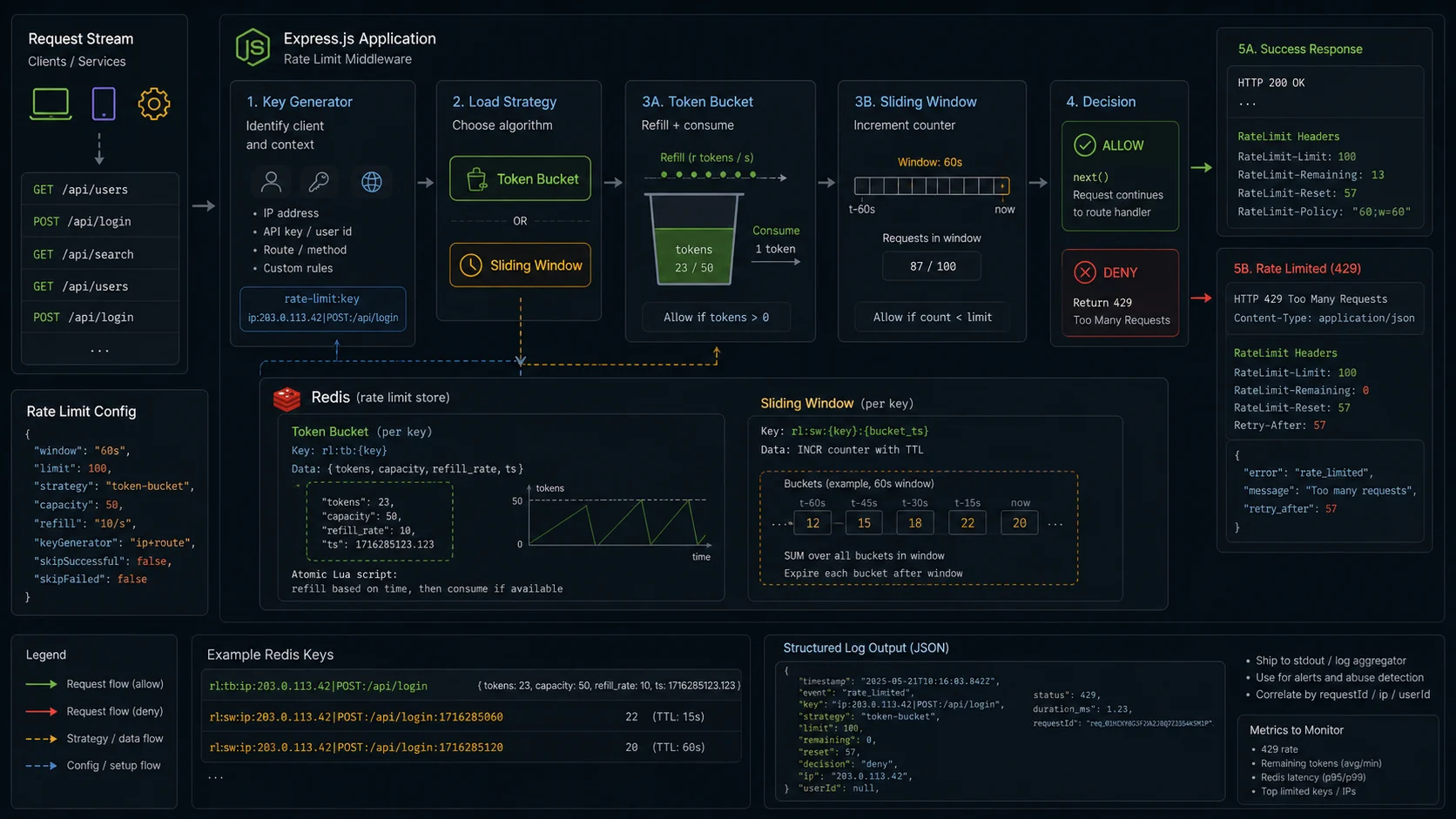
Step 1: express-rate-limit 8.x with a Redis store
npm i express-rate-limit@^8 rate-limit-redis@^4 ioredis@^5// src/limiters/api.ts
import { rateLimit } from "express-rate-limit";
import { RedisStore } from "rate-limit-redis";
import { redis } from "../redis.js";
export const apiLimiter = rateLimit({
windowMs: 60_000,
limit: 100,
standardHeaders: "draft-8",
legacyHeaders: false,
store: new RedisStore({
sendCommand: (...args) => redis.call(...args),
prefix: "rl:api:",
}),
});A few things in that block matter more than the line count suggests:
limit: 100instead ofmax. express-rate-limit renamed the option in v7.maxstill works for back-compat but the linter will warn on a new project. Uselimit.standardHeaders: "draft-8". Emits the combined IETFRateLimitheader in the format"100;w=60". Older code uses"draft-7"which emits three separate headers. Either is fine —"draft-8"is the newest and more compact. Don’t use the legacyX-RateLimit-*set unless an old client requires it; turn it off explicitly withlegacyHeaders: false.- Per-limiter
prefix. If you mount more than one limiter on the same Redis instance (you will), prefix every key.rl:api:,rl:login:,rl:checkout:. Otherwise the counters collide.
Now every Node.js instance shares the same counter. Setting up the Redis client itself (retry strategy, connection pool, error handling) is in the Node.js Redis caching guide.
Step 2: pick the right key (and don’t break IPv6)
The default key generator is the client IP. In v8, that IP is now masked to a /56 subnet for IPv6 — a security fix. Before v8.0, an IPv6 client with a /64 ISP allocation could iterate through 2^8 unique addresses inside their own subnet and bypass any IP-based limit. The new default treats everything inside a /56 as one user.
For unauthenticated endpoints, the IP-based default is fine. For authenticated APIs, IP is the wrong key — one corporate NAT can route 200 legitimate users out of a single egress IP, and the limit hits all of them at once. Switch to a per-user key, falling back to IP for unauthenticated requests:
// src/limiters/user.ts
import { rateLimit, ipKeyGenerator } from "express-rate-limit";
import { RedisStore } from "rate-limit-redis";
import type { Request } from "express";
import { redis } from "../redis.js";

export const userLimiter = rateLimit({
  windowMs: 60_000,
  limit: 60,
  standardHeaders: "draft-8",
  legacyHeaders: false,
  ipv6Subnet: 56,
  store: new RedisStore({
    sendCommand: (...a) => redis.call(...a),
    prefix: "rl:user:",
  }),
  keyGenerator: (req: Request) => {
    const userId = (req as { user?: { id?: string } }).user?.id;
    if (userId) return `u:${userId}`;
    // ipKeyGenerator handles IPv6 /56 normalisation — required when you use req.ip
    return ipKeyGenerator(req.ip ?? "anon");
  },
});

// Order matters — auth FIRST, then the user-keyed limiter
app.use("/api/", authMiddleware, userLimiter);
Two non-obvious things here. First, you must call ipKeyGenerator() on req.ip in any custom keyGenerator; v8 ships a validation check that warns when you don’t. Skipping it reopens the IPv6-subnet-rotation bypass that v8 was built to fix. Second, the order of middleware matters — if rate limiting runs before authMiddleware, req.user is undefined and you’re back to per-IP counting. Same Redis prefix, completely different semantics.
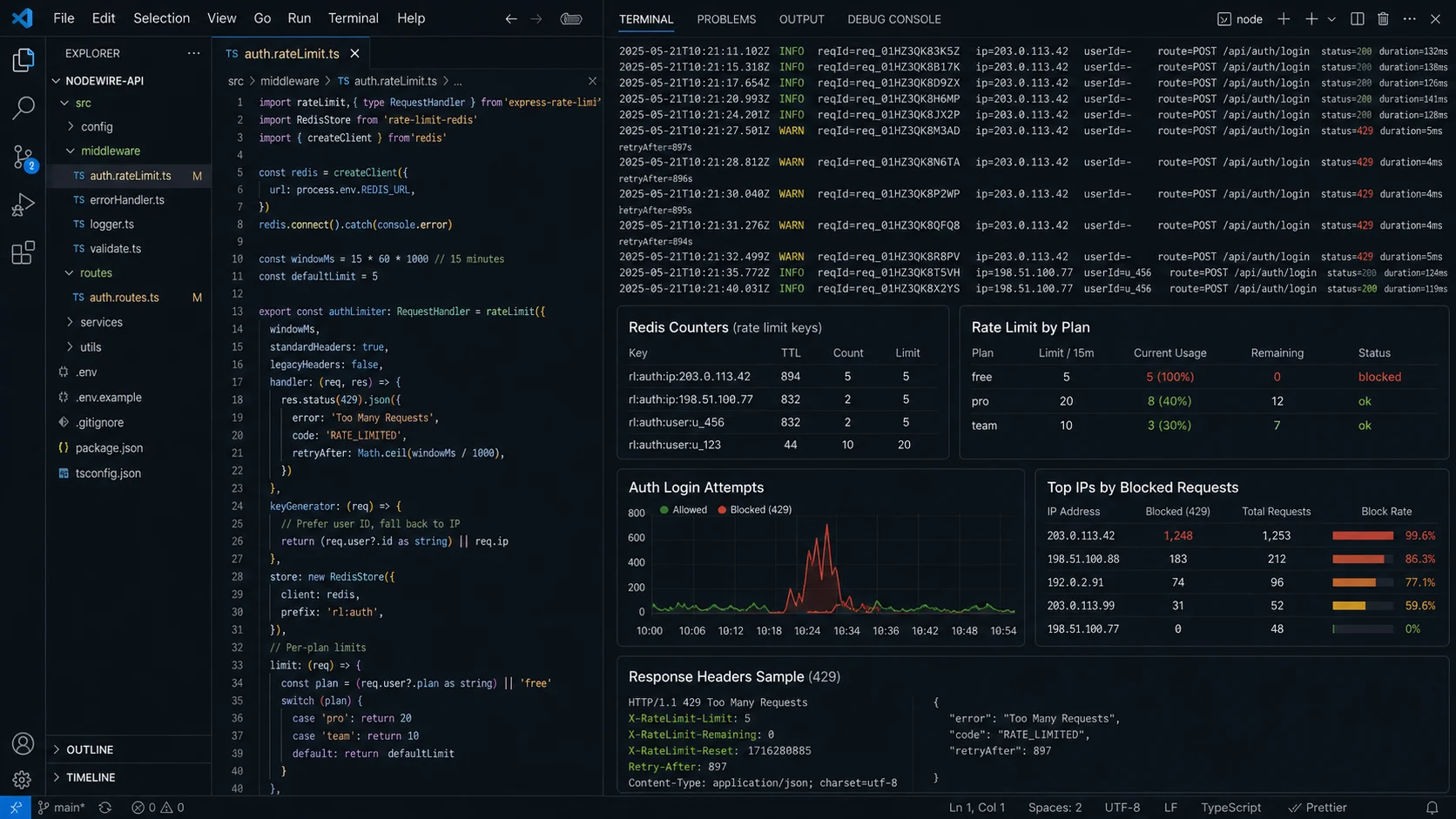
Step 3: tighter limits on auth endpoints (and the trick that saves real users)
The login endpoint should not have the same limit as GET /api/health. I run a much stricter limiter on auth routes — and I count failures separately from successes:
// src/limiters/login.ts
import { rateLimit } from "express-rate-limit";
import { RedisStore } from "rate-limit-redis";
import { redis } from "../redis.js";

export const loginLimiter = rateLimit({
  windowMs: 15 * 60_000,
  limit: 5,
  standardHeaders: "draft-8",
  legacyHeaders: false,
  ipv6Subnet: 56,
  skipSuccessfulRequests: true,           // the trick — only failures count
  message: { error: "Too many login attempts. Try again in 15 minutes." },
  store: new RedisStore({ sendCommand: (...a) => redis.call(...a), prefix: "rl:login:" }),
});

app.post("/auth/login", loginLimiter, loginHandler);
skipSuccessfulRequests: true is the bit that matters. A successful login doesn’t count toward the 5-per-15-minute budget. Five wrong passwords in a row locks the IP out for fifteen minutes. Five right ones never trip it. Pair this with proper auth (short-lived access tokens, rotated refresh tokens) — the full pattern is in the JWT authentication guide. OWASP’s brute-force guidance recommends 5–10 attempts per 15 minutes for password endpoints; I default to 5.
Step 4: the algorithm comparison nobody runs honestly
Four rate-limiting algorithms ship in production code. They have different traffic shapes and different abuse profiles. Most “express rate limiting” tutorials skip this entirely.
| Algorithm | Burst tolerance | Fairness | Memory | Best for |
|---|---|---|---|---|
| Fixed window | 2× limit at boundary | Low — clock-aligned | 1 key per user | Simple per-IP throttling |
| Sliding window log | Exact | High — true rolling rate | N entries per user | Pricing-tier APIs (every request counted) |
| Sliding window counter | ~1.5× limit | Medium | 2 keys per user | General-purpose, low-overhead |
| Token bucket | Configurable burst | High | 2 fields per user | Bursty clients you want to allow |
| Leaky bucket | Smooth fixed rate | High | 2 fields per user | Protecting a downstream rate-limited API |
express-rate-limit uses fixed windows. The downside: a client can burst at the very end of one window and the very beginning of the next, effectively doubling the limit at the boundary. For most APIs this is fine — abuse traffic rarely targets clock boundaries. For APIs where smooth throttling matters (you’re forwarding to a paid third-party API priced per call), use a token bucket via rate-limiter-flexible.
Step 5: token bucket with rate-limiter-flexible
npm i rate-limiter-flexible@^5// src/limiters/token-bucket.ts
import { RateLimiterRedis } from "rate-limiter-flexible";
import type { Request, Response, NextFunction } from "express";
import { redis } from "../redis.js";
const bucket = new RateLimiterRedis({
storeClient: redis,
keyPrefix: "rl:tb",
points: 100, // bucket capacity — burst budget
duration: 60, // refill window in seconds
blockDuration: 300, // optional 5-minute block on overflow
execEvenly: true, // smooth distribution across the window
});
export async function tokenBucket(req: Request, res: Response, next: NextFunction) {
const userId = (req as { user?: { id?: string } }).user?.id;
const key = userId ?? req.ip ?? "anon";
try {
const r = await bucket.consume(key, 1);
res.set({
"RateLimit": `${100};w=60;remaining=${r.remainingPoints}`,
"RateLimit-Remaining": String(r.remainingPoints),
"RateLimit-Reset": String(Math.ceil(r.msBeforeNext / 1000)),
});
next();
} catch (rejRes) {
const r = rejRes as { msBeforeNext?: number };
const retryAfter = Math.ceil((r.msBeforeNext ?? 1000) / 1000);
res.set("Retry-After", String(retryAfter));
res.status(429).json({
error: "Rate limit exceeded",
retryAfter,
});
}
}execEvenly: true is the meaningful flag. Instead of accepting 100 requests in the first second of the window and rejecting for 59 more, it spaces them. This matters for upstream services that get DDoS-pattern traffic from your “well-behaved” client. The 429 response includes Retry-After in seconds — the IETF standard header for “wait this long before retrying” — defined in RFC 6585.
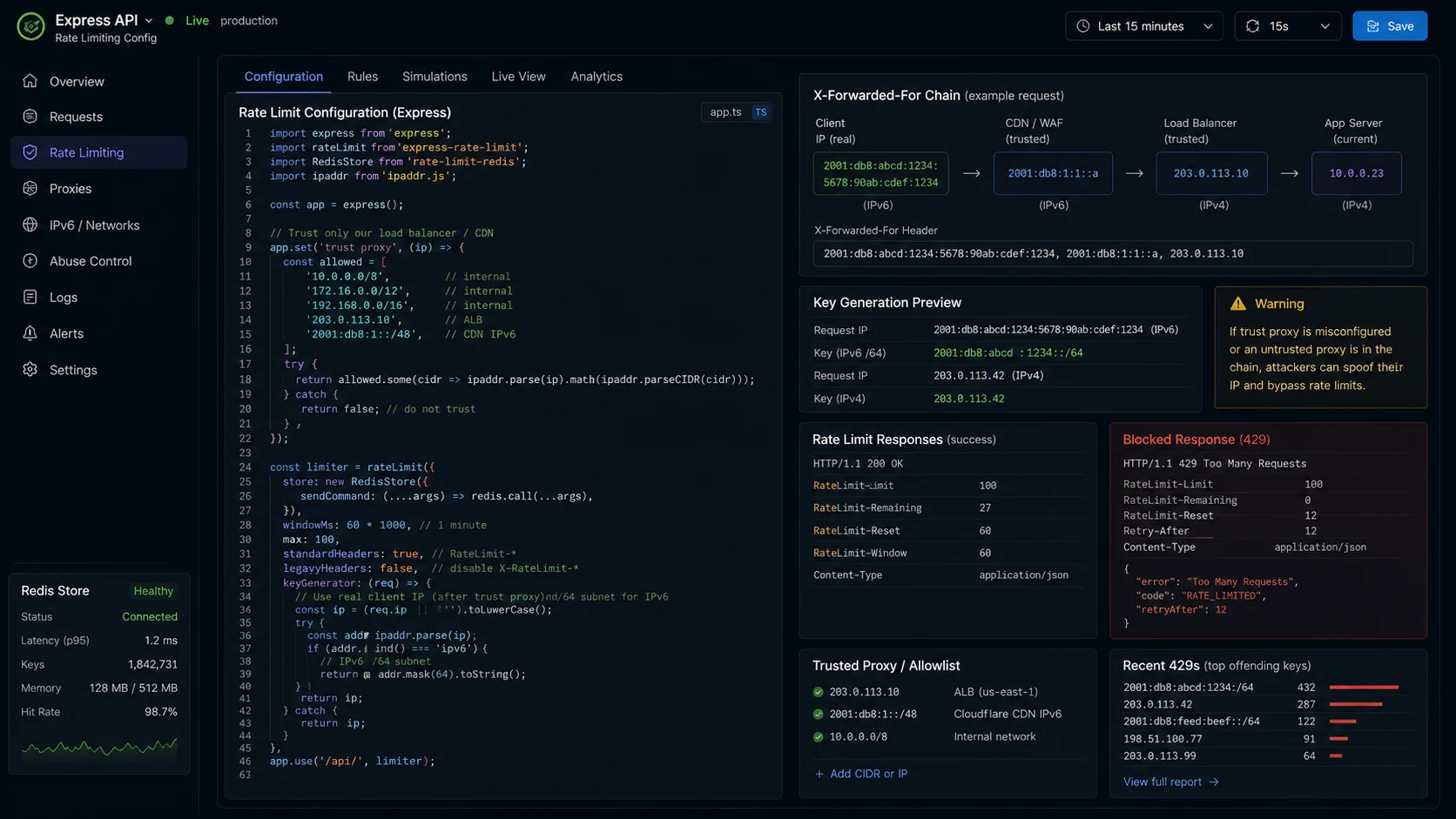
Step 6: trust proxy correctly (or your IPs are wrong, or your IPs are spoofable)
If your Express app sits behind nginx, a load balancer, or Cloudflare, req.ip is the proxy’s IP — not the client’s. Rate limiting becomes “everyone counts as the same key” and your service is wide open to a single bad actor.
The fix is app.set("trust proxy", N) where N is the number of proxy hops you control. The danger is setting it too high.
// behind one proxy hop (nginx on the same box, or Heroku/Fly.io router)
app.set("trust proxy", 1);

// behind nginx + cloudflare (two hops, both controlled)
app.set("trust proxy", 2);

// trust the immediate upstream IP if it's in a private range — typical AWS ALB
app.set("trust proxy", "loopback, linklocal, uniquelocal");

// dangerous — only safe if your upstream strips X-Forwarded-For from clients
app.set("trust proxy", true);
Set this once at the app level. trust proxy: true with no upstream stripping of X-Forwarded-For means a client can spoof their IP by setting the header themselves and bypass the limiter completely. The Express docs on proxies cover the whole surface. The express-rate-limit project ships a validation check that yells in the logs when your trust proxy setting and the actual X-Forwarded-For chain length don’t match.
Step 7: fail closed or fail open?
Redis goes down at some point. Two strategies for what happens then:
- Fail closed — return 503 on store error. Safe but customer-visible.
passOnStoreError: false(the default in v8). - Fail open — let requests through when the store errors. Customer-invisible but defeats the limiter.
passOnStoreError: truein v7.4+.
const apiLimiter = rateLimit({
  windowMs: 60_000,
  limit: 100,
  store: new RedisStore({ sendCommand: (...a) => redis.call(...a), prefix: "rl:api:" }),
  passOnStoreError: true,                   // explicit choice — survive a Redis incident
  // log every fail-open so you know it happened
  logger: {
    warn: (msg) => console.warn({ event: "rate_limit_store_error", msg }),
    error: (msg) => console.error({ event: "rate_limit_store_error", msg }),
  },
});
For most APIs I default to passOnStoreError: false — you’d rather drop traffic than be defenceless during a Redis outage. For APIs where availability matters more than abuse prevention (a public read API in front of a CDN), fail open with loud logging. The custom logger option landed in v8.4 — it lets you ship the warning to Pino instead of console.
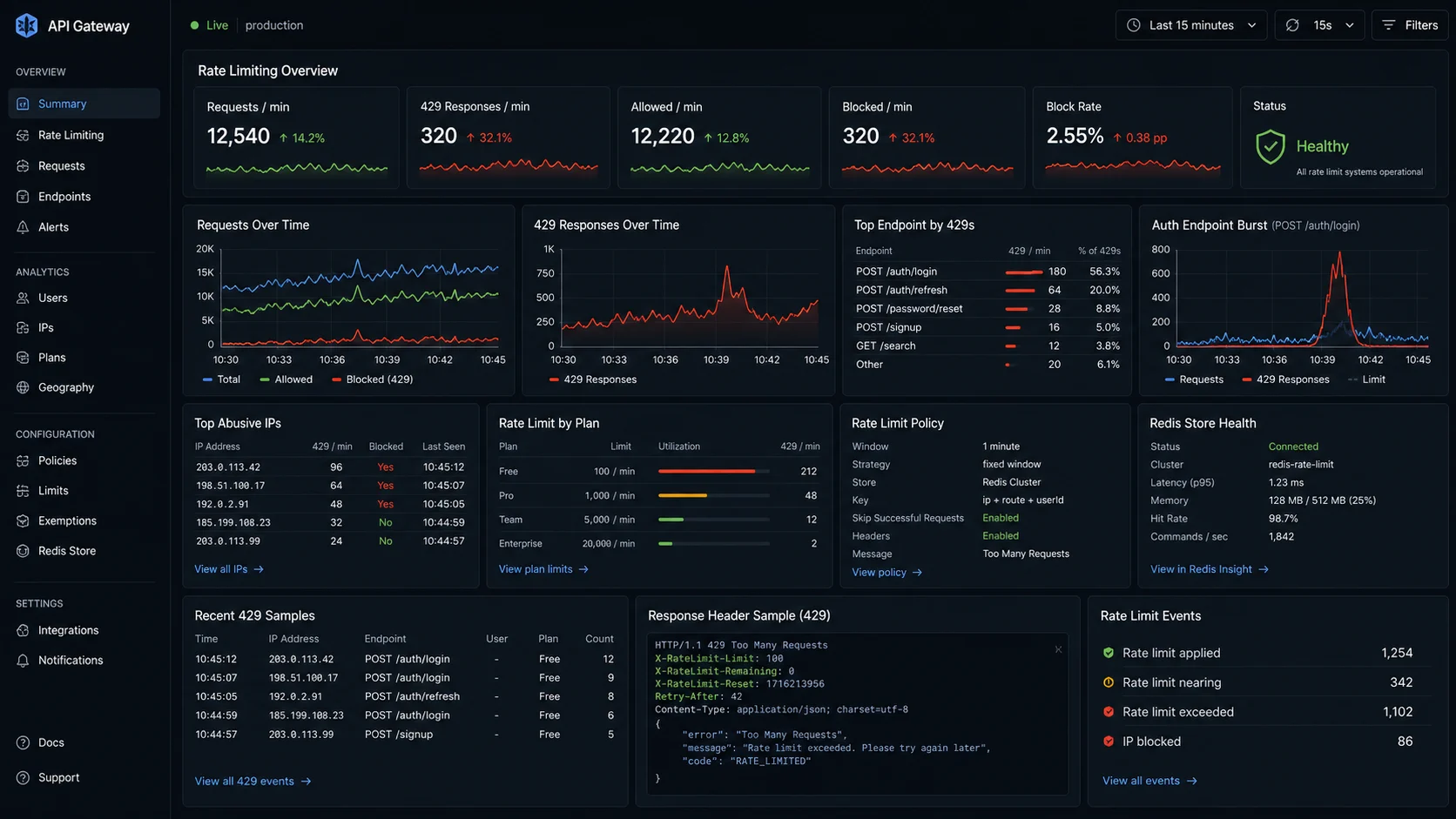
Step 8: structured logging and a dashboard for hits
Every 429 should be visible in your log aggregator. The custom handler option lets you log every limit hit:
import { rateLimit } from "express-rate-limit";
import { logger } from "../logger.js";

export const apiLimiter = rateLimit({
  windowMs: 60_000,
  limit: 100,
  standardHeaders: "draft-8",
  legacyHeaders: false,
  handler: (req, res, _next, options) => {
    logger.warn({
      event: "rate_limit_exceeded",
      ip: req.ip,
      userId: (req as { user?: { id?: string } }).user?.id,
      path: req.path,
      method: req.method,
      limit: options.limit,
      windowMs: options.windowMs,
    }, "rate limit hit");
    res.status(429).json({
      error: "Too many requests",
      retryAfter: Math.ceil(options.windowMs / 1000),
    });
  },
});
Pino’s logger.warn on every 429 makes rate-limit hits visible — Pino vs Winston comparison covers the setup. Alert on the rate of 429s as a fraction of total traffic; a sudden spike means either a botnet or a frontend bug.
The bug that bit me (lesson: never one global limiter)
An e-commerce checkout API was rate-limited at 30 req/min per user. We added a feature that retried payment-provider webhooks on failure with exponential backoff. The retries were triggered from the client side. Within an hour, customers were getting 429s on completely legitimate payment flows — the retry storm chewed through their per-user budget while the original transaction was already mid-flight.
The fix was splitting the limiter into two: a tight one for “writes” (checkout, profile update) and a generous one for read-heavy paths (cart fetch, product detail). Same Redis backend, different prefixes, different limits:
const writeLimiter = rateLimit({
  windowMs: 60_000,
  limit: 20,
  store: new RedisStore({ sendCommand: (...a) => redis.call(...a), prefix: "rl:w:" }),
});
const readLimiter = rateLimit({
  windowMs: 60_000,
  limit: 200,
  store: new RedisStore({ sendCommand: (...a) => redis.call(...a), prefix: "rl:r:" }),
});

app.use("/api/cart", readLimiter);
app.use("/api/products", readLimiter);
app.use("/api/checkout", writeLimiter);
app.use("/api/profile", writeLimiter);
One global limiter is rarely the right shape. Different endpoints have different cost and abuse profiles. A read on /products/123 can fan out to a CDN-cached response in 1ms; a write to /checkout hits Stripe and writes to Postgres. Treating them the same wastes either security headroom or customer experience. Pick a number that hurts attackers and not legitimate users.
Decision matrix: which limiter for which endpoint
| Endpoint type | Limit | Window | Key | Algorithm | Notes |
|---|---|---|---|---|---|
| Login / register / password-reset | 5 | 15 min | IP (fall back from user) | Fixed window | skipSuccessfulRequests: true |
| Authenticated read API | 200 | 1 min | User ID | Fixed window | Fall back to IP |
| Authenticated write API | 20–60 | 1 min | User ID | Fixed window | Fall back to IP |
| Public read API (no auth) | 100 | 1 min | IP /56 | Fixed window | Most abuse target |
| Outbound proxy to paid 3rd-party | Match upstream | 1 min | User ID | Token bucket | execEvenly: true |
| Health checks / metrics | — | — | — | Skip entirely | Mount before the limiter |
| Webhooks (Stripe, GitHub) | 500–1000 | 1 min | Source IP allowlist | Skip if signature OK | Verify HMAC before counting |
Health checks should never be rate limited — your load balancer pings /health every few seconds and a tight global limit will mark your service as unhealthy for no reason. Mount the limiter on /api/, not on /, and put /health outside that prefix.
Step 9: tier limits by user plan (the SaaS pattern)
If your API is the product, different paying tiers get different ceilings. Use the limit option as a function of the request:
const tieredLimiter = rateLimit({
  windowMs: 60_000,
  limit: (req) => {
    const tier = (req as { user?: { tier?: string } }).user?.tier ?? "free";
    return ({
      free: 60,
      starter: 300,
      pro: 1000,
      enterprise: 10_000,
    } as const)[tier as "free" | "starter" | "pro" | "enterprise"] ?? 60;
  },
  keyGenerator: (req) => {
    const userId = (req as { user?: { id?: string } }).user?.id;
    if (userId) return `u:${userId}`;
    return ipKeyGenerator(req.ip ?? "anon");
  },
  standardHeaders: "draft-8",
  legacyHeaders: false,
  store: new RedisStore({ sendCommand: (...a) => redis.call(...a), prefix: "rl:tier:" }),
});
The tier comes from your auth middleware, not a database round-trip per request — keep that on the JWT claims so the limiter is one Redis call, not two. The JWT authentication article covers tier claims.
When NOT to rate-limit at the application layer
- You have an upstream WAF or API gateway. Cloudflare Rate Limiting, AWS WAF, Kong, Apigee — they drop the request before it costs you a Node.js cycle. Application-layer rate limiting is the second line of defence, not the first. Both is fine; only one is wasteful.
- The endpoint is for trusted internal services only. Service-to-service calls inside a VPC don’t need rate limits — they need authentication and circuit breakers. Rate limiting your own services causes more outages than it prevents (covered in the Node.js API security checklist).
- You can’t tolerate a Redis dependency. If Redis being down means your API stops accepting traffic and you can’t fail open without compromising security, you’ve added a single point of failure. Better answer: keep Redis HA (managed Redis on AWS ElastiCache, Upstash, or Redis Cloud) and skip the question.
- You need true DDoS protection. By the time the request reaches Node.js, you’ve already paid the connection cost. App-layer rate limiting protects your downstream services (DB, payment provider) from over-traffic. For DDoS, use Cloudflare, AWS Shield, or a similar edge layer.
Express vs Fastify rate limiting (one-paragraph version)
Fastify has @fastify/rate-limit, which is faster than express-rate-limit on Fastify because it reuses Fastify’s internal hooks and skips the Express middleware overhead. On a Fastify 5.x app I ran benchmarks against last year, the same Redis-backed limit hit 30% more throughput at p99. If you’re already on Fastify, use @fastify/rate-limit — the API is similar enough that this article’s patterns translate. If you’re picking between the two frameworks, the Express vs Fastify comparison covers the broader trade-off.
Production checklist
- Redis-backed store for any deployment with more than one Node.js instance.
rate-limit-redis+ioredis. - Per-limiter prefix in Redis (
rl:api:,rl:login:) so counters don’t collide. standardHeaders: "draft-8"for the IETF combined header.legacyHeaders: false.ipv6Subnet: 56default in v8 — keep it. Don’t go above /64 unless you understand the bypass.- Custom
keyGeneratorusesipKeyGenerator()for the IP fallback when authenticated. - Per-route limits for auth (5/15min,
skipSuccessfulRequests: true), writes (20–60/min), reads (200+/min). app.set("trust proxy", N)matches your real proxy chain. Nevertrueunless your edge stripsX-Forwarded-For.- Decide fail-open vs fail-closed on Redis outage.
passOnStoreError+ log every store error. - Custom
handleremits a structured log line on every 429 — track 429-rate as an alert. - Skip rate limiting for
/healthand other infra endpoints — mount the limiter on the API prefix, not the root. - Edge rate limiting in front (Cloudflare or WAF) plus app-layer behind it — the two are complementary.
- Webhooks have their own path with HMAC verification before any counter is bumped — don’t waste budget on signed traffic.
Troubleshooting FAQ
How do I add rate limiting to an Express.js app?
Install express-rate-limit and a Redis-backed store (rate-limit-redis). Configure a window and limit, then mount the middleware on the routes you want to protect. Use a per-user keyGenerator for authenticated endpoints and ipKeyGenerator() for the IP fallback. Set app.set("trust proxy", N) to match your proxy chain.
Why does my rate limit not work behind nginx?
Express needs app.set("trust proxy", N) to read the client IP from X-Forwarded-For. Without it, every request looks like it came from the proxy’s IP and your limiter counts everyone as one client. The express-rate-limit v8 validation check warns about this in startup logs.
Should I use express-rate-limit or rate-limiter-flexible?
express-rate-limit for fixed-window limiting on standard Express apps — simple, well-trodden, integrates cleanly with the headers spec. rate-limiter-flexible when you need token bucket, leaky bucket, or other smoother strategies, or when you’re not on Express (Fastify, Koa, Nest, raw Node). Both work. The choice is about algorithm, not framework.
What is the difference between fixed window and token bucket rate limiting?
Fixed window resets the counter at clock boundaries — simple, allows up to 2× the limit at the boundary. Token bucket refills tokens at a steady rate and lets clients consume them — smoother, more memory per user, configurable burst. For abuse prevention, fixed window is fine. For protecting downstream rate-limited APIs (Stripe, OpenAI), use a token bucket.
How do I rate limit per user instead of per IP?
Use keyGenerator to return the authenticated user ID instead of the IP. Mount the limiter after your authentication middleware so req.user is populated. Fall back to IP for unauthenticated requests, and use the ipKeyGenerator() helper to apply the v8 IPv6 subnet masking.
What does skipSuccessfulRequests do, and when should I use it?
It tells the limiter to only count requests that returned a 4xx/5xx status. On login endpoints, this means a successful login doesn’t burn budget — only wrong passwords count toward the 5-per-15-minute lockout. It’s the difference between “five logins per quarter-hour” (annoying for legitimate users) and “five wrong passwords per quarter-hour” (annoying only for attackers).
Will rate limiting protect me from a DDoS attack?
No, not at the application layer. By the time the request reaches your Node.js process you’ve already paid the connection cost. App-layer rate limiting protects your downstream services (database, payment provider, third-party APIs) from over-traffic. For volumetric DDoS, use Cloudflare, AWS Shield, or another edge layer.
What’s the right limit value to use?
Look at your real traffic for a week. Compute p99 requests-per-minute per user. Set the limit at 3–5× that. If your p99 user makes 40 req/min, set the limit at 150. You want false positives to be rare; you do not want to accidentally rate-limit your most active customer.
Does rate-limit-redis work with Upstash, AWS ElastiCache, and Redis Cloud?
Yes — all three speak the Redis protocol that ioredis uses. Upstash’s HTTP-mode REST API is not compatible; use their Redis-protocol endpoint. ElastiCache and Redis Cloud need TLS in production; configure tls: {} on the ioredis connection.
Can I use the same rate-limit-redis store across multiple limiters?
No — each limiter needs its own Store instance. v7.3 added a validation check that warns when you reuse a Store. The reason is that the Store holds per-limiter state; sharing it produces confusing counts. One new RedisStore() per limiter, with a unique prefix.
What ships next
Rate limiting is the bouncer at the door. The next question is what happens once the request gets past — input validation with Zod, authentication that scales beyond a single Redis hit, and structured logging that ties every 429 to the user that triggered it. Express async error handling covers the response shape that pairs cleanly with your 429s. Postgres with Prisma covers the persistence layer the limiter is protecting. And the Node.js API security checklist ties the whole stack together.