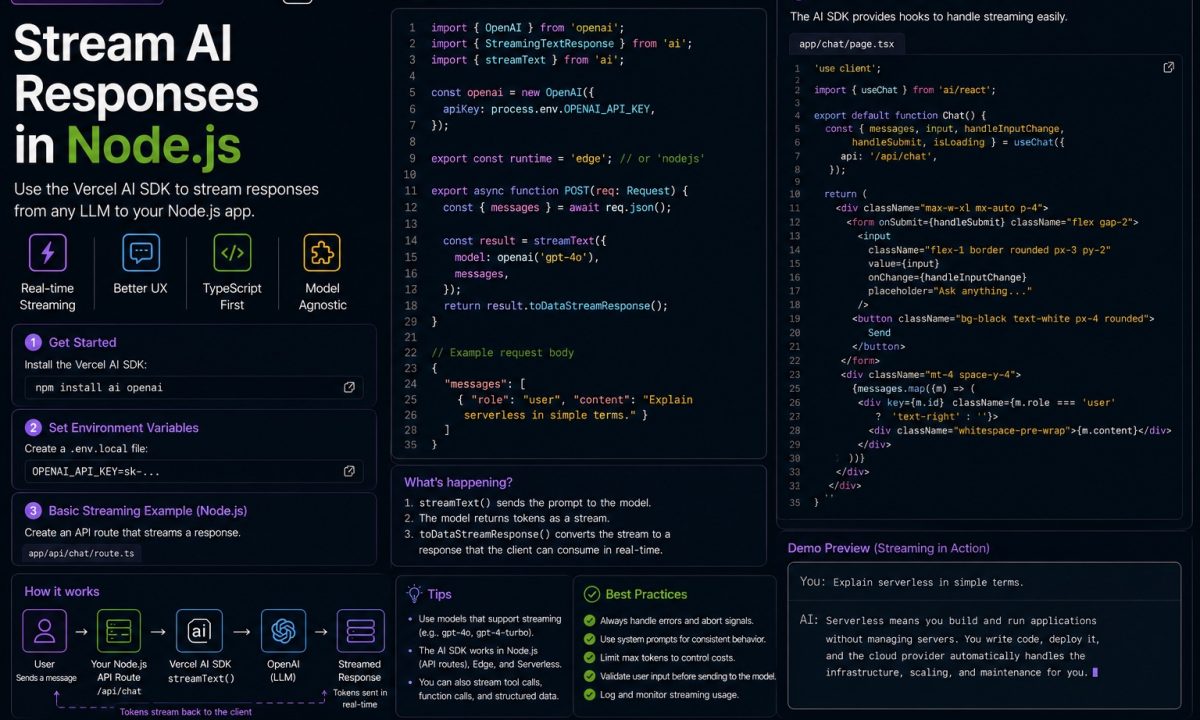
A client of mine had a support-assistant endpoint that called an LLM, waited for the whole answer, then sent it back as one JSON blob. Median response was 6.8 seconds. People hammered the send button twice because they assumed it had hung. The model wasn’t slow — it was producing tokens the entire time. We were just sitting on them until the last one arrived.
The streaming setup
For AI streaming in Node.js with the Vercel AI SDK, use streamText() for token-by-token text, expose the stream over SSE or your framework’s response helper, and switch providers by changing the model adapter rather than rewriting the route. Add abort handling, backpressure awareness, and token budgeting before you call the endpoint production-ready.
Vercel AI SDK streaming fixes exactly that. Instead of await on a complete response, you forward each token to the client as the model emits it. Time-to-first-token on that same endpoint dropped to roughly 400ms. The total generation time barely moved, but perceived latency went from “is this broken” to “it’s typing.” That’s most of the reason the SDK exists.
This is a backend guide. No React, no useChat hook. Just Node 20+, TypeScript, and an HTTP server pushing tokens.
The packages you actually need
The SDK splits into a core package and one provider package per model vendor. Install the current ai package plus only the providers you actually call, then pin versions in package.json so a minor documentation drift does not silently change streaming behavior under you.
npm install ai @ai-sdk/openai @ai-sdk/anthropic zod
ai gives you streamText, generateText, streamObject, and the tool helper. The two provider packages give you the model factory functions. zod is for structured output and tool schemas — you’ll want it within the hour.
Set your keys as environment variables. Keep model IDs in environment variables too, especially if you swap providers. The provider functions read OPENAI_API_KEY and ANTHROPIC_API_KEY automatically, so you don’t pass secrets in code:
export OPENAI_API_KEY=sk-...
export ANTHROPIC_API_KEY=sk-ant-...
The streaming helpers lean on Web Streams and async iterators. Use a supported Node LTS line — Node 20 or newer is the safe floor for these examples — and do not build new streaming infrastructure on an EOL runtime.
Your first stream: iterating textStream in Node
Before wiring up a server, prove the stream works in a plain script. streamText returns immediately — it does not return a promise you await for the text. The result object hands you textStream, which is both an async iterable and a ReadableStream (the streamText reference lists every return property). You loop over it. If async iterables and ReadableStream feel fuzzy, my Node.js streams guide covers the underlying machinery.
import { streamText } from 'ai';
import { openai } from '@ai-sdk/openai';

async function main() {
  const result = streamText({
    model: openai('gpt-5.5'),
    prompt: 'Explain database connection pooling in three sentences.',
  });

  for await (const chunk of result.textStream) {
    process.stdout.write(chunk);
  }
  process.stdout.write('n');
}

main();
Run that and you’ll watch the answer materialize a few tokens at a time. The for await is where the network call actually gets consumed — if you forget to iterate the stream (or read any of the result promises), nothing happens, because the SDK uses backpressure and won’t pull tokens nobody asked for.
A failure mode to know upfront: streamText deliberately does not throw on provider errors mid-stream. A 429 or a dropped connection halfway through won’t crash your loop — it’ll just end. If you need to see those errors, you pass an onError callback (more below). Silent truncation is the single most confusing thing about this API when you first hit it.
Streaming over HTTP: piping to an Express or Fastify response
The terminal demo is nice. Production needs those tokens going down an HTTP socket to a browser. The SDK ships helpers that pipe straight to a Node ServerResponse, so you don’t hand-roll the chunked-transfer plumbing. Here’s a raw text stream over Express — pipeTextStreamToResponse writes the tokens as text/plain with chunked encoding:
import express from 'express';
import { streamText } from 'ai';
import { anthropic } from '@ai-sdk/anthropic';

const app = express();
app.use(express.json());

app.post('/api/chat', (req, res) => {
  const result = streamText({
    model: anthropic('claude-sonnet-4-6'),
    prompt: req.body.prompt,
  });

  result.pipeTextStreamToResponse(res);
});

app.listen(3000);
On the browser side you read it with fetch and a ReadableStream reader — no SDK required on the client to consume raw text. If you’d rather push proper Server-Sent Events (so a standard EventSource works, with data: framing and auto-reconnect), use the UI message stream helper instead, which sets the SSE content type and event format for you:
app.post('/api/chat-sse', (req, res) => {
  const result = streamText({
    model: anthropic('claude-sonnet-4-6'),
    prompt: req.body.prompt,
  });

  result.pipeUIMessageStreamToResponse(res);
});
Fastify works the same way — both helpers take the underlying Node response object. In Fastify that’s reply.raw. The one gotcha: once you hand the raw socket to the SDK, don’t also call reply.send(), or Fastify will fight the SDK over who owns the response. Pick one.
Switching providers without rewriting your code
This is the part I genuinely like. The model is an argument, not an architecture. Swapping OpenAI for Anthropic is one line, because both provider functions return the same model interface that streamText consumes (the providers list shows the full set). If you’re coming from the raw vendor SDKs, I’ve also written up the OpenAI API in Node and the Claude API in Node directly.
// OpenAI
const result = streamText({
  model: openai('gpt-5.5'),
  prompt,
});

// Anthropic — same call, one line changed
const result = streamText({
  model: anthropic('claude-sonnet-4-6'),
  prompt,
});
In real code I keep a tiny factory so the provider is config, not a hardcode:
import { openai } from '@ai-sdk/openai';
import { anthropic } from '@ai-sdk/anthropic';

function pickModel(name: string) {
  if (name.startsWith('claude')) return anthropic(name);
  return openai(name);
}
I’d push back on one piece of the marketing, though: “switch providers in one line” is true for the call, not for your prompts. Models have different temperaments. A prompt tuned for GPT can get chattier or more literal on Claude, and tool-call formatting differs in subtle ways. The transport is identical; the behavior isn’t. Test both before you flip a flag in prod.
Streaming structured data with streamObject
Sometimes you don’t want prose — you want JSON that matches a schema, rendered as it fills in. A product-extraction endpoint that streams fields into a form, say. streamText gives you a string; streamObject gives you a progressively-completing object validated against Zod.
import { streamObject } from 'ai';
import { openai } from '@ai-sdk/openai';
import { z } from 'zod';

const result = streamObject({
  model: openai('gpt-5.5'),
  schema: z.object({
    title: z.string(),
    summary: z.string(),
    tags: z.array(z.string()),
  }),
  prompt: 'Summarize this support ticket: ...',
});

for await (const partial of result.partialObjectStream) {
  console.log(partial); // { title: "Refund..." } then grows field by field
}

const final = await result.object; // fully validated, typed
partialObjectStream yields the object as it grows — early values are incomplete and some fields still undefined, which is exactly what a live-filling UI wants. When you need the finished, schema-validated result, await result.object. That promise rejects if the model produces something that doesn’t satisfy the schema, so wrap it in a try/catch.
One caveat that has bitten me: streamObject can’t also call tools. If you need structured output and tool calls in the same generation, use streamText with the Output.object() option instead.
Tool calls in the middle of a stream
Real assistants don’t just talk — they look things up. The model decides it needs the current order status, calls your function, gets the result, and keeps generating with that data folded in. The SDK runs that loop for you when you pass tools and a stop condition.
import { streamText, tool, stepCountIs } from 'ai';
import { anthropic } from '@ai-sdk/anthropic';
import { z } from 'zod';

const result = streamText({
  model: anthropic('claude-sonnet-4-6'),
  prompt: 'What is the status of order 4815?',
  tools: {
    getOrderStatus: tool({
      description: 'Look up the current status of an order by ID',
      inputSchema: z.object({ orderId: z.string() }),
      execute: async ({ orderId }) => {
        const row = await db.orders.findById(orderId);
        return { status: row?.status ?? 'not_found' };
      },
    }),
  },
  stopWhen: stepCountIs(5),
});

for await (const chunk of result.textStream) {
  process.stdout.write(chunk);
}
The tool helper pairs a Zod inputSchema with an execute function. The SDK validates the model’s arguments against that schema before your code runs, so a hallucinated field gets rejected, not passed to your database. stopWhen: stepCountIs(5) caps the loop — without a stop condition a model that keeps calling tools spins until it hits the SDK’s default ceiling of 20 steps. I set an explicit cap on every tool-enabled call. A runaway agent that hits a paid API forty times in a loop is a real way to set money on fire.
To watch tool calls and results stream by alongside the text, iterate result.fullStream instead of textStream. It emits typed parts: text deltas, tool-call events, tool results, finish events.
Errors, aborts, backpressure, and the bill
Four things that separate a demo from something you’d put on call.
Errors. Because streamText swallows mid-stream errors by design, you need onError to log them. Without it, a provider outage looks like a short answer.
const result = streamText({
  model: openai('gpt-5.5'),
  prompt,
  onError({ error }) {
    logger.error({ err: error }, 'stream failed mid-flight');
  },
});
Aborting. When a user closes the tab, don’t keep paying for tokens nobody will read. Wire an AbortSignal to the request. Express gives you req.on('close'); pass the controller’s signal into streamText.
const controller = new AbortController();
req.on('close', () => controller.abort());

const result = streamText({
  model: openai('gpt-5.5'),
  prompt,
  abortSignal: controller.signal,
});
On abort the SDK stops pulling tokens and cancels the provider call, so you stop being billed for the rest of the generation.
Backpressure. The pipe helpers respect the TCP socket. If the client reads slowly — a phone on a weak connection — the SDK won’t buffer the whole response in memory ahead of it. That’s a property of the underlying Web Streams, and it’s why a slow reader doesn’t blow up your heap. You get it for free, as long as you use the pipe helpers instead of collecting everything into a string first.
Cost. Streaming doesn’t change your token bill — same tokens, same price — but you can read it. onFinish (or awaiting result.usage) gives you inputTokens, outputTokens, and totalTokens once generation completes. Log it per request and you’ll spot the prompt that quietly tripled your spend.
const result = streamText({
  model: openai('gpt-5.5'),
  prompt,
  onFinish({ usage }) {
    logger.info({ usage }, 'tokens used'); // { inputTokens, outputTokens, totalTokens }
  },
});
Where buffering is better
Streaming is the default for chat, but it’s the wrong call in plenty of places.
Short responses don’t benefit. If the model returns a single classification label or a yes/no, the whole answer arrives in one or two chunks anyway — streaming adds chunked-transfer overhead for nothing. Use generateText and send JSON.
Batch jobs shouldn’t stream. A nightly summarizer processing 10,000 tickets has no human watching tokens appear. Buffer the result, write it to the database, move on.
And don’t stream when you need the complete object before you can act on it. If the LLM output feeds a validation step, a payment calculation, or anything that has to be whole and correct before the next line runs, streaming partial state buys you nothing and tempts you into acting on half an answer. Await the full result with generateText or generateObject, validate, then proceed. Stream what a person reads; buffer what your code consumes.
FAQ
Do I need React or Next.js to use the Vercel AI SDK?
No. The ai core package and the provider packages run in plain Node. streamText, streamObject, and the pipeTextStreamToResponse / pipeUIMessageStreamToResponse helpers work in any Node 18+ server — Express, Fastify, or a raw http server. The React hooks like useChat live in a separate UI package you simply don’t install for a backend-only project.
What’s the difference between textStream and fullStream?
textStream yields only the generated text as plain strings — it’s what you want for a typing-effect UI. fullStream yields typed events for everything happening in the generation: text deltas, tool calls, tool results, reasoning, and the final finish event with usage. Reach for fullStream when you need to observe or render tool activity, and textStream when you just want the words.
How do I stream Server-Sent Events specifically?
Use result.pipeUIMessageStreamToResponse(res), which sets the SSE content type and frames each chunk as a data: event, so a standard browser EventSource can consume it with automatic reconnection. If you only need raw chunked text and will read it with fetch plus a stream reader, pipeTextStreamToResponse is lighter. Both take the Node response object — in Fastify, pass reply.raw.
Can I switch from OpenAI to Anthropic without rewriting my route?
The call changes by one line: swap openai('gpt-5.5') for anthropic('claude-sonnet-4-6'), since both return the same model interface streamText expects. Your routing, streaming, and response handling stay identical. The catch is prompt behavior — models differ in tone and tool-call formatting, so a prompt tuned for one can read differently on the other. Test both before you flip providers in production.
How do I stop the model from running tool calls forever?
Pass a stop condition with stopWhen. The common one is stepCountIs(n), which halts the tool-calling loop after n steps. The SDK defaults to a ceiling of 20 steps, but I set an explicit, lower cap on every tool-enabled call so a model that keeps deciding to call a paid API can’t spin out of control and run up the bill.
Does streaming cost more than a regular request?
No. You’re billed for the same input and output tokens whether you stream them or buffer them — streaming only changes when you receive them, not how many there are. You can read the exact counts from result.usage or the onFinish callback, which returns inputTokens, outputTokens, and totalTokens once the generation finishes.
Why does my stream end early with no error?
streamText suppresses provider errors mid-stream by design, so a rate limit, timeout, or dropped connection ends the loop silently instead of throwing. Add an onError callback to log what actually happened. For server-side runs you should also wire an AbortSignal to the request lifecycle so a client disconnect cancels the generation cleanly rather than leaving it billing in the background.