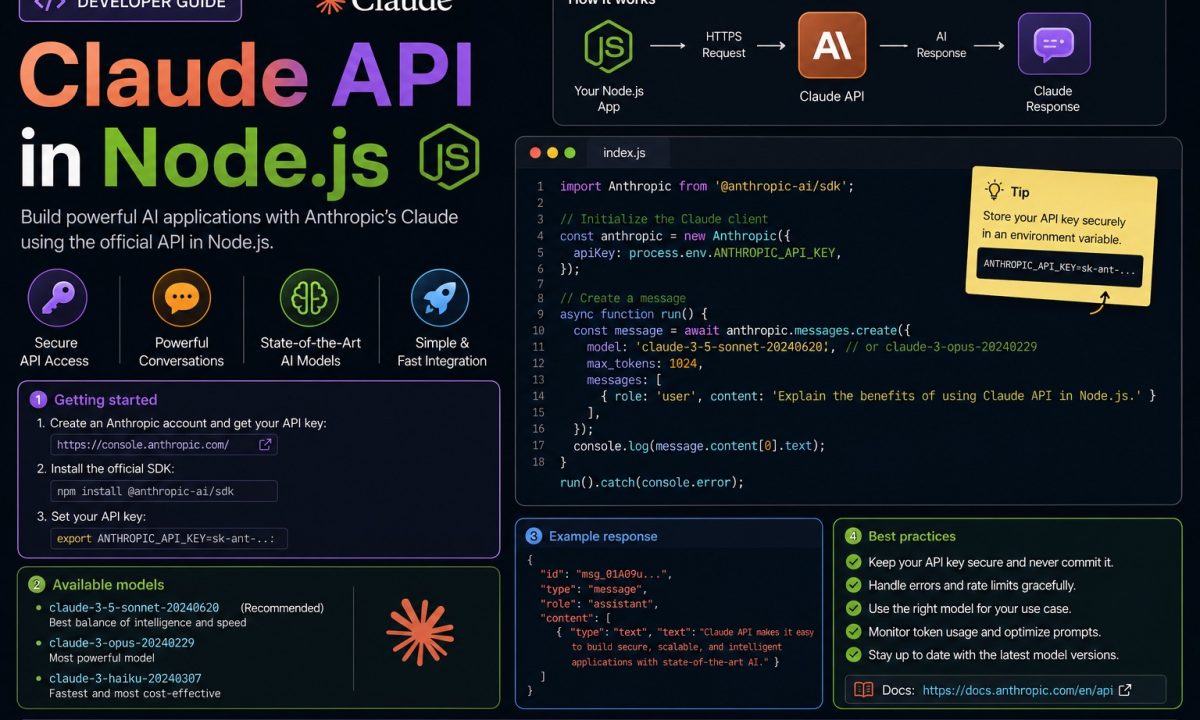
A client wants an AI summarizer bolted onto their support inbox: ~400 tickets a day, each a wall of text, agents wanting a three-line gist before they open it. You reach for the Claude API in Node.js because the summaries need to be genuinely good, not keyword soup. The first call works in ten minutes. Then week two hits a traffic burst, you get a wall of 429s at 2pm every weekday, your token bill is triple the estimate because nobody counted the output tokens, and the streaming endpoint you bolted on is silently dropping the last chunk. That gap — between the demo and the thing that survives load — is what this tutorial is about: key handling, the Messages API, streaming, multi-turn, one real tool, and the failure modes I want you thinking about before you deploy.
Production answer
For a production Claude API integration in Node.js, install @anthropic-ai/sdk, keep ANTHROPIC_API_KEY in the environment, call the Messages API with an explicit model and max_tokens, stream longer responses, store conversation history yourself, and handle 429, 529, token usage, and tool safety before you put the feature in front of users.
A reality check first: this isn’t always the right call. If you just need structured JSON out of a fixed prompt and you’re already on Vercel’s stack, the framework abstractions are less code. If the task is deterministic enough for a regex or a small classifier, an LLM is an expensive, slower, occasionally-wrong way to do it. Reach for Claude when the language understanding has to be good and the inputs are open-ended — summarizing arbitrary tickets qualifies; parsing a date out of a string does not.
Everything below runs on a clean Node 20+ install with @anthropic-ai/sdk. The SDK supports Node.js 20 LTS or later, so if you’re on 18, upgrade first.
Install it, and handle the key like it’s radioactive
The package is @anthropic-ai/sdk. One install:
npm install @anthropic-ai/sdk
# at time of writing: @anthropic-ai/sdk@0.104.1
Now the part people get wrong on day one: the API key goes in an environment variable, never in the source. Hard-code sk-ant-... into a file once, push it, and you’ve handed your billing account to anyone who reads the repo — bots scrape public Git history for exactly that string within minutes. The SDK reads ANTHROPIC_API_KEY from the environment automatically, so you don’t even pass it:
import Anthropic from "@anthropic-ai/sdk";

// Reads process.env.ANTHROPIC_API_KEY automatically.
const client = new Anthropic();
Load it from a .env that’s in .gitignore. Node 20.6+ reads dotenv files natively — node --env-file=.env server.js — so you don’t strictly need the dotenv package. Confirm the key is present before any call, or a missing var fails three frames deep with a confusing auth error instead of an obvious one:
if (!process.env.ANTHROPIC_API_KEY) {
  throw new Error("ANTHROPIC_API_KEY is not set — check your .env file");
}
The Node API security checklist goes deeper on env handling, rotation, and what not to log. The one-liner: the key is a bearer credential. Whoever has it is you, as far as billing is concerned.
Your first Messages API call
Everything in the Claude API goes through one endpoint: client.messages.create. No separate chat-vs-completion split to memorize — it’s all Messages. A first call needs a model, a max_tokens ceiling, and a messages array:
import Anthropic from "@anthropic-ai/sdk";

const client = new Anthropic();

const message = await client.messages.create({
  model: "claude-opus-4-8",
  max_tokens: 1024,
  system: "You summarize support tickets in exactly three short bullet points. No preamble.",
  messages: [
    { role: "user", content: "Customer can't log in after the password reset email..." },
  ],
});

// content is an array of typed blocks — find the text one, don't assume [0].
const text = message.content.find((b) => b.type === "text");
console.log(text?.type === "text" ? text.text : "");
Three things to flag. The model string is not something to memorize from a blog post: Anthropic rotates availability, retires older variants, and occasionally changes access by account tier. Use the current Opus, Sonnet, or Haiku ID from the official models page before you deploy. Opus is the most capable tier, Sonnet is the default balance of quality and cost, and Haiku is the high-volume choice. The call shape stays the same when you swap IDs.
The system prompt is the steering wheel — a separate top-level field, not a message with role: "system". Role, format rules, and constraints go here; “three bullets, no preamble” in the system prompt is far more reliable than burying it in the user turn.
And message.content is an array of blocks, not a string — Claude can return text, tool calls, or thinking blocks in one response, so you filter for the type you want. Reaching for message.content[0].text works right up until a thinking block lands at index 0 and you read undefined.
One note on claude-opus-4-8: no temperature knob, no manual thinking budget. It uses adaptive thinking — deciding how hard to think per request — so temperature, top_p, and budget_tokens aren’t accepted and throw a 400. Steer with the prompt, not sampling params.
Streaming, so the UI doesn’t stare at a spinner
A two-paragraph summary takes several seconds. If a user is watching, a non-streaming call means a dead spinner for that whole time — and for long outputs, the idle connection can sit long enough that a proxy drops it and the call fails outright. Streaming fixes both: tokens arrive as generated, and the connection stays warm. The SDK’s messages.stream helper hands you a text event per chunk and accumulates the final message:
import Anthropic from "@anthropic-ai/sdk";

const client = new Anthropic();

const stream = client.messages
  .stream({
    model: "claude-opus-4-8",
    max_tokens: 2048,
    messages: [{ role: "user", content: "Explain connection pooling to a junior dev." }],
  })
  .on("text", (delta) => {
    process.stdout.write(delta); // pipe each chunk to your socket / SSE response
  });

const final = await stream.finalMessage(); // full Message once the stream closes
console.log(`n[${final.usage.output_tokens} output tokens]`);
The detail that saves a bug report: await stream.finalMessage(). That catches the stream’s close cleanly and gives you the complete accumulated message plus usage. Concatenating text events yourself and assuming the loop’s end means you’re done is how you lose the last chunk on a flaky network — let the helper own accumulation. The streaming docs cover the lower-level event types. For max_tokens above ~16K, streaming isn’t optional — the SDK refuses the non-streaming request because it’d likely outlive the timeout.
Multi-turn: the API is stateless, the history is yours
The Claude API does not remember your last call. No session, no server-side conversation ID. “Memory” is entirely Node-side: you keep an array of messages and resend the whole thing each turn. The shape alternates user / assistant, and the assistant’s previous reply has to go back in verbatim or Claude has no idea what it just said.
import Anthropic from "@anthropic-ai/sdk";

const client = new Anthropic();
const history: Anthropic.MessageParam[] = [];

async function ask(userText: string): Promise<string> {
  history.push({ role: "user", content: userText });

  const reply = await client.messages.create({
    model: "claude-opus-4-8",
    max_tokens: 1024,
    system: "You are a terse Node.js mentor.",
    messages: history,
  });

  const text = reply.content.find((b) => b.type === "text");
  const answer = text?.type === "text" ? text.text : "";

  history.push({ role: "assistant", content: answer }); // feed the reply back in
  return answer;
}

await ask("What's an index in Postgres?");
await ask("When would that hurt me?"); // Claude knows "that" means the index
Use Anthropic.MessageParam for the array type — the SDK ships it, so don’t hand-roll your own interface. The catch nobody mentions: this array grows forever, and you pay input tokens on the entire history every turn. A 40-message conversation re-bills all 40 on turn 41, so for long chats, trim old turns or summarize them. If you’ve wired up the OpenAI API in Node, this feels familiar — same message shape, different field names.
Tool use: let Claude call your code
A summarizer is read-only. The moment you want Claude to do something — look up an order, check inventory, hit your own API — you need tool use. You describe a tool with a JSON schema; when Claude decides it needs it, it returns a tool_use block with arguments; you run the real function and feed the result back. The SDK’s toolRunner automates that loop so you’re not hand-writing the back-and-forth.
A concrete one — Claude looks up an order status by calling a function you control:
import Anthropic from "@anthropic-ai/sdk";
import { betaZodTool } from "@anthropic-ai/sdk/helpers/beta/zod";
import { z } from "zod";

const client = new Anthropic();

const getOrderStatus = betaZodTool({
  name: "get_order_status",
  description: "Look up the current shipping status of an order by its ID.",
  inputSchema: z.object({
    orderId: z.string().describe("The order ID, e.g. ORD-4821"),
  }),
  run: async ({ orderId }) => {
    // Your real lookup — DB query, internal API call, whatever.
    const status = await db.orders.statusFor(orderId);
    return `Order ${orderId}: ${status}`;
  },
});

const final = await client.beta.messages.toolRunner({
  model: "claude-opus-4-8",
  max_tokens: 1024,
  messages: [{ role: "user", content: "Where's order ORD-4821?" }],
  tools: [getOrderStatus],
});

console.log(final.content);
The description fields aren’t decoration — they’re how Claude decides whether and when to call a tool, so write them like you’re briefing a new hire: say when to use it, not just what it does. Vague descriptions mean the model ignores a tool it should use or fires one it shouldn’t.
Respect this about tools: run executes whatever you put in it, automatically, whenever the model asks. Fine for a read-only lookup. For anything destructive — charging a card, deleting a row, sending an email — validate inputs inside run and gate the dangerous ones behind a confirmation step. The model decides to call; your code owns whether that call is safe. Never trust the arguments blindly just because they came from Claude. The tool use docs go deeper on schemas and the manual loop if you need fine-grained control.
Errors and rate limits: plan for them, don’t react
This is what separates a prototype from production, so it goes before the victory lap. Under real traffic the Claude API returns errors you must handle:
429rate limit — you exceeded requests- or tokens-per-minute; the response carries aretry-afterheader. This is the one that hits in bursts.529overloaded — Anthropic’s side is temporarily saturated. Transient; back off and retry.500+ server errors — also transient, also retry.400bad request — your fault (bad params, stale model ID, malformed message). Do not retry.401auth — key wrong or missing. Not retryable.
The SDK gives you typed error classes, so branch on the class, not string-matching the message:
import Anthropic from "@anthropic-ai/sdk";

const client = new Anthropic();

try {
  const message = await client.messages.create({
    model: "claude-opus-4-8",
    max_tokens: 1024,
    messages: [{ role: "user", content: "Summarize this ticket..." }],
  });
  // ...use message
} catch (err) {
  if (err instanceof Anthropic.RateLimitError) {
    const retryAfter = err.headers?.["retry-after"];
    console.warn(`Rate limited. Retry after ${retryAfter}s.`);
  } else if (err instanceof Anthropic.APIError) {
    // Covers 4xx and 5xx; err.status has the code.
    console.error(`API error ${err.status}: ${err.name}`);
  } else {
    throw err; // not from the API — a real bug, let it surface
  }
}
The part that surprises people: the SDK already retries 429, 408, 409, and 5xx for you, twice, with exponential backoff. You usually don’t need a hand-rolled retry loop — bump maxRetries if two isn’t enough:
const client = new Anthropic({ maxRetries: 4 });
So the rate-limit story is mostly: let the SDK’s backoff do its job, surface the errors you can’t recover from, and don’t paper a 400 over and over. Steady 429s are a signal to spread requests over time or request a higher tier — not to retry harder.
Watch the token bill — input and output
Two things drive cost, and people only watch one. Input tokens are everything you send: system prompt, full history, tool definitions. Output tokens are what Claude generates. On claude-opus-4-8, output is $25 per million versus $5 for input — five times the unit price. A bot that returns long, chatty replies costs far more per call than its input suggests. Don’t need an essay? Say so; “answer in two sentences” is a real cost lever. Every response reports what you spent:
const message = await client.messages.create({ /* ... */ });
console.log(message.usage);
// { input_tokens: 312, output_tokens: 88, cache_read_input_tokens: 0, ... }
The other lever is prompt caching. Send the same big system prompt or reference doc on every request, mark it cacheable, and Claude serves the repeated prefix at ~a tenth of the input price — a real reduction for a support tool with a fat instruction block on every ticket:
const message = await client.messages.create({
  model: "claude-opus-4-8",
  max_tokens: 1024,
  system: [
    {
      type: "text",
      text: LONG_STATIC_INSTRUCTIONS,
      cache_control: { type: "ephemeral" },
    },
  ],
  messages: [{ role: "user", content: ticketText }],
});
Check message.usage.cache_read_input_tokens to confirm it’s working. If it stays zero across identical-prefix calls, something is silently changing your prefix — a timestamp in the system prompt, a reordered tool list — and the cache never hits.
Where calling the API directly is overkill
The raw SDK is right when you want full control — custom tool loops, your own streaming plumbing, exact error handling. It’s the wrong tool when a framework solves your problem with less code.
- Shipping on Next.js / Vercel with UI-bound streaming. The Vercel AI SDK wraps Claude with React hooks like
useChatand streaming UI primitives you’d otherwise hand-build. For “chat box in a Next page,” that’s less code and fewer foot-guns than wiring SSE yourself. - Swapping models across providers behind one interface. If “Claude today, maybe GPT next quarter” is real, an abstraction layer buys you a single API surface — at the cost of lagging the newest Claude features, which land in the official SDK first.
- Orchestration, retrieval, and agents out of the box. For multi-step retrieval pipelines, a framework’s pre-built chains save real time over assembling them from
messages.createcalls.
The tradeoff is always the same: frameworks trade a little control and a little feature-lag for a lot less boilerplate. Use the raw @anthropic-ai/sdk when control matters or you need a capability the day Anthropic ships it. Standing up the project fresh? Get your TypeScript and Node setup solid first — the SDK is fully typed, and a clean tsconfig makes the tool schemas and message types pull their weight.
FAQ
How do I set up the Claude API in Node.js?
Install @anthropic-ai/sdk, set your key as the ANTHROPIC_API_KEY environment variable, and create a client with new Anthropic() — it reads the env var automatically. Then call client.messages.create({ model, max_tokens, messages }). You need Node.js 20 LTS or later.
What’s the current Claude model ID to use in 2026?
Do not hard-code a model ID from an old tutorial and forget it. Use the current Opus, Sonnet, or Haiku ID from Anthropic’s official models page at deploy time, then pin that ID in config so a later code review can see exactly what changed. Opus is the capability pick, Sonnet is the balanced default, and Haiku is the high-volume option.
Why does message.content[0].text return undefined?
Because content is an array of typed blocks (text, tool_use, thinking), and the block at index 0 isn’t guaranteed to be text. Filter with message.content.find((b) => b.type === "text") instead of indexing blindly — a thinking or tool-use block can land first.
How do I handle rate limits (429) with the Anthropic SDK?
The SDK auto-retries 429 and 5xx twice with exponential backoff by default, so often you write no retry code at all — raise maxRetries if you need more. Catch Anthropic.RateLimitError for cases you must handle, and read the retry-after header rather than guessing a delay.
Can I stream Claude responses in Node.js?
Yes — use client.messages.stream(...), attach an .on("text", ...) handler to push each chunk to your client, and await stream.finalMessage() for the complete message and usage once the stream closes. Default to streaming for long output; above ~16K max_tokens the SDK requires it.
Why is my Claude API bill higher than expected?
Almost always output tokens — they cost five times input on Opus 4.8, and chatty replies add up fast. Watch message.usage on every call, constrain reply length in the system prompt, and turn on prompt caching by marking large stable content blocks with cache_control: { type: "ephemeral" }.