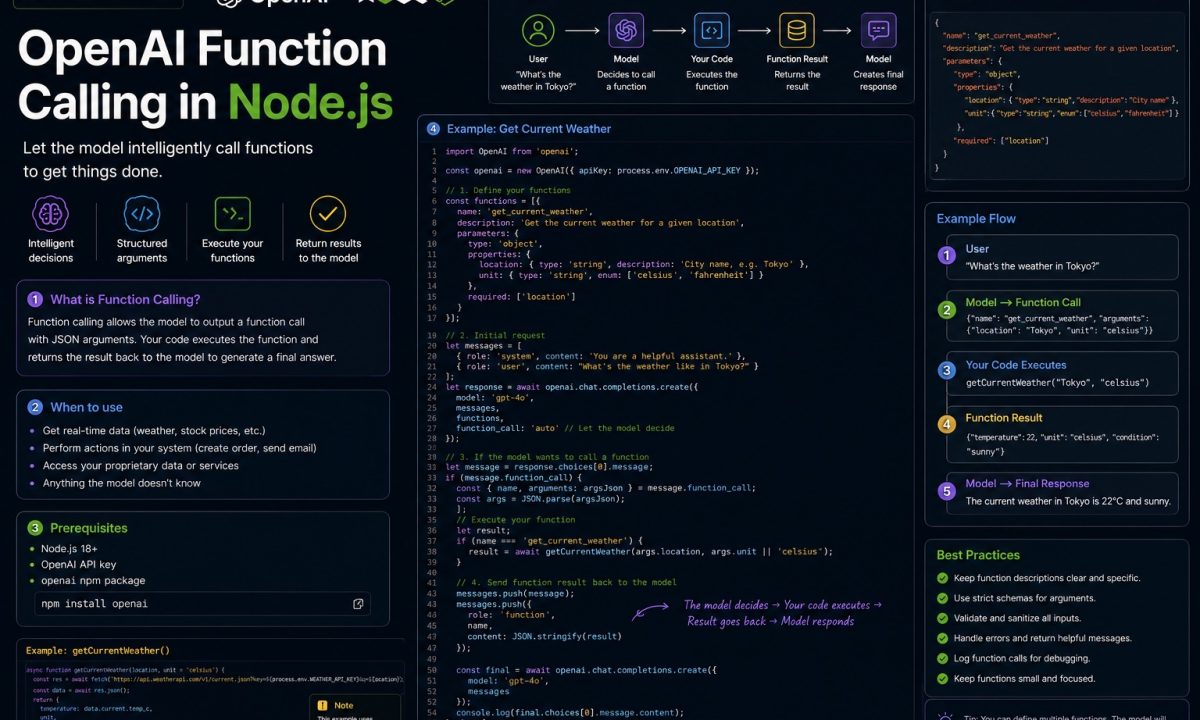
A support chatbot I built last quarter needed to answer “where’s my order #48201?” The model can’t know that. The answer lives in Postgres, behind an internal API, gated by the customer’s session. So the model has to ask you to go fetch it, you run the query, you hand the row back, and then it writes the friendly sentence. That handoff is OpenAI function calling, and in Node.js it’s a loop you control end to end — not magic, just a structured request/response dance with a few sharp edges.
The tool-calling loop
OpenAI function calling in Node.js is a tool loop: define tools with JSON Schema, send the user request, receive tool_calls, validate arguments with Zod, execute your real functions, send tool results back, and let the model produce the final answer. The important production rule is simple: the model may request a tool call, but your code decides whether it is safe to run.
The thing nobody tells you upfront: the model never runs your code. It only emits a JSON blob that says “I’d like to call get_order with these arguments.” Your server decides whether to trust that, runs the real function, and feeds the result back. Get the loop wrong and you’ll either hang waiting for a reply that already came, or pass unvalidated model output straight into a SQL query. We’ll wire the whole thing up, then cover the failure modes that bite in production: bad arguments, 429s, runaway cost, and the cases where you shouldn’t reach for tool calling at all.
Setup: SDK, key, and which API you’re targeting
At last review the official client is openai v6.42.0, and it needs a non-EOL Node — 20 LTS or newer. Install it and the validation library we’ll lean on later:
npm install openai@^6 zod
Set your key in the environment, never in source. Keep the model name in configuration too: examples below use gpt-5.5 because it is current in OpenAI’s function-calling docs, but production code should read it from OPENAI_MODEL so changing models is a config deploy, not a code edit. If you’ve leaked a key before, you know why — rotate it and move on.
// client.ts
import OpenAI from "openai";

export const client = new OpenAI({
  apiKey: process.env.OPENAI_API_KEY, // throws at request time if missing
});
One fork before any code: OpenAI now positions the Responses API (client.responses.create) as the primary surface for new server-side integrations. It treats tool calls and tool outputs as separate Items linked by call_id, and it supports function calling, built-in tools, and multi-turn reasoning in one API. Chat Completions still works and remains useful to understand the old explicit messages loop, but new production code should start with Responses unless you have a compatibility reason not to.
The main example below keeps the Chat Completions loop because it makes the mechanics painfully visible: assistant requests a tool, your code runs it, then you send a tool result back. Treat that as the mental model. For greenfield code, translate the same flow to Responses, where the model returns a function_call Item and your app replies with a function_call_output Item carrying the matching call_id. New to the basics of either? Start with the OpenAI API Node.js tutorial and come back.
Defining a tool: the JSON Schema is the contract
A tool is a function description plus a JSON Schema for its parameters. The model reads the description fields to decide when and with what to call it, so write them like you’re briefing a junior dev, not like database column comments.
// tools.ts
import type OpenAI from "openai";

export const tools: OpenAI.Chat.Completions.ChatCompletionTool[] = [
  {
    type: "function",
    function: {
      name: "get_order_status",
      description:
        "Look up the current status and ETA of a customer's order by its numeric order ID.",
      parameters: {
        type: "object",
        properties: {
          orderId: {
            type: "integer",
            description: "The order's numeric ID, e.g. 48201",
          },
        },
        required: ["orderId"],
        additionalProperties: false,
      },
      strict: true,
    },
  },
];
That strict: true plus additionalProperties: false is doing real work — it pins the model to your schema instead of letting it improvise an extra field. More on that below. The shape here is the current function calling spec: type: "function", the function object, and a JSON Schema parameters block.
The round-trip loop: ask, run, feed back, answer
Here’s the part people get wrong. One create call is not enough. The first call returns a tool_calls array instead of a final message. You execute each call, append a role: "tool" message carrying the result, and call create again. The model then writes its answer — or asks for another tool. So it’s a loop, not a single request.
// run.ts
import { client } from "./client.js";
import { tools } from "./tools.js";
import type OpenAI from "openai";

// Your real implementations. These hit the DB, an API, whatever.
async function getOrderStatus(orderId: number) {
  // pretend this is a Prisma query
  return { orderId, status: "shipped", eta: "2026-06-16", carrier: "UPS" };
}

const handlers: Record<string, (args: any) => Promise<unknown>> = {
  get_order_status: ({ orderId }) => getOrderStatus(orderId),
};

export async function ask(userMessage: string) {
  const messages: OpenAI.Chat.Completions.ChatCompletionMessageParam[] = [
    { role: "system", content: "You are a concise order-support assistant." },
    { role: "user", content: userMessage },
  ];

  // Loop so the model can chain calls. Cap it so a confused model can't bill you forever.
  for (let turn = 0; turn < 5; turn++) {
    const res = await client.chat.completions.create({
      model: "gpt-5.5",
      messages,
      tools,
      tool_choice: "auto",
    });

    const choice = res.choices[0].message;
    messages.push(choice); // the assistant turn (may contain tool_calls)

    if (!choice.tool_calls?.length) {
      return choice.content; // model is done — this is the final answer
    }

    // Run every requested call and append one tool message per call_id.
    for (const call of choice.tool_calls) {
      const fn = handlers[call.function.name];
      const args = JSON.parse(call.function.arguments); // a JSON *string*, always
      const result = fn ? await fn(args) : { error: "unknown tool" };
      messages.push({
        role: "tool",
        tool_call_id: call.id,
        content: JSON.stringify(result),
      });
    }
  }

  throw new Error("Tool loop did not converge within 5 turns");
}
Three things that trip people: call.function.arguments is a JSON string, so JSON.parse it. Every tool call you received needs a matching role: "tool" message with its tool_call_id before your next create, or the API rejects the request for a dangling call. And you must push the assistant message that contained the tool calls back onto the array — skip it and the model loses the thread.
Parallel tool calls: one turn, several requests
Ask “compare order 48201 and order 48202” and a current model won’t make two round-trips. It returns a tool_calls array with two entries in a single turn. The loop above already handles this — it iterates over every call and appends a result for each. The only mistake worth flagging: don’t run them serially with await in a for-loop if they’re independent I/O. Fan them out.
const results = await Promise.all(
  choice.tool_calls.map(async (call) => {
    const fn = handlers[call.function.name];
    const args = JSON.parse(call.function.arguments);
    return {
      role: "tool" as const,
      tool_call_id: call.id,
      content: JSON.stringify(fn ? await fn(args) : { error: "unknown tool" }),
    };
  }),
);
messages.push(...results);
If you’d rather the model never batch calls — maybe each one mutates state and ordering matters — pass parallel_tool_calls: false on the create. Chat Completions and the Assistants API both honor it.
Forcing structured output with strict mode
“Auto” lets the model answer in prose when it feels like it. Sometimes you don’t want a choice — you want it to always call a specific tool, and you want the arguments to match your schema exactly. Two levers.
To force a call, set tool_choice to "required" (it must call something) or name the exact function:
tool_choice: { type: "function", function: { name: "get_order_status" } }
To make the arguments reliable, that’s what strict: true on the tool was for. Strict mode constrains generation to your JSON Schema — the model can’t hand you an extra field or skip a required one. The constraints OpenAI enforces: additionalProperties: false on every object, and every property listed in required (mark genuinely optional fields with a ["string", "null"] union instead of leaving them out). This is the same structured outputs machinery that powers JSON-schema response formatting, applied to tool arguments. It dramatically cuts the “the model invented order_id instead of orderId” class of bug.
It does not, however, mean the values are safe. Schema-valid and trustworthy are different claims.
Validate the arguments with Zod before you execute
Strict mode guarantees shape, not sanity. The model can still hand you orderId: -1, or an ID belonging to a different customer, or a string where strict mode wasn’t applied because the schema couldn’t be normalized. Treat every argument object as untrusted input — because it is. Same rule as any request body crossing your boundary; see Node API security best practices for the broader version of this argument.
Zod gives you a runtime gate that doubles as your TypeScript type:
import { z } from "zod";

const GetOrderStatusArgs = z.object({
  orderId: z.number().int().positive(),
});

function runGetOrderStatus(raw: unknown, customerId: string) {
  const { orderId } = GetOrderStatusArgs.parse(raw); // throws on bad input
  // Authorization is still YOUR job — the model has no idea who's asking.
  return getOrderForCustomer(orderId, customerId);
}
Note the second argument. The model proposed an order ID; it has no concept of whose order it is. Authorization lives in your handler, keyed off the session, not off anything the model said. I’ve seen a demo where every customer could read every order because the dev assumed the model would “only ask about the right one.” It won’t.
Errors, 429s, retries, and the bill
Failure modes, upfront, because they all show up the first week in production:
Rate limits (429). You hit them on requests-per-minute and tokens-per-minute, and function calling burns extra tokens — every tool definition rides along in every request, and a 4-turn loop is 4 billed calls. The SDK retries 429 and 5xx automatically with backoff (twice by default); bump it with maxRetries and set a timeout so a stuck call doesn’t wedge a request handler:
const res = await client.chat.completions.create(
  { model: "gpt-5.5", messages, tools, tool_choice: "auto" },
  { maxRetries: 4, timeout: 30_000 },
);
For anything past trivial volume, add your own queue or token-bucket limiter in front — client retries alone won’t save you from a traffic spike.
Your tool throws. Don’t let the exception kill the turn. Catch it and feed the error back as the tool result so the model can recover or apologize gracefully: content: JSON.stringify({ error: "Order not found" }). The model handles a structured error far better than a 500 it never sees.
Cost. Tool definitions are input tokens on every call, the loop multiplies calls, and a model that keeps re-calling tools because your results are vague quietly inflates the bill. Watch the usage block, cap the loop, and for high-volume cheap lookups route to a smaller model like gpt-4.1-nano. Pick a current model id off the models page rather than pinning something that’ll get deprecated under you.
The Responses API for new projects
Same idea, different envelope. The tool is flattened (no function wrapper), and the model returns a function_call Item that you answer with a function_call_output Item carrying the matching call_id:
const res = await client.responses.create({
  model: "gpt-5.5",
  input: [{ role: "user", content: "Where is order 48201?" }],
  tools: [
    {
      type: "function",
      name: "get_order_status",
      description: "Look up an order's status by numeric ID.",
      parameters: {
        type: "object",
        properties: { orderId: { type: "integer" } },
        required: ["orderId"],
        additionalProperties: false,
      },
      strict: true,
    },
  ],
});
// res.output contains function_call items; reply with { type: "function_call_output", call_id, output }
If you’re starting a greenfield project in 2026, use Responses first. Keep Chat Completions examples around only when you are maintaining an older integration, teaching the old message loop, or depending on a library that has not moved yet.
Where function calling is the wrong tool
Tool calling is a tax: extra latency, extra tokens, extra failure surface. Skip it when a cheaper path exists.
If the user’s input is already structured — a form, a query string, a webhook payload — and you just need data shaped or routed, write a deterministic parser. A switch statement is faster, free, and never hallucinates a field. Don’t pay a model to do JSON.parse.
If you only need the model to return structured data (extract fields from a paragraph, classify a ticket), you don’t want function calling at all — you want plain structured outputs with a response schema. Function calling is for when the model needs to trigger an action or fetch something it can’t see.
And if a single well-written prompt gets you 95% there, ship the prompt. Reaching for tools to shave the last 5% often adds more breakage than it removes. The same lesson holds across providers — the round-trip pattern in the Claude API Node.js tutorial looks nearly identical, and so does the over-engineering trap.
FAQ
Does the OpenAI model execute my function?
No. The model only returns a tool_calls (or, in the Responses API, a function_call) item describing the function name and a JSON-string of arguments. Your Node.js code parses that, runs the real function, and sends the result back as a role: "tool" message. The model never touches your code or your database — which is exactly why you, not it, own validation and authorization.
Why do I have to call the API twice for one answer?
The first call surfaces the model’s request for data it doesn’t have; the second lets it write the final answer using the data you fed back. Each iteration is one billed request, so a conversation that chains tools costs several calls. Cap the loop (a turn < 5 guard works) so a confused model can’t bill you in circles, and append every role: "tool" result before the next request or the API rejects the dangling call.
What’s the difference between strict mode and validating with Zod?
Strict mode (strict: true plus additionalProperties: false) constrains the model’s output shape to your JSON Schema at generation time, so it can’t add or drop fields. Zod validates values at runtime on your server — that an ID is positive, an email parses, a date is real. Strict gives you the right keys; Zod gives you trustworthy values. You want both, and neither replaces an authorization check.
How do parallel tool calls work?
When a request needs several independent lookups, a current model returns multiple entries in one tool_calls array in a single turn instead of making separate round-trips. Run them with Promise.all if they’re independent I/O, and append one role: "tool" message per tool_call_id. If concurrent execution is unsafe — say each call mutates state — pass parallel_tool_calls: false to force one at a time.
How do I handle 429 rate-limit errors?
The official SDK already retries 429 and 5xx responses with exponential backoff (twice by default); raise that with maxRetries and set a timeout per request. Because every tool definition is re-sent on every call and loops multiply requests, you burn tokens fast — for real volume put a queue or token-bucket limiter in front of the client instead of relying on retries alone, and watch the usage field to catch a model that’s re-calling tools needlessly.
Should I use Chat Completions or the Responses API for tool calling?
Both support it. Chat Completions keeps tool calls and results in one messages array with role: "tool" replies, which makes the loop explicit and easy to debug. The Responses API treats calls and outputs as separate Items linked by call_id, flattens the tool definition, and normalizes schemas toward strict mode automatically — and it’s where OpenAI is steering new work. Greenfield in 2026: lean Responses. Existing integration: Chat Completions is fine and stable.
Which model should I use for function calling?
Use a current reasoning-capable model for multi-step tool use, and consider a smaller model for high-volume, simple lookups to cut cost and latency. Do not hard-code a model id from a blog post and forget it — check the official models page before release, keep the chosen model in config, and review it whenever pricing or latency changes.