A dashboard I shipped last quarter needed a job-progress bar that ticked from 0 to 100 as a background worker chewed through a queue. My first instinct was a WebSocket. I wired up the server, the upgrade handshake, a reconnect loop, a ping/pong keepalive — and then stared at it. The browser never sent anything back. All that bidirectional plumbing carried traffic in exactly one direction: server to client. I’d reached for the heavy tool out of habit.
SSE setup
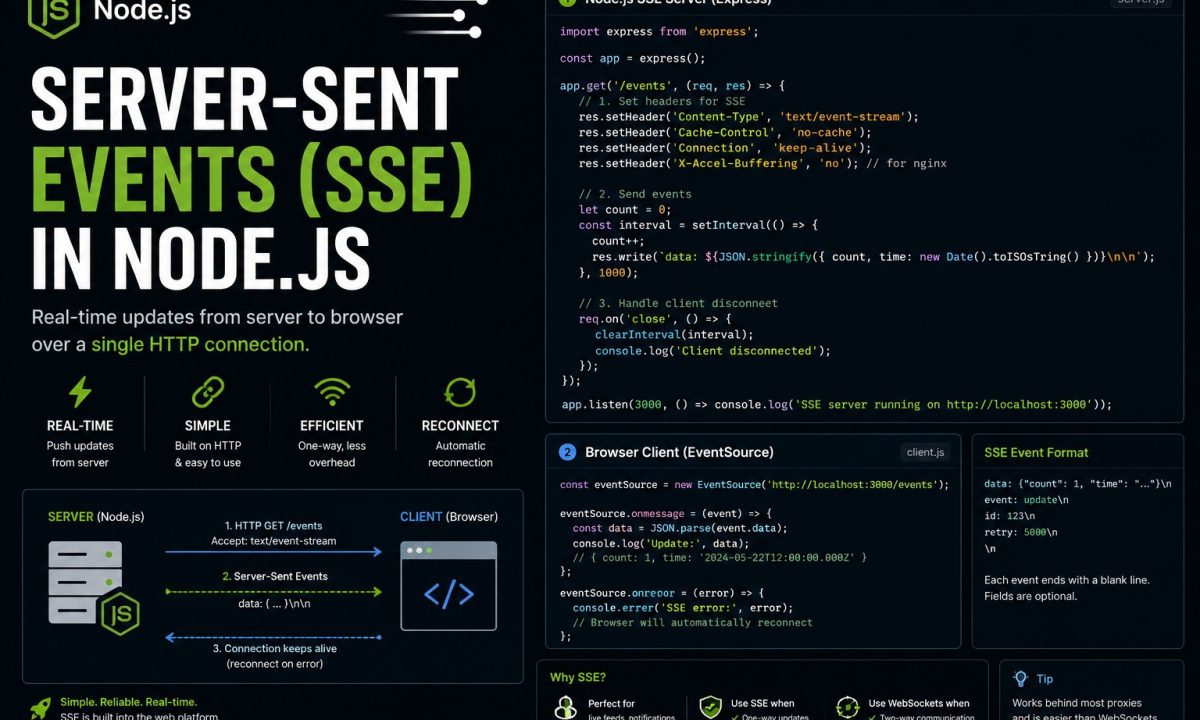
Server-Sent Events are best for one-way live updates from Node.js to the browser: progress logs, notifications, queue status, AI tokens, and dashboards. Use text/event-stream, flush headers, send heartbeats, support reconnects with id and Last-Event-ID, and disable proxy buffering in nginx. Use WebSockets instead when the browser must send frequent real-time messages back.
Server-Sent Events in Node.js is the right tool for that shape of problem. SSE is a plain HTTP response that stays open and streams text events to the browser, with a native client (EventSource) that handles reconnection for you. No upgrade handshake, no extra protocol, no library. If your data only flows one way — progress bars, notifications, a live log tail, an AI token stream — SSE does the job with a fraction of the code. This guide builds one from the wire format up, then covers the parts that bite in production: broadcasting, heartbeats, and the reverse-proxy settings that silently break everything.
What SSE actually is, and when it beats WebSockets
SSE is a long-lived HTTP response with the content type text/event-stream. The server holds the connection open and writes small UTF-8 text frames whenever it has something to say; the browser parses those frames and fires events. That’s the whole idea.
The contrast with WebSockets is worth getting right, because the answer isn’t “WebSockets are newer, use those.” They solve different problems:
- WebSockets are full-duplex. After an HTTP upgrade handshake, you have a two-way binary-or-text pipe. Use them when the client talks back at speed — chat, multiplayer, collaborative editing.
- SSE is one-way, server to client, over ordinary HTTP. You get auto-reconnect and event IDs for free. Use it when the browser is a listener.
The mistake I made — and see often — is treating WebSockets as the default for “real-time.” Most “real-time” features are server push with the occasional REST call back. For those, SSE is less code to write, less to break, and it rides through HTTP infrastructure (proxies, load balancers, HTTP/2) without special handling. The native client is documented in MDN’s Server-sent events guide; I covered the WebSocket approach with Socket.IO separately.
A minimal SSE endpoint in plain Node and Express
The problem: turn an HTTP request into a stream that stays open. The trick is what you don’t do — you never call res.end(). You set the right headers, flush them, and then write event frames as data arrives.
Here’s a bare endpoint that pushes the server clock every second. Clean Node 20+, Express 4/5:
import express, { Request, Response } from "express";

const app = express();

app.get("/events", (req: Request, res: Response) => {
  // The three headers that make this a stream, not a normal response.
  res.writeHead(200, {
    "Content-Type": "text/event-stream",
    "Cache-Control": "no-cache",
    Connection: "keep-alive",
  });
  res.flushHeaders(); // send headers now, don't wait for the first body chunk

  const tick = setInterval(() => {
    // The wire format: "data:" + payload + a BLANK line to end the event.
    res.write(`data: ${new Date().toISOString()}nn`);
  }, 1000);

  // When the client disconnects, stop writing or you leak the interval.
  req.on("close", () => {
    clearInterval(tick);
  });
});

app.listen(3000, () => console.log("SSE on http://localhost:3000/events"));
The wire format is fussy in exactly one way: each event is one or more data: lines followed by a blank line. That nn is the event boundary. Forget the second newline and the browser buffers your message forever, waiting for an end that never comes — a bug that looks like “SSE just doesn’t work” until you read the bytes. Per the HTML spec, the stream must be UTF-8, and a line starting with a colon (:) is a comment the client ignores — handy for heartbeats later.
You can test it without a browser:
curl -N http://localhost:3000/events
# -N disables curl's buffering so you see frames as they land
The browser EventSource client and named events
On the client, you don’t parse anything by hand. EventSource is built into every modern browser and does the framing, reconnection, and event dispatch:
const source = new EventSource("/events");

// Unnamed "data:" frames arrive as "message" events.
source.onmessage = (event) => {
  console.log("tick:", event.data);
};

source.onerror = (err) => {
  // Fired on disconnect. EventSource is ALREADY retrying — usually do nothing.
  console.warn("connection dropped, retrying...", err);
};
By default every frame fires the generic message event. Once you push more than one kind of update, you want named events so the client can route them. Add an event: line:
// Server: a named event with a JSON payload.
res.write(`event: progressn`);
res.write(`data: ${JSON.stringify({ jobId, percent: 42 })}nn`);
// Client: listen for that specific name. onmessage will NOT see it.
source.addEventListener("progress", (event) => {
  const { jobId, percent } = JSON.parse(event.data);
  updateBar(jobId, percent);
});
That event: progress line changes which listener fires. Anything named no longer reaches onmessage — a subtle gotcha when you add your first named event and the old handler goes quiet. Use named events for everything once you have more than one message type; it ages better.
Auto-reconnect, id, and Last-Event-ID for resuming
Here’s where SSE earns its keep. When the connection drops — laptop sleeps, wifi blips, a proxy times out — EventSource reconnects on its own. You write zero reconnection logic. The default delay is implementation-defined (the spec says “a few seconds”); suggest your own with a retry: line:
res.write(`retry: 5000n`); // ask the client to wait 5s between reconnects
res.write(`data: hellonn`);
Reconnection alone isn’t enough, though. The real question after a drop is did I miss anything? SSE answers it with event IDs. Attach an id: to each event, and the browser remembers the last one it saw. On reconnect, it sends that value back in a Last-Event-ID request header — and your server resumes from there:
app.get("/events", (req: Request, res: Response) => {
  res.writeHead(200, {
    "Content-Type": "text/event-stream",
    "Cache-Control": "no-cache",
    Connection: "keep-alive",
  });
  res.flushHeaders();

  // After a reconnect, the browser tells you where it left off.
  const lastId = Number(req.headers["last-event-id"] ?? 0);

  let cursor = lastId;
  const pump = setInterval(() => {
    cursor += 1;
    res.write(`id: ${cursor}n`);
    res.write(`event: updaten`);
    res.write(`data: ${JSON.stringify({ seq: cursor })}nn`);
  }, 1000);

  req.on("close", () => clearInterval(pump));
});
The catch: resuming only works if the server can replay events past lastId. That means a buffer — an in-memory ring, a Redis stream, a Postgres table with a monotonic sequence. Keep no history and Last-Event-ID arrives with nothing to backfill, so the client continues forward with a gap. Fine for a clock; not fine for a notification feed. Decide whether missed events matter, and size the buffer to your reconnect window.
Broadcasting to many clients
A single connection is the easy part. Real apps push the same event to every connected browser, which means you need a registry of open responses and disciplined cleanup. The pattern is a Set of response objects:
import express, { Request, Response } from "express";

const app = express();
const clients = new Set<Response>();

app.get("/events", (req: Request, res: Response) => {
  res.writeHead(200, {
    "Content-Type": "text/event-stream",
    "Cache-Control": "no-cache",
    Connection: "keep-alive",
  });
  res.flushHeaders();

  clients.add(res);

  // The single most important line in this file. Without it you leak
  // a dead response on every disconnect, and broadcasts crash on write.
  req.on("close", () => {
    clients.delete(res);
  });
});

// Call this from anywhere — a queue worker, a webhook, a DB trigger.
function broadcast(eventName: string, payload: unknown) {
  const frame =
    `event: ${eventName}n` + `data: ${JSON.stringify(payload)}nn`;
  for (const res of clients) {
    res.write(frame);
  }
}

// Demo: announce a heartbeat-count to everyone every 3 seconds.
let n = 0;
setInterval(() => broadcast("count", { n: ++n }), 3000);

app.listen(3000);
The req.on("close", ...) cleanup is non-negotiable. Skip it and your clients set fills with dead connections; the next broadcast writes to a closed socket and you’re debugging ERR_STREAM_WRITE_AFTER_END in production. One honest limit: this Set lives in one Node process. Run two instances behind a load balancer and a broadcast only reaches the clients pinned to that box. The fix is a shared bus — publish on Redis pub/sub, have every instance subscribe and fan out to its local clients.
Heartbeats so proxies don’t kill idle connections
Idle connections die. Reverse proxies, load balancers, and corporate firewalls reap a TCP connection that’s been silent for 30 or 60 seconds, and an SSE stream with nothing to say looks idle. The symptom: streams that work great under load and mysteriously drop when traffic is quiet.
The fix is a heartbeat — a comment line on an interval. A line starting with : is ignored by the client, so it’s a no-op that still pushes bytes through every box in the path and resets their idle timers:
// Inside your /events handler, alongside the real data interval:
const heartbeat = setInterval(() => {
  res.write(`: keepalive ${Date.now()}nn`); // ":" = comment, client ignores it
}, 15000);

req.on("close", () => {
  clearInterval(heartbeat);
  clients.delete(res);
});
Fifteen seconds is a safe default; tune it below your proxy’s idle timeout. It costs almost nothing and turns “flaky after a minute of quiet” into a non-issue.
The nginx gotcha: proxy_buffering off
You build all of the above, it works perfectly on localhost, you deploy behind nginx, and the browser receives… nothing. Or everything at once, in a burst, minutes late. This one has cost more debugging hours than the rest of the article combined.
The cause: nginx buffers proxied responses by default (proxy_buffering on). It collects your stream into its own buffer and forwards it in chunks — exactly wrong for SSE, where the whole point is byte-for-byte immediacy. Turn buffering off for the SSE location:
location /events {
    proxy_pass http://127.0.0.1:3000;
    proxy_http_version 1.1;

    proxy_buffering off;      # default is "on" — THIS is the fix
    proxy_cache off;
    proxy_read_timeout 24h;   # don't reap the long-lived connection

    proxy_set_header Connection "";  # keep upstream keep-alive intact
}
There’s a second, app-side lever for when you don’t control the nginx config (shared hosting, a platform proxy): nginx honors an X-Accel-Buffering: no response header from your Node app and disables buffering for that response. Belt and suspenders:
res.writeHead(200, {
  "Content-Type": "text/event-stream",
  "Cache-Control": "no-cache",
  Connection: "keep-alive",
  "X-Accel-Buffering": "no", // tells nginx: do not buffer this response
});
The nginx docs confirm both knobs. Set them and your stream flows in real time again. If you’re standing up that proxy layer from scratch, I walk through the full config in the nginx reverse proxy for Node.js guide.
The 6-connection limit (and why HTTP/2 fixes it)
One more sharp edge, and it’s a browser limit, not a Node one. Over HTTP/1.1, browsers cap concurrent connections to a single domain at six, and an open SSE stream holds one for the life of the page. Open the same app in three tabs and you’ve spent three of six on SSE before a single image or API call loads; a few more tabs and new requests just hang, queued behind your own streams. It looks like the server is down. It isn’t — the browser is refusing to open a seventh connection.
HTTP/2 dissolves the problem. It multiplexes many logical streams over one TCP connection, and the practical ceiling jumps to whatever the server negotiates — commonly 100 concurrent streams. Serve your app over HTTP/2 (nginx with listen 443 ssl http2;, or a CDN that speaks it) and the six-connection wall is gone. Stuck on HTTP/1.1 for now? Serve SSE from a dedicated subdomain so it has its own connection budget, or consolidate to one shared EventSource per browser via a SharedWorker. HTTP/2 is the real answer; the rest are workarounds.
Where SSE is the wrong tool
SSE is the wrong tool more often than enthusiasts admit. Reach for something else when:
- You need bidirectional, low-latency traffic. Chat, multiplayer, collaborative cursors — anything where the client pushes as fast as the server — is WebSockets. SSE has no client-to-server channel; the browser falls back to separate
fetchcalls, and you’ve rebuilt a worse WebSocket. - You’re sending binary. SSE is UTF-8 text only, by spec. Images, audio, or protobuf mean base64-encoding (bloating payloads ~33%) or picking WebSockets, which carry binary natively.
- It’s a one-shot request. Ask once, get one answer — that’s a normal HTTP request. Don’t hold a persistent stream open to deliver a single payload.
SSE shines for one-way server push of text. Push it past that and you’re fighting the protocol.
FAQ
What is the difference between SSE and WebSockets?
SSE is a one-way channel: the server streams text events to the browser over ordinary HTTP, and the browser only listens. WebSockets are full-duplex — after an upgrade handshake, both ends push text or binary freely. Choose SSE for server-to-client updates like notifications, progress, or live logs; choose WebSockets when the client genuinely talks back at speed, like chat or multiplayer.
Do I need a library to use Server-Sent Events in Node.js?
No. The server side is a plain HTTP response with Content-Type: text/event-stream where you res.write() frames and never call res.end(), and the browser side uses the built-in EventSource API. No npm dependency is required on either end, which is a large part of why SSE is simpler than WebSockets for one-way data.
How does SSE handle reconnection automatically?
The browser’s EventSource reconnects on its own after a drop, with no client code from you. If you attach an id: to each event, the browser remembers the last one and sends it back in a Last-Event-ID request header on reconnect, so your server can replay missed events — provided you keep a buffer (in-memory ring, Redis stream, or a Postgres sequence) to replay from.
Why is my SSE stream buffered or delayed behind nginx?
nginx buffers proxied responses by default (proxy_buffering on), which collects your stream and forwards it in chunks instead of immediately. Set proxy_buffering off on the SSE location, or send an X-Accel-Buffering: no response header from your Node app, which nginx honors per-response. Both disable buffering and restore real-time delivery.
What is the 6-connection limit and does it affect SSE?
Over HTTP/1.1, browsers allow only six concurrent connections per domain, and each open SSE stream occupies one for the page’s lifetime. A few tabs can exhaust the budget and make new requests hang. HTTP/2 multiplexes streams over one connection and raises the practical limit to around 100 negotiated streams, which removes the problem entirely.
How do I broadcast the same SSE event to many clients?
Keep a registry of open response objects — a Set<Response> works — add each new connection on request and remove it in req.on("close", ...). To push to everyone, loop the set and res.write() the same frame to each. The cleanup handler is essential; without it you leak dead connections and broadcasts crash writing to closed sockets. Across multiple Node instances, fan out via Redis pub/sub.
Can SSE send binary data like images or audio?
No. The SSE specification requires UTF-8 text, so binary has to be base64-encoded into a text field, which inflates the payload by roughly a third and adds encode/decode work on both ends. If you’re moving binary at any volume, WebSockets carry it natively and are the better fit.